Why Your AI Todo List Is a Lie (And How to Build a Real One)
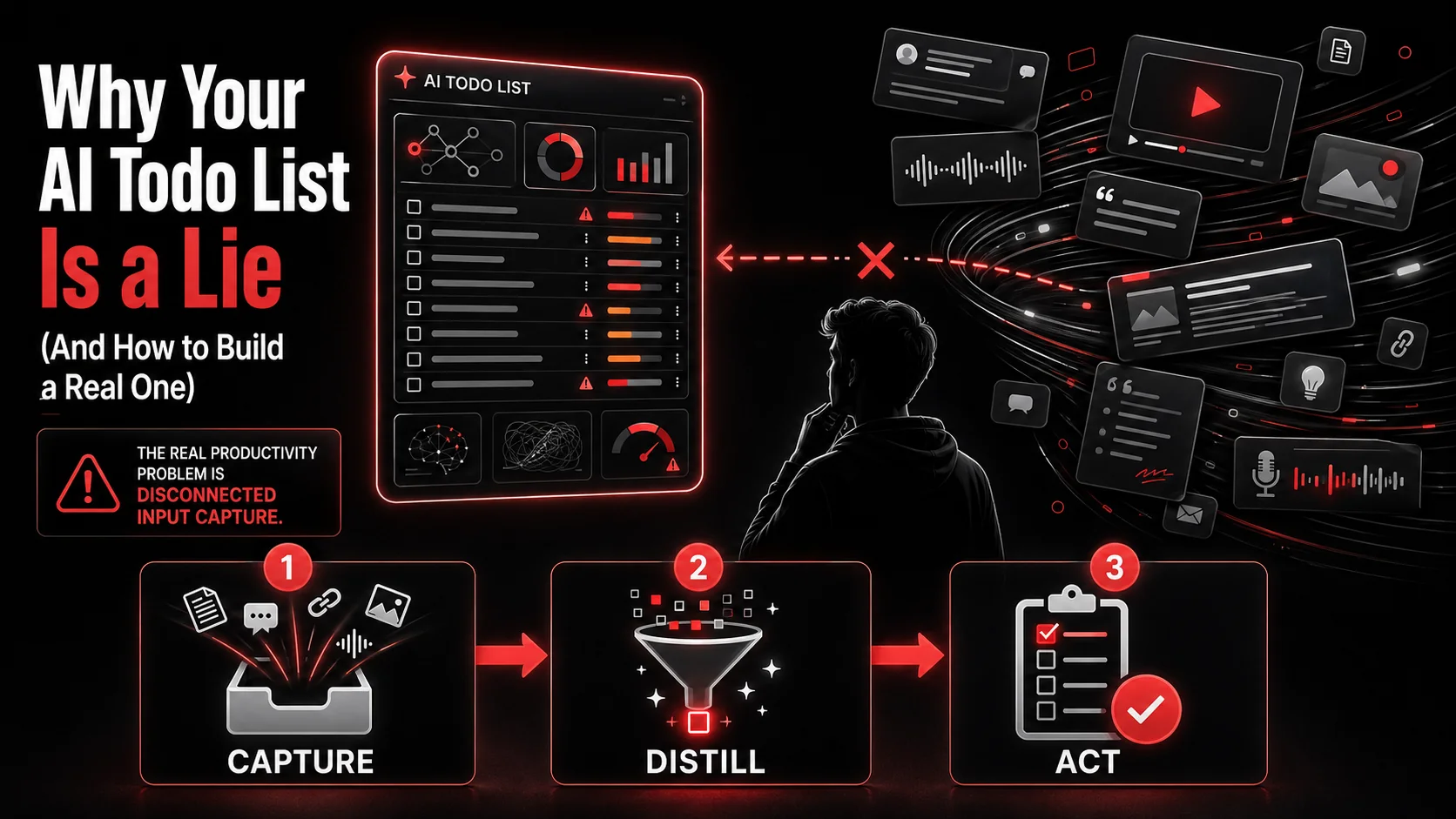
You’ve seen the promise. A single click, and an AI scans your meeting notes or a long article and spits out a neat, prioritized list of tasks. It feels like magic. For about a week. Then you’re left with the same old problem: a beautifully organized list of things you’ll never actually do. The tasks feel abstract, disconnected from the spark of inspiration that made you save that link or jot down that note in the first place.
The fundamental lie of most AI todo lists is that they start with the task. They assume the hard part is organizing "build login flow" or "write blog post." It’s not. The hard part happens ten minutes earlier, when you’re scrolling Twitter and see a brilliant UI animation, or watching a YouTube tutorial and realize you could apply that technique to your own project. That’s the moment of value, the raw input. Most systems ignore it entirely, focusing instead on the downstream chore of list management. They’re polishing a bucket with a hole in the bottom.
This article isn’t about managing your tasks better. It’s about fixing the broken pipe that’s supposed to feed your system. We’ll dismantle the myth of the AI task manager, examine why the 2026 productivity market is missing the point, and build a practical workflow that turns the content you consume into the work you ship.
What Is a Real Productivity System?
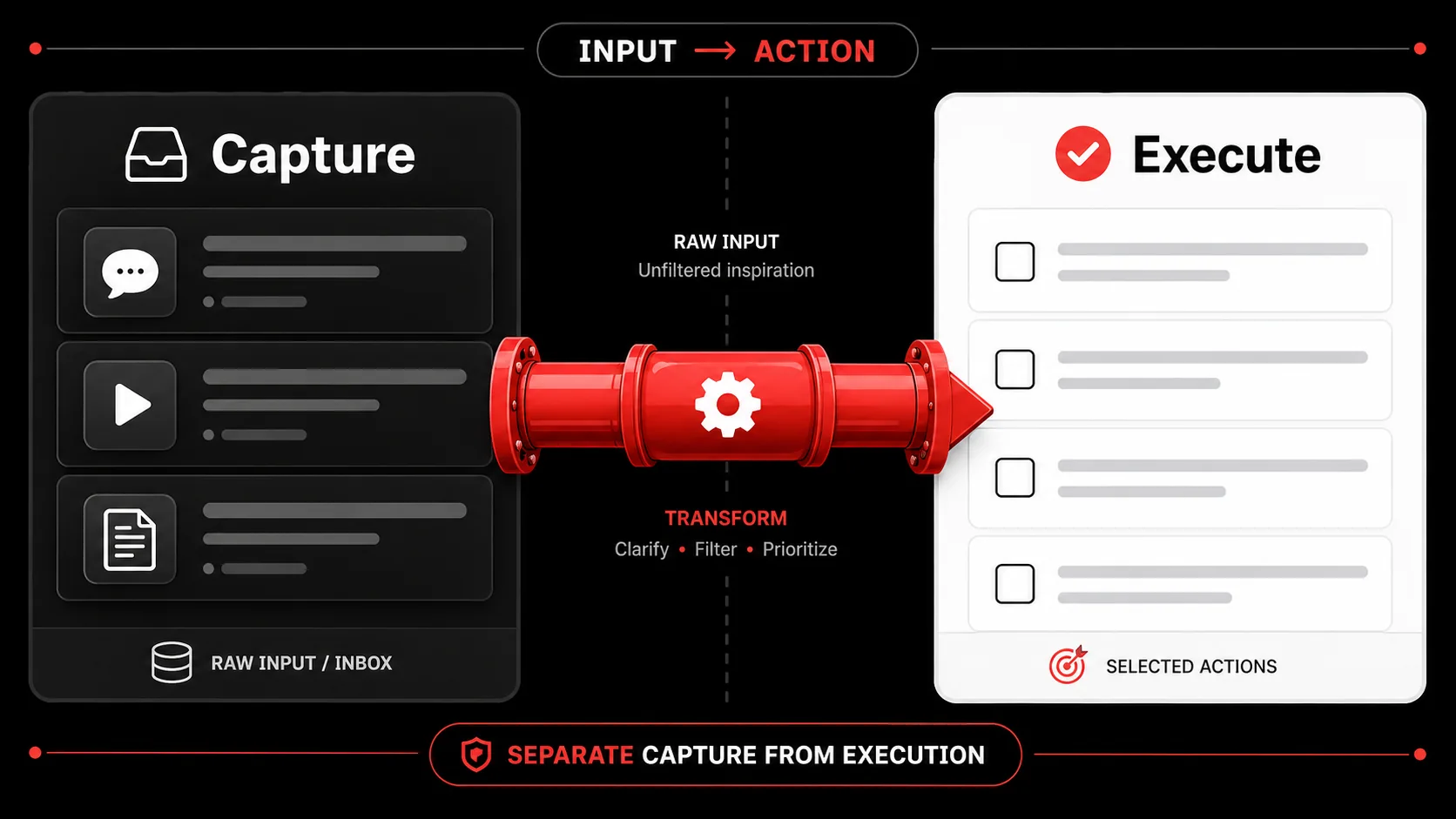
A real productivity system isn't a list. It's a pipeline. Think of it like a software development workflow: you have source control (where ideas come from), a staging area (where you refine them), and then production (where you execute). Most AI todo apps try to be the production server, but they have no connection to your source control, your brain and the digital world that feeds it.
The core of any effective system is a trusted capture layer. This is the single, reliable place where every potential task, idea, or reference lands the moment it occurs to you. David Allen's Getting Things Done (GTD) methodology calls this your "inbox," and its power is psychological. It gets things out of your head and into a system you trust, freeing mental RAM. But GTD was designed for a world of emails and memos. Our "inbox" today is a firehose of tweets, video essays, blog posts, and Discord threads. A notepad app can't handle that.
This is where the modern breakdown happens. We try to force 2026's multimedia input into 2001's text-based capture tools. You see a 30-second TikTok explaining a CSS hack. The value isn't in a text note saying "CSS hack." The value is in the video itself. Your capture tool needs to hold the original artifact, not just your flawed memory of it.
Let's break down the anatomy of a real system versus the common facade:
System Component | The Lie (Common AI Todo Apps) | The Reality (A Complete Pipeline)
Input | Assumes tasks appear fully-formed. | Accepts messy, multimedia inspiration (tweets, videos, screenshots). Processing | AI parses text to guess at tasks. | AI (or you) extracts the actionable essence from the original source. Organization | Sorts tasks into projects and priorities. | Connects the task back to its source material and relevant project context. Output | A pretty list. | A clear, contextual next action tied directly to the inspiration that spawned it.
The difference is context. "Optimize database queries" on a list is a chore. "Optimize database queries using the method from [YouTube link] that we saved for the performance overhaul project" is a clear, motivated next step. The latter has lineage.
The Two Layers Every System Needs
From my decade building tools for developers, I've seen one pattern consistently: the most productive people separate capture from execution. They use different tools for each job.
The Capture Layer is fast, frictionless, and multimedia. Its only job is to get the thing out of your head or off your screen and into the system. It doesn't judge, categorize, or prioritize. That's a later step. Tools here need one-tap saving from anywhere: a browser extension, a mobile share sheet, a keyboard shortcut.
The Execution Layer is where planning happens. This is your project manager, your kanban board, your calendar. It's for refined, scoped work. The magic is in the workflow that connects Layer 1 to Layer 2. This is where most systems fail. They are only Layer 2, expecting you to manually bridge the gap every time. This gap is where ideas die. We built Glean specifically to automate this bridge, turning raw captures into organized todos, but the principle applies to any toolchain. The key is acknowledging both layers exist.
Why "Smarter" Lists Aren't the Answer
The recent TechCrunch analysis highlighting a 40% funding surge in AI task managers misses the forest for the trees. These tools compete on whose AI can better guess a due date or auto-assign a priority label. It's a race to optimize the last 10% of a process that's failing at the first 90%. User retention is low because the fundamental input problem isn't solved. You can't AI your way out of a workflow that starts with you manually typing "maybe look into that new JS framework" into a blank field.
The real innovation needed isn't in list management; it's in turning consumption into creation. This is the "input paralysis" indie hacker forums are buzzing about. You watch, you read, you get inspired... and then the friction of translating that into a concrete task is enough to stop you cold. Your system should reduce that friction to zero.
Why Most Productivity Systems Fail at the First Step
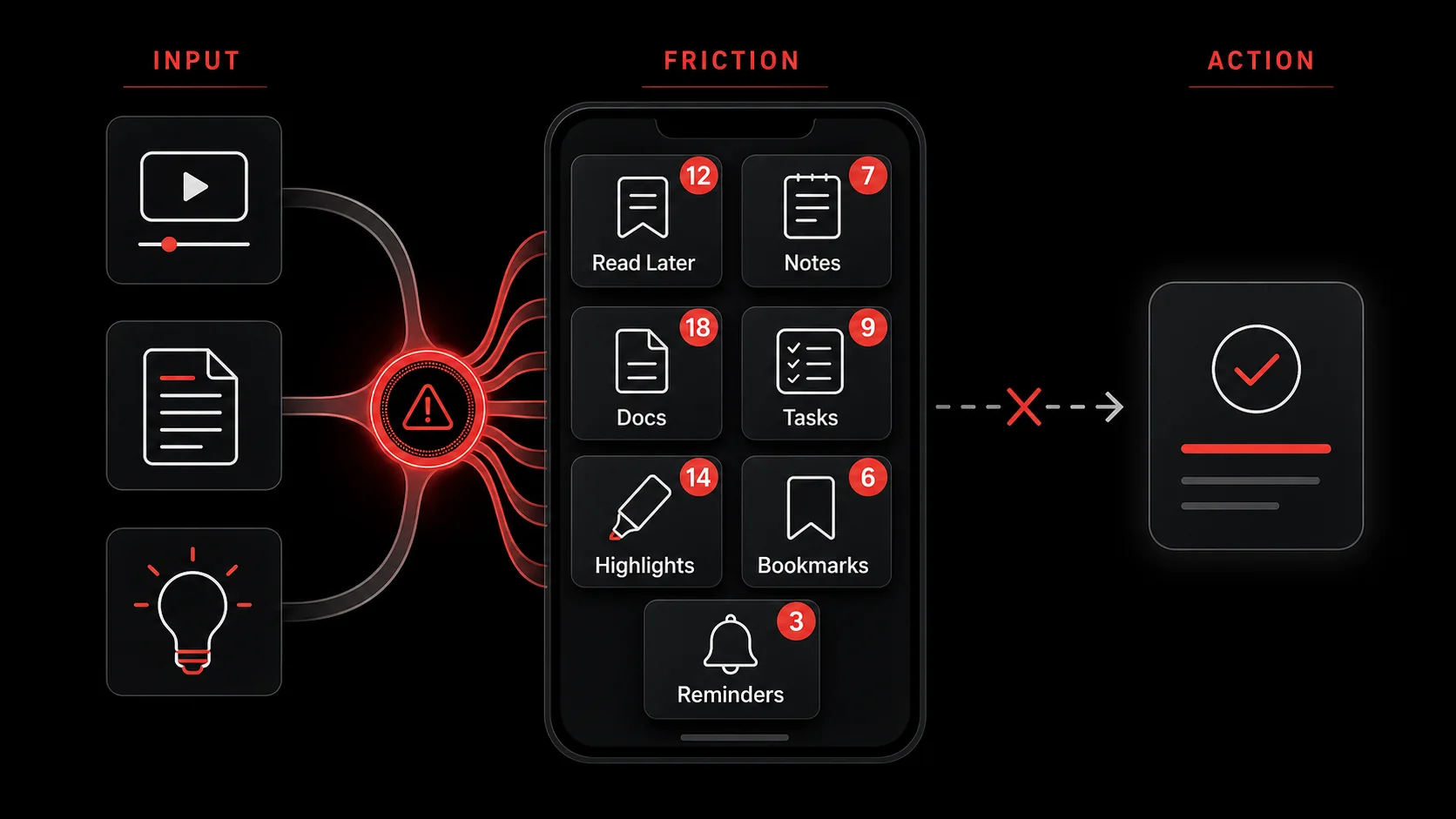
The failure isn't a lack of discipline. It's a design flaw. Most systems are built on a flawed premise: that you know what you need to do. But for knowledge workers, creators, and developers, the work is often figuring out what to do next. Our tasks are born from research, inspiration, and exploration. A system that only handles the "doing" part ignores the essential "discovering" part.
Here’s what actually happens. You're researching a problem. You have ten browser tabs open: a Stack Overflow answer, a GitHub issue thread, two blog posts with different approaches, and a relevant RFC document. Buried in tab five is a comment that gives you the breakthrough. The old-school method? Manually copy the URL, open your task manager, create a new task, paste the link, and write a summary. That's four steps and a context switch. In that moment, most of us think, "I'll remember this," and close the tab. We don't.
Problem 1: The Friction of Capture
Every millisecond of friction in your capture process costs you ideas. If saving something requires more than one tap or a conscious decision about where to put it, you'll do it less. This is why bookmark managers often fail. They ask too many questions: "Add to folder? Add tags?" This interrupts your flow. The goal of capture is to be brain-dead simple. The intelligence comes later, in processing. Most todo apps are designed for the processing phase, making them terrible capture tools.
Problem 2: The Decay of Inspiration
An idea captured as a bland text task loses its energy. "Check out Svelte 5" on a list is forgettable. But the original tweet that said, "Svelte 5's runes finally make reactivity feel intuitive. This changes everything for our prototype," carries the excitement and the reason why it mattered. When you review your list days later, the text task is a dead artifact. The original capture, with its source intact, can rekindle the original spark. This connection is what turns a duty into a desire. Without a system that preserves this link, you're relying on your memory to reconstruct motivation, a losing bet.
This is the critical gap between simply saving links and building a true capture workflow that feeds your projects. It's not about hoarding information; it's about creating a pipeline of actionable inspiration.
Problem 3: Context Stripping
This is the silent killer. When you distill a rich piece of content into a one-line task, you strip away all the supporting context. The task "Implement OAuth" is vague. The original capture (a YouTube walkthrough of Auth.js with Next.js 15, with timestamps for the tricky bits) contains the how. Your future self, tasked with "Implement OAuth," now has to re-find that tutorial or figure it out from scratch. You've saved a task but created more work. A proper system should allow the task and the source material to live together, turning your todo list into a launchpad for action, not a reminder of research you need to redo.
The data backs this up. A 2025 study from the Productivity Lab at UC Irvine (an external link to a research institution) found that "context recovery" (the time spent re-finding information needed to start a task) accounted for nearly 25% of the total time spent on complex knowledge work. Your todo app, by isolating the task from its source, is a major contributor to this tax.
How to Build a Real Input-First Productivity System
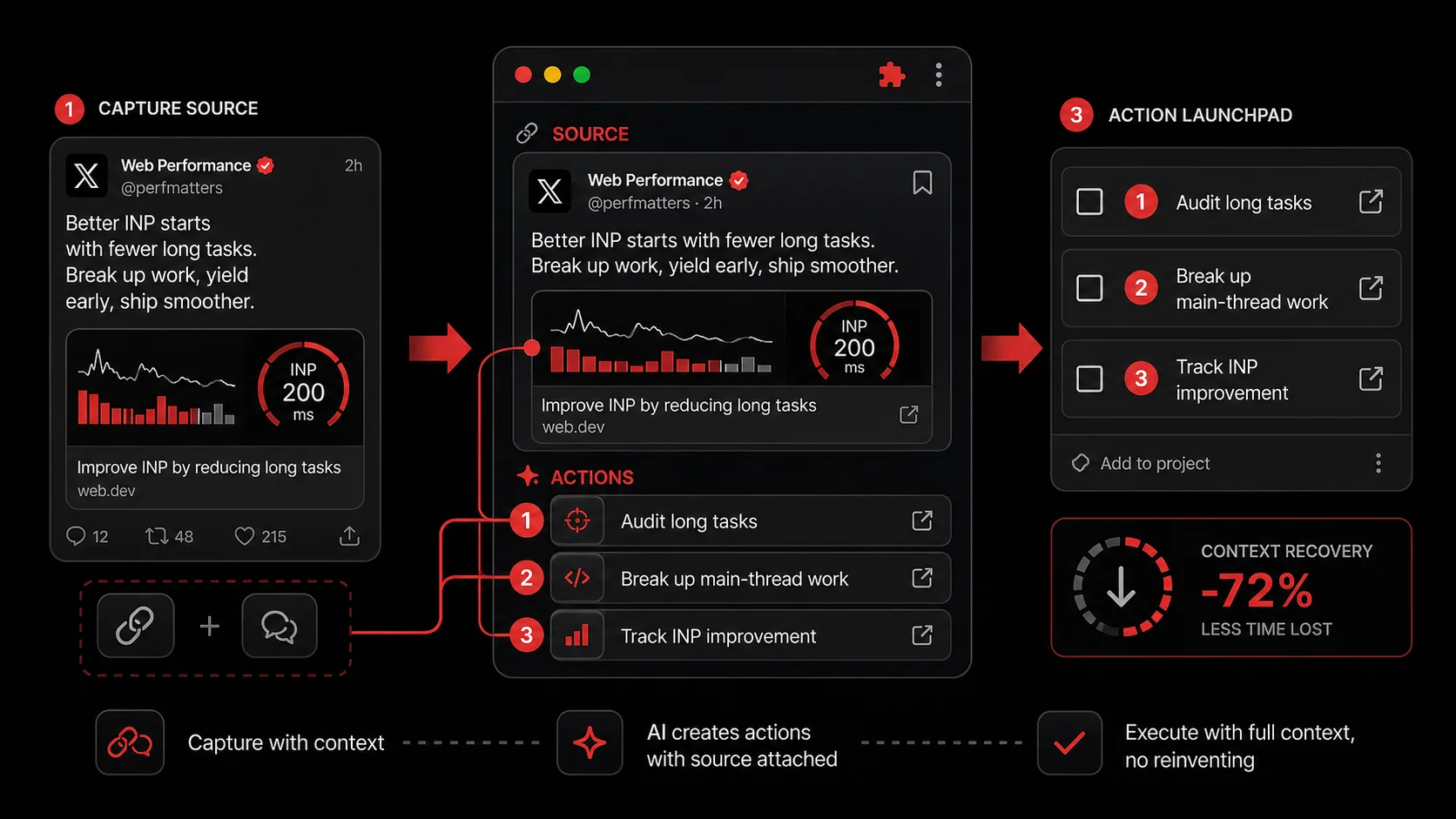
Building a real system means inverting the model. Start with the input. Design a workflow where capturing inspiration is effortless, and let the tasks generate naturally from that pool. Here’s a step-by-step method to build yours, whether you use dedicated tools or stitch together a franken-system.
Step 1: Establish a Zero-Friction Capture Hub
This is non-negotiable. You need one place where everything lands. This hub must be accessible within one second from any device or context.
- On Desktop (Browser): This is your primary battlefield. Install a browser extension that lets you save the current page, selected text, or a screenshot with a single click or keyboard shortcut. Options include Glean's extension, Raindrop.io, or even a configured bookmarklet that sends to a note app.
- On Mobile: Configure your share sheet. The "Share" button on iOS/Android should have your capture hub as a top option. Tapping "Share" -> "Glean" (or "Notion", "Bear") should be how you save tweets, articles, videos, and images.
- The Rule: If it takes more than one action to save something, your system is broken. Period.
Step 2: Process Captures into Actions, Not Just Archives
A capture hub that fills up and is never reviewed is a digital graveyard. You need a regular processing habit. This is where the "AI" in AI todo lists should actually help, not by managing tasks, but by extracting potential tasks from your captures.
Set aside 15 minutes at the end of each day or week. Go through your new captures. For each one, ask: "What is the single, next physical action this inspires?"
- Is it a reference? (e.g., a great CSS snippet). Tag it and file it in a reference database like Obsidian (an external link to a major tool) or a dedicated Notion page.
- Is it a task? (e.g., "try this API library"). Turn it into a concrete next action. "Install
libxyzin project-alpha and write a test call." The key is to connect this new task directly to the source capture. Many tools allow you to link records. - Is it just interesting? Maybe it sparks no immediate action. That's fine. Archive it or delete it. The point of capture is to decide, not to hoard.
Step 3: Integrate Actions into Your Execution Engine
Now you have a list of contextual, inspired next actions. This is where they meet your traditional project management system. The integration is key.
For Developers: Your action might become a ticket in Linear, GitHub Issues, or Jira. The description should include a link back to the original capture*. The ticket "Implement dark mode toggle" is better as "Implement dark mode toggle - [Inspiration: Dribbble shot #123] [Reference: Tailwind CSS dark mode guide]."
- For Content Creators: A captured video essay might spawn a task in Trello or Asana for a script outline. Attach the video link directly to the card.
- The Principle: Never let an action float free of its inspiration. That link is the thread that turns a generic task into a purposeful one.
Step 4: Close the Loop with Review
A system that doesn't get reviewed becomes obsolete. A weekly review isn't just about your tasks; it's about your captures and the pipeline itself.
- Review Old Captures: Did last week's captures turn into actions? If not, why? Was the capture unclear? Did processing fail?
- Audit Your Projects: Look at your active projects in your execution engine. Are they fed by recent captures? If a project has no new inspiration linked to it, is it still alive, or is it running on inertia?
- Prune and Refine: Delete captures that no longer resonate. Archive completed action chains. This keeps the signal-to-noise ratio high.
Proven Strategies to Turn Your Feed Into a Workflow
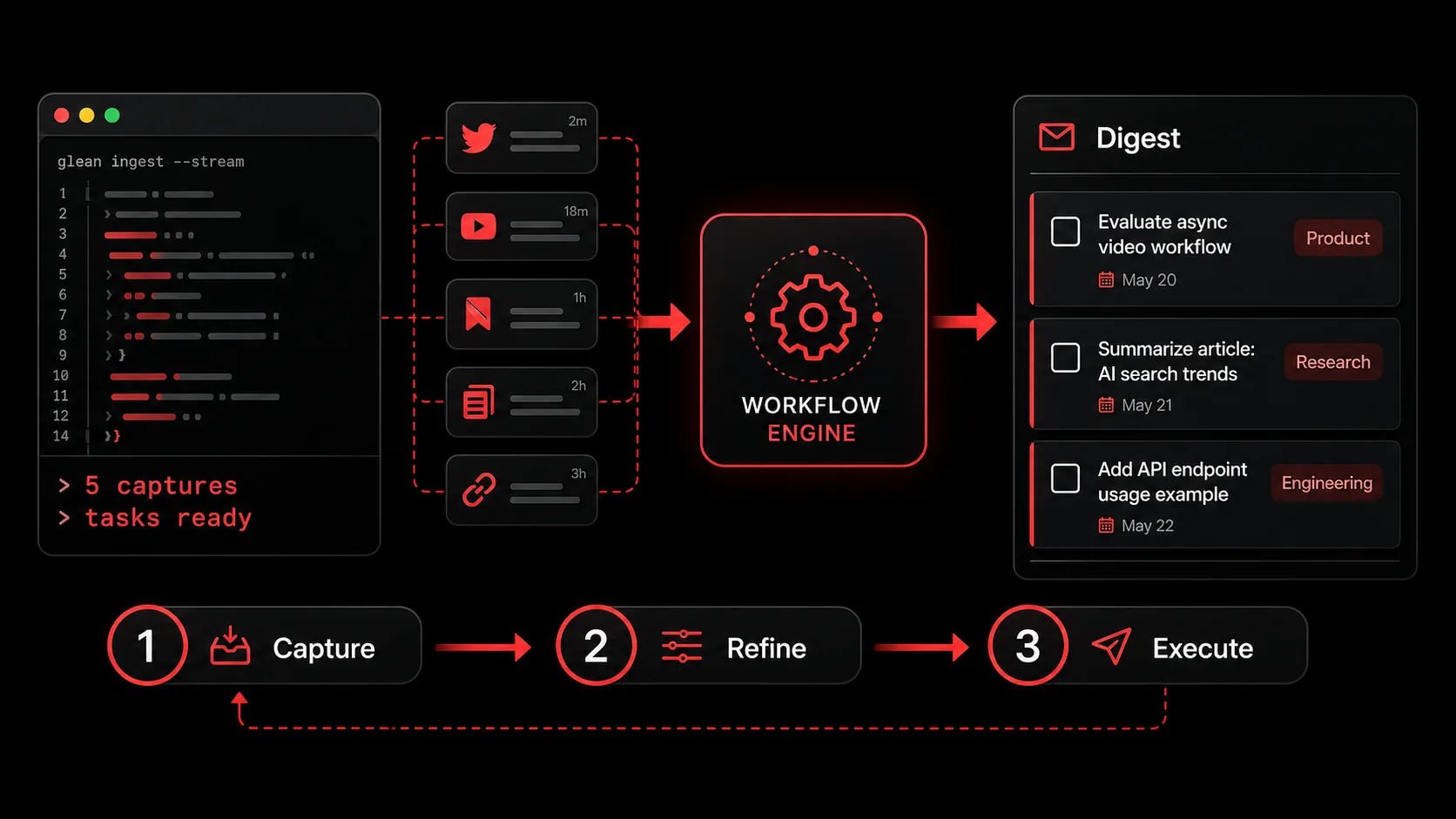
Once you have the basic pipeline, you can layer on advanced tactics that supercharge the connection between consumption and creation. These strategies treat your information intake as a deliberate input for your output.
Strategy 1: Thematic Capture Sessions
Don't just capture randomly. Be intentional. When you sit down to research a specific topic (say, "serverless database options") go into capture mode. Use your tool to save every relevant article, benchmark tweet, and pricing page. Process them together in one batch. The AI in a tool like Glean can help synthesize across multiple sources, suggesting a comparative task like "Create a pro/con table for X vs. Y based on captured articles." This turns a research session directly into an actionable deliverable.
Strategy 2: Build a Personal Inspiration API
For developers, this is where it gets fun. Many modern capture tools (including Glean) offer an API. You can build automations that turn your captures into tailored workflows.
- Example: A script that runs every evening, fetches your YouTube video captures, and posts the AI-extracted action items to a dedicated "Learning Backlog" channel in your team's Slack.
- Example: An automation that watches for captures tagged "#blog-idea," formats them with the source link, and adds them directly as draft cards on your content calendar in Trello.
- The Power: This moves beyond a personal system to a team or public-facing workflow. Your capture habit becomes a content engine or a team knowledge base.
Strategy 3: The Capture-Driven Project Kickoff
Start new projects backward. Instead of staring at a blank project board, start by capturing. Want to build a new landing page? Spend 30 minutes capturing 20-30 examples of great copy, design, and CTAs from across the web. Dump them all into your capture hub. Then, process them. The AI can help identify common patterns ("most pages use a hero video," "pricing tables have 3 tiers"). Your first project tasks emerge naturally from this analysis: "Sketch hero section inspired by [Capture A] and [Capture B]." The project is born from inspiration, not from a void.
Strategy 4: Curate Your Inputs to Shape Your Output
Your capture pipeline is only as good as what you feed it. This is a nuanced, often missed point. If you only capture advanced theoretical CS papers, your action list might become intimidating and abstract. If you only capture quick-tip tweets, your work may lack depth.
Be a curator of your own attention. Follow sources that balance inspiration with immediate applicability. Follow the indie maker who ships, not just the pundit who talks. Follow the engineer who writes tutorials with code, not just the architect who draws diagrams. The quality of your captures dictates the quality of your potential actions. This is why a tool that captures the full context (not just a link) is vital. It preserves the nuance of the source.
Got Questions About AI Todo Lists and Capture? We've Got Answers
How often should I process my capture inbox?
Aim for daily, but keep it short. A 5-10 minute daily review is far more effective than a 2-hour weekly marathon. Daily processing prevents backlog anxiety and keeps the connection between inspiration and action fresh. If daily feels like too much, a firm commitment to process everything every Friday afternoon is the absolute minimum.
What if a capture doesn't lead to an immediate task?
That's perfectly normal and common. Not everything you find interesting is actionable right now. In your processing, simply tag it as "Reference" or "Someday/Maybe" and file it in an appropriate database. The value was in getting it out of your head and into a system where you can find it later. The act of deciding it's not a current task is, itself, a productive step that clears mental clutter.
Can I use this system with tools I already have, like Todoist and Notion?
Absolutely. The system is a workflow, not a single tool. Use a quick-capture app like Apple Notes or Google Keep as your frictionless Layer 1. During your processing session, manually create the corresponding, well-written tasks in Todoist and paste the source link into the task notes. Store the full capture as a page in Notion for richer context. The friction is higher than an integrated tool, but the principle (separate capture from execution, and link them), still works.
What's the biggest mistake people make when trying to fix their productivity?
They optimize the wrong end. They spend hours tweaking their project board colors, testing new prioritization frameworks, or trying the "hot new AI scheduler." These are all execution-layer tweaks. The real leverage is upstream, at the point of input. Fixing how you capture and process inspiration has a 10x greater impact on your actual output than any reorganization of your todo list. Start there.
Ready to build a productivity system that starts with inspiration, not chores?
Glean is built on the input-first principle. It captures tweets, videos, and screenshots in one tap, uses AI to extract the actionable essence, and organizes it directly into your projects. Stop managing tasks that have no connection to your work. Start capturing the inspiration that drives it.
Start Glean Pro Trial and turn your feed into your workflow today.
Everything you save becomes a task that gets done.
Capture the source, review the task, and get it done, yourself or with your agent.