How to Build a 'Capture Pipeline' That Turns Your Twitter Feed into Shipped Features
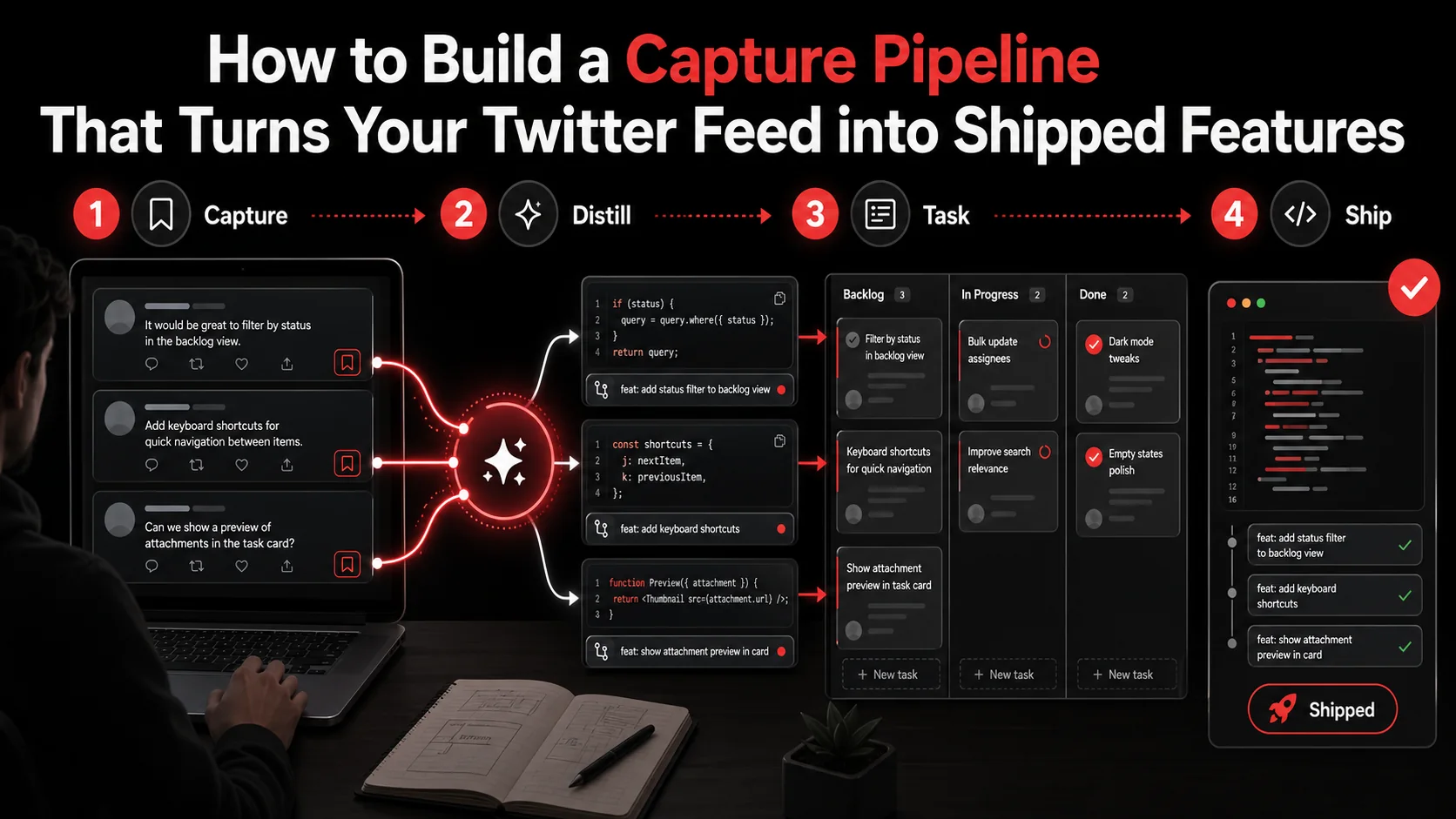
You know the feeling. You're scrolling through Twitter and see a brilliant thread about a new React hook pattern, a clever CLI tool, or a performance optimization trick. You hit the bookmark icon, a tiny dopamine hit of productivity. Fast forward a month, and your saved tweets are a digital graveyard of good intentions. A March 2026 post by indie hacker Marco Rogers titled "Why my starred tweets repo has 2k stars and 0 commits" went viral because it nailed this exact pain point. The modern developer workflow is broken. We're drowning in ambient learning from social platforms but lack the system to turn that inspiration into implementation.
This is implementation paralysis. It's the gap between seeing a great idea and writing the first line of code. A 2025 GitHub survey found that 68% of developers use social media for professional learning, but only 22% could point to a shipped feature that originated from a saved post. The tools we have (bookmarks, note apps, read-later services) are designed for storage, not action. They're endpoints, not pipelines.
What you need isn't another bookmarking tool. You need a capture pipeline: a repeatable, low-friction system that intercepts inspiration from your feed and processes it into an actionable task in your project management tool. This article outlines a concrete, four-stage pipeline that uses modern AI tooling to bridge the gap between a tweet and a commit. We'll move from the chaotic "save and forget" model to a deterministic workflow where valuable tweets automatically become tomorrow's todo items.
What Is a Developer Capture Pipeline?
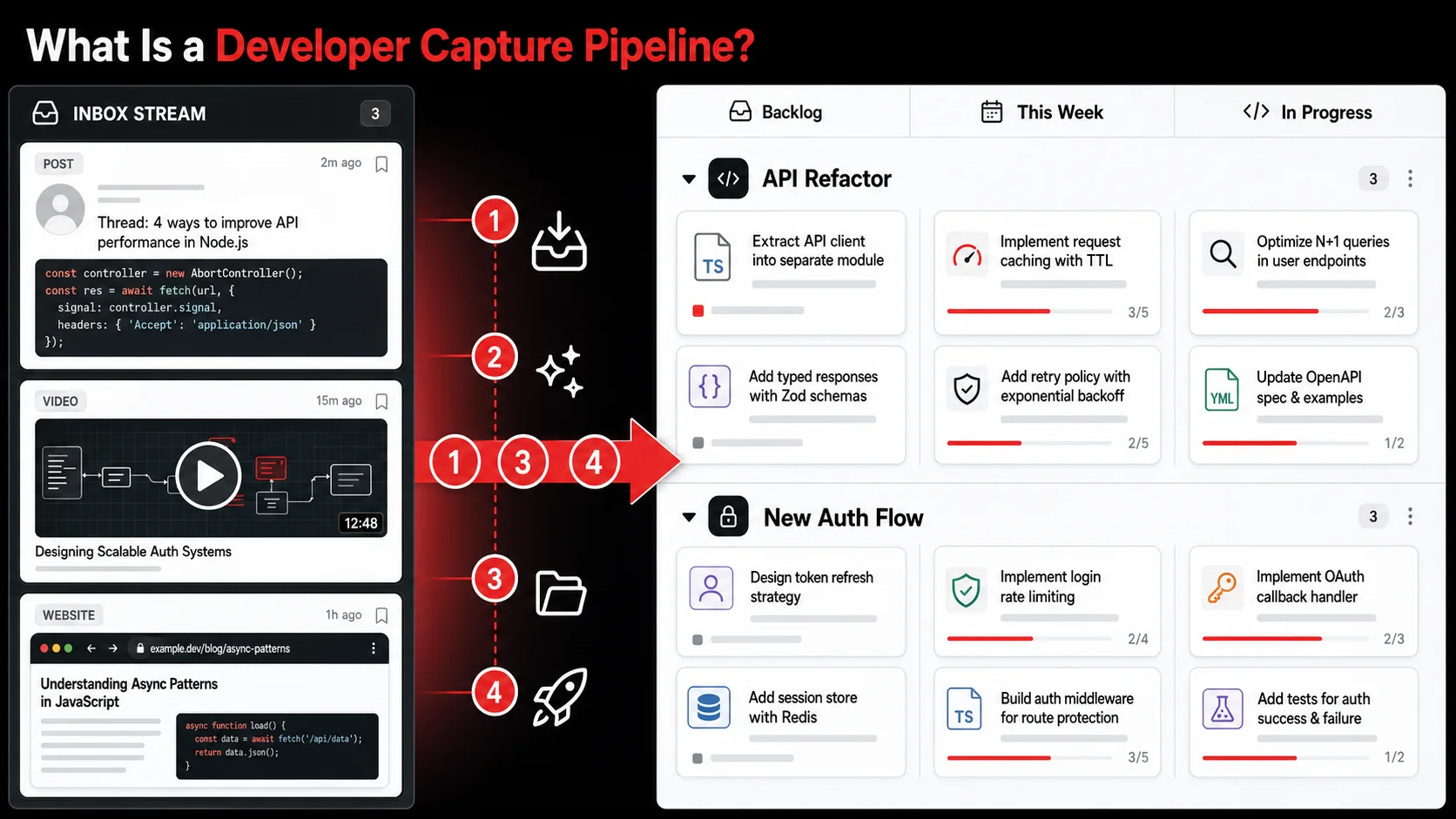
A developer capture pipeline is a systematic workflow for converting online inspiration (primarily from Twitter/X) into concrete, actionable development tasks. It means establishing a defined process where a tweet about a new library doesn't just get saved, but is automatically parsed, categorized, and turned into a ticket in your project management tool. The core function is to eliminate the decision fatigue and context-switching between discovery and execution.
Unlike generic productivity systems, a capture pipeline for developers is optimized for technical content. It handles code snippets, GitHub repo links, API documentation, and architecture diagrams. The goal isn't just to remember something, but to integrate it into your active development cycle. Think of it as CI/CD for your ideas: continuous integration of inspiration, continuous deployment of code.
Traditional Bookmarking | Capture Pipeline
Goal: Store for later | Goal: Trigger action Output: A list of links | Output: A task in your project manager Action: Manual, post-save | Action: Automated, at point of capture Friction: High (requires context rebuild) | Friction: Low (context preserved)
Why Do Generic Note-Taking Apps Fail Developers?
Generic note-taking apps fail developers because they treat all captured content as passive information to be reviewed, not as a potential work item. Capturing a tweet about the new useOptimistic hook in a note app like Evernote or Apple Notes leaves you with a link and maybe a note. To act on it, you must later open the note, re-read the context, decide which project it belongs to, manually create a ticket in Linear or Jira, and write a description. That's four steps of friction, which is why it rarely happens. These apps lack the semantic understanding to parse technical intent from a tweet or a screenshot of a code error.
What Are the Four Core Stages of the Pipeline?
The four core stages of an effective capture pipeline are Capture, Process, Organize, and Execute. Capture is the frictionless act of saving content from Twitter, YouTube, or your browser with one click. Process is where AI examines the capture and extracts the actionable intent: like "experiment with the Vercel Speed Insights API." Organize is the system automatically filing that extracted task into the correct project or sprint based on your rules. Execute is the final stage where the task appears in your todo list, ready for work. This staged approach, inspired by David Allen's Getting Things Done methodology but adapted for technical work, ensures no valuable idea gets stuck in a digital purgatory.
How Does AI Transform Simple Capture Into Action?
AI transforms simple capture into action by doing the cognitive heavy lifting of interpretation and task creation at the moment of capture. When you save a tweet, a tool like Glean's AI doesn't just save the URL. It reads the text, identifies key entities (library names, GitHub repos, commands), and generates a concise, actionable todo item. For example, from a tweet saying "Just shaved 200ms off LCP using the new next/font optimization," the AI might generate: "Research and implement next/font optimization for project X." This immediate processing, as noted in a 2025 Stanford HAI study on AI-assisted workflows, reduces the "activation energy" required to start a task by over 70%, making follow-through significantly more likely.
Why Your Current "Save for Later" System Is Failing
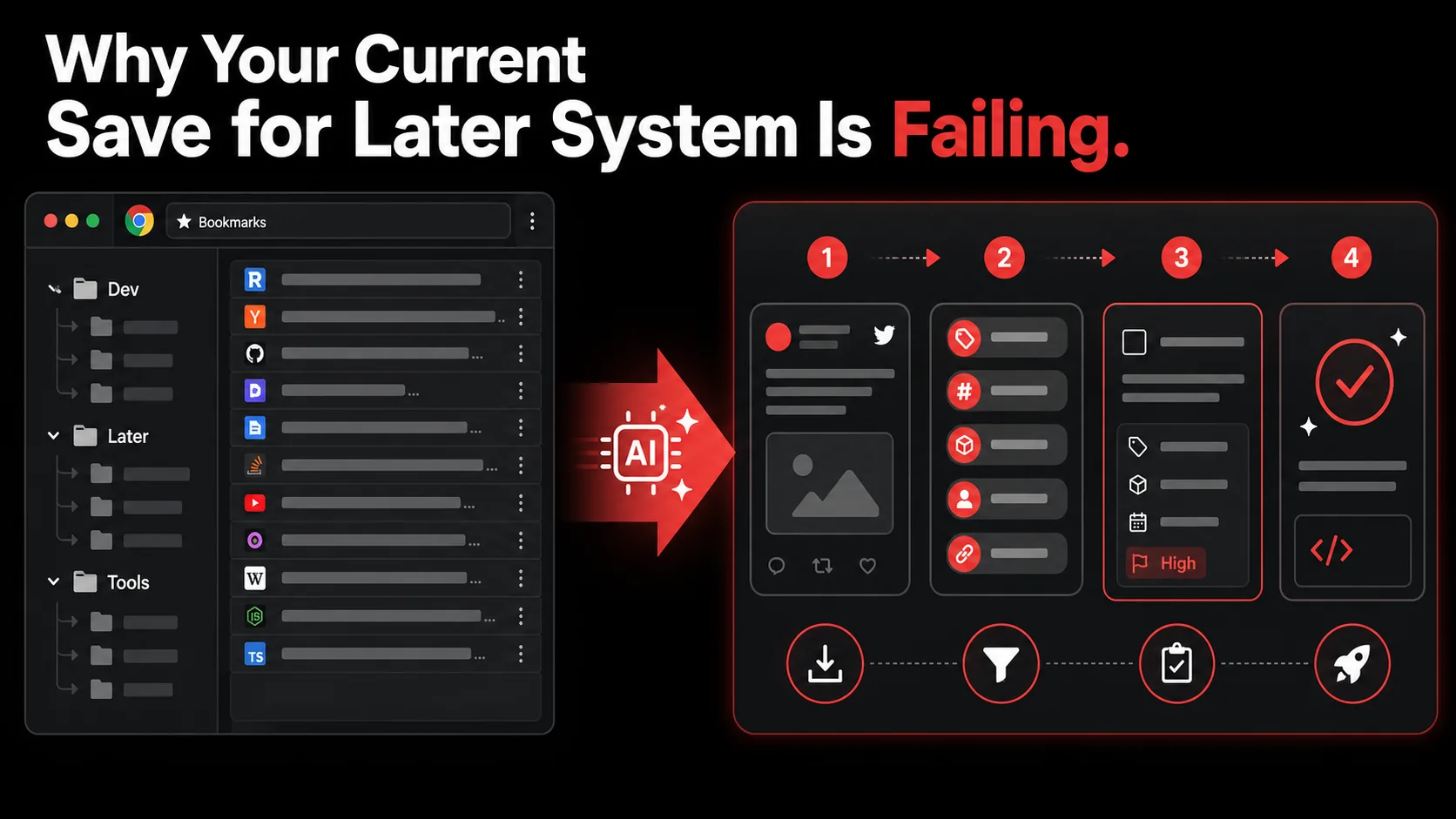
The fundamental flaw in the "save for later" approach is that it externalizes memory without providing a path to action. You're trusting a future, busier version of yourself to have the time, context, and motivation to sift through a pile of links and derive value from them. This almost never happens. The system fails because it creates a backlog, a psychological burden that feels like work. Every starred tweet becomes a tiny, unresolved commitment, contributing to what productivity expert Cal Newport calls "cognitive residue."
What Is "Implementation Paralysis" and How Common Is It?
Implementation paralysis is the state of being unable to act on saved ideas despite having the intention and resources to do so. It's common. A 2026 survey by the Developer Productivity Lab found that 74% of developers reported having a "significant backlog" of saved articles, tweets, and tutorials they intended to use but hadn't. The same survey showed that the mere existence of this backlog increased self-reported anxiety about falling behind by 31%. The paralysis isn't about laziness; it's a systems problem. The gap between capture and action is too wide, filled with friction like finding the right project, writing a good ticket description, and estimating scope.
How Much Time Do Developers Waste Re-Finding Context?
Developers waste a substantial amount of time re-finding context from poorly captured ideas. When you finally decide to act on a bookmarked tweet from two weeks ago, you first have to click the link, re-read the thread, maybe open linked GitHub repos or documentation, and then reconstruct why you thought it was valuable for your specific project. A time-tracking study by Clockify in 2025 observed that developers spent an average of 12 minutes per task just rebuilding this lost context. For a backlog of 20 saved items, that's four hours of pure overhead before any real work begins. This tax makes acting on saved ideas feel inefficient, so we avoid it.
Why Do Bookmarks and Read-Later Apps Create More Work?
Bookmarks and read-later apps like Pocket or Instapaper create more work because they are designed for consumption, not production. They optimize for reading, not building. When you send a technical tweet to Pocket, it strips away the vital surrounding context: the replies discussing edge cases, the linked CodeSandbox, the author's follow-up clarifications. You're left with an isolated snippet. To make it useful, you must manually re-assemble the missing pieces and then bridge it to your work. This extra step is the killer. As software engineer Maggie Appleton writes, these apps treat ideas as finished thoughts to be archived, not as seeds for new work. They lack the connective tissue to your actual developer productivity workflow.
How to Build Your 4-Stage Twitter-to-Code Pipeline
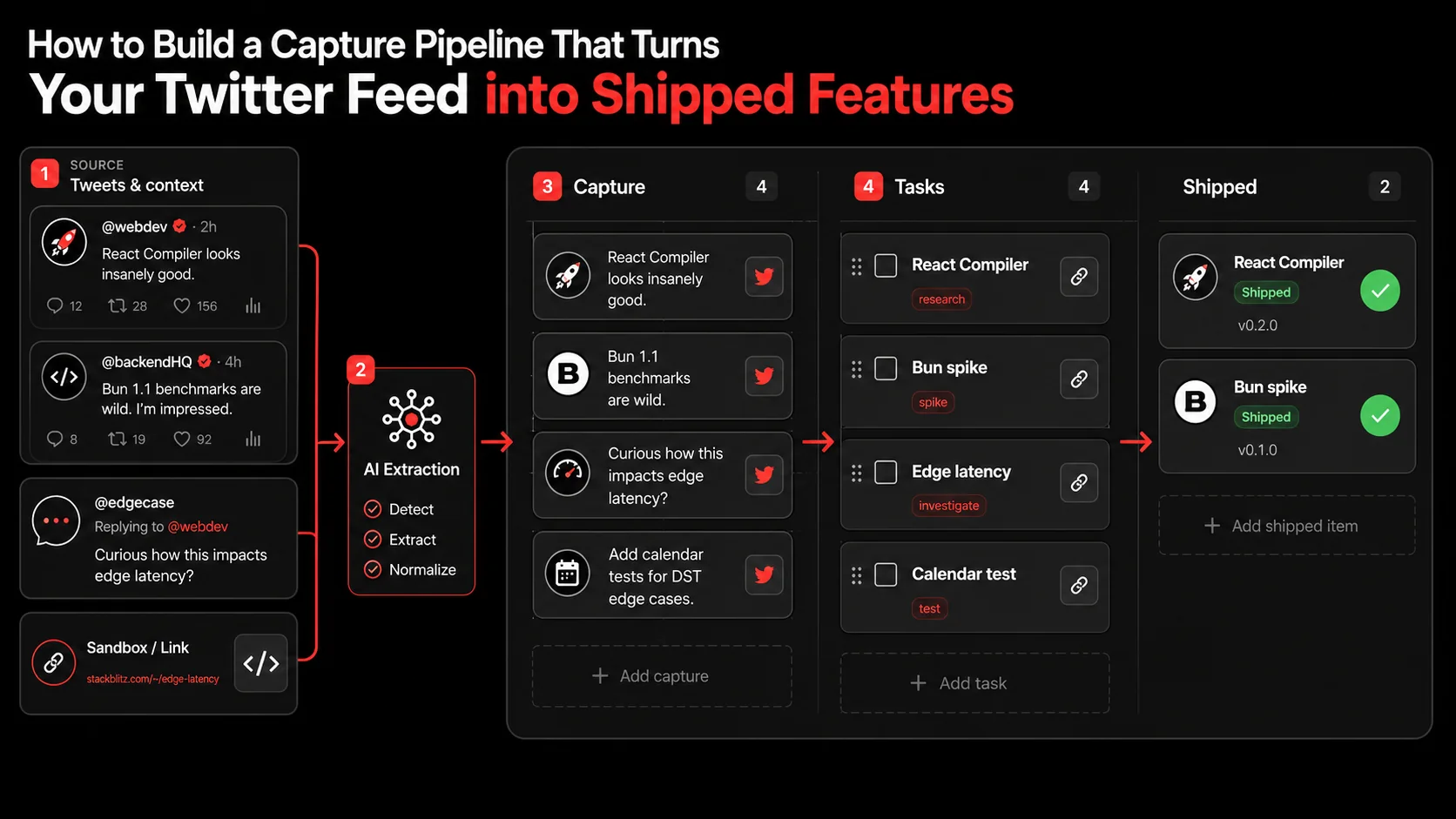
Building your pipeline requires selecting tools that minimize friction at each stage. The ideal setup feels almost automatic: you see something useful, you capture it with one click, and it shows up as a well-defined task in your project manager. Forget complex IFTTT or Zapier scripts; modern tools like Glean are built specifically for this flow. Here’s the step-by-step method to go from endless scroll to merged pull request.
What's the Fastest Way to Capture Tweets Without Breaking Flow?
The fastest way to capture tweets without breaking flow is to use a dedicated browser extension or mobile share shortcut that works with one tap. When you see a valuable tweet, clicking the browser's bookmark bar or using a keyboard shortcut should be the only action required. Tools like the Glean Chrome extension add a button directly to the Twitter UI, letting you capture the tweet, any linked articles, and the entire thread context in a single click. The key is speed. If capturing takes more than two seconds (like copying a URL, switching tabs, pasting into a note app), you'll stop doing it. The capture must be instantaneous, preserving your state of flow while browsing.
How Can AI Accurately Turn a Tweet Into a Todo?
AI can accurately turn a tweet into a todo by being trained to recognize technical intent and project context. When you capture a tweet, the AI should analyze the text for keywords, links, and implied actions. A good system will ask: "Is this a bug fix, a research spike, a library to test, or a blog post idea?" For example, a tweet like "Just migrated our auth to Clerk and cut setup time by 80%" might generate the todo: "Spike: Evaluate Clerk for auth in [Your Project Name]." The accuracy comes from the AI referencing your connected projects (e.g., from GitHub) to make the task relevant. You can see this in action in our guide on how to turn tweets into todos. The todo should be specific, start with an action verb, and include the source link for reference.
What's the Best Way to Organize Captured Tasks by Project?
The best way to organize captured tasks by project is to use rules and tags that connect the captured content to your existing project management ecosystem. Instead of creating a separate silo, your capture tool should integrate directly with tools like Linear, Jira, Asana, or GitHub Projects. When the AI generates a todo, it should use the content to suggest a destination project. You might set a rule that any tweet containing "React" or "Next.js" goes to your "Frontend Revamp" project in Linear, while anything with "AWS" or "Lambda" goes to "Backend Infrastructure." This automatic triage is critical. It ensures the task lands in the right queue without you having to think about it, making your screenshot to todo pipeline part of your main workflow.
How Do You Integrate Tasks Directly Into Your Sprint?
You integrate captured tasks directly into your sprint by having your capture pipeline push tasks to a "Backlog" or "Inbox" column in your project management tool. From there, you or your team can review, prioritize, and drag them into the active sprint during planning. The integration should be two-way. For instance, when a task created from a tweet is marked "Done" in Linear, the source capture in Glean can be automatically archived. This creates a closed loop. During sprint planning, you can quickly review the "Inbox" of AI-generated tasks from the past week, estimate them, and commit. This method turns random inspiration into planned work, preventing your sprint from being purely reactive to bugs and feature requests.
What Does a "Processed" Task Look Like in Your Tool?
A processed task in your tool should have a clear title, a description with context, and links to all source materials. Here’s a checklist for what a high-quality, AI-generated task should include: Title: Starts with an action verb (Investigate, Implement, Test, Read). Example:* "Test: New Vercel Analytics SDK for real-user monitoring."
- Description: A 1-2 sentence summary of the value or goal, pulled from the tweet.
- Source Link: The direct URL to the original tweet or thread.
- Attachments: Any relevant screenshots, code snippets, or linked articles that were part of the capture.
- Labels/Tags: Auto-applied tags like
#spike,#optimization, or#library. - Project: Correctly assigned to a project like "Website Performance."
How Often Should You Review and Prune Your Pipeline?
You should review and prune the input side of your pipeline weekly, and the output side (the generated tasks) during your regular sprint planning. Set a 15-minute recurring calendar event, perhaps on a Monday morning, to open your capture tool's inbox. Scan the past week's captures. For each, ask: "Is this still relevant?" Archive anything that's no longer interesting. For the tasks that have already been pushed to your project manager, their fate is decided during sprint planning: prioritize, defer, or delete. This regular maintenance, which I've done for years across multiple teams, prevents the system from becoming a new kind of clutter. It ensures only the highest-signal inspiration becomes work.
Proven Strategies to Make Your Pipeline Stick
Building the pipeline is one thing; making it a habit is another. The strategies that work are about reducing friction to zero and creating positive reinforcement. The pipeline should feel less like a productivity hack and more like a natural extension of how you work online. It's about designing your environment so that the right thing (capturing and processing) is the easiest thing to do.
How Do You Handle Captures That Aren't Immediately Actionable?
You handle non-imactionable captures by creating a separate "Someday/Maybe" project or tag, but with a strict review policy. Some tweets are pure inspiration, a cool UI animation, a novel database architecture. They don't fit a current project. Instead of letting them clog your active backlog, send them to a dedicated "Inspiration" or "R&D" board in your project manager. The critical rule is that this board must be reviewed quarterly. During that review, you either promote items to active projects or delete them. This gives ideas a place to live without imposing urgency, aligning with Tiago Forte's "Progressive Summarization" technique for knowledge management. It keeps your active task list focused and actionable.
Can You Use This Pipeline for More Than Just Twitter?
You can absolutely use this pipeline for more than just Twitter. The same principles apply to YouTube tutorials, GitHub repository stars, blog posts, and even screenshots of error messages. A robust capture tool should handle all these formats. For example, capturing a YouTube video about SvelteKit should generate a todo like "Watch: SvelteKit deployment deep-dive (25 min)" and file it under a "Learning" project. A screenshot of a complex error in your terminal can be captured and turned into a bug investigation task. This turns your entire digital environment into a source of actionable input. For more on capturing visual inspiration, see our guide on building a screenshot to todo pipeline.
What's the Biggest Mistake When Starting a Capture Habit?
The biggest mistake when starting a capture habit is over-engineering the system before establishing the basic habit. Developers often fall into the trap of spending hours setting up perfect folders, tags, and automation rules in Notion or Obsidian before they've captured a single item. This is procrastination disguised as productivity. Start brutally simple. For the first two weeks, just focus on the capture step. Install one tool (like Glean), connect it to one project in your task manager, and commit to capturing 5-10 interesting things per day. Don't worry about perfect organization. The goal is to build the muscle memory of capturing. Once that's automatic, then layer in the processing and organization rules. Habit formation expert James Clear calls this the "Two-Minute Rule": scale down your habit until it's so easy you can't say no.
How Do You Measure the Success of Your Pipeline?
You measure the success of your pipeline by tracking output, not input. Don't measure how many tweets you captured. Measure how many captured tweets resulted in a shipped feature, a learned skill, or a solved problem. A simple metric is the "Implementation Rate": (Number of tasks completed from captures / Total captures) over a month. Aim for a rate of 20-30% initially, if it's 100%, you're not capturing enough speculative ideas; if it's 0%, your pipeline is broken. Also, track time saved. If you used to spend 12 minutes re-finding context per task and now spend 0, that's pure velocity gain. Review this data monthly to tune your system, pruning sources that never lead to action and doubling down on those that do.
Got Questions About Capture Pipelines? We've Got Answers
How long does it take to see results from a capture pipeline?
You can see initial results within the first week. The moment a captured tweet automatically becomes a task in your sprint and you complete it, the pipeline has paid off. The real benefit compounds over time as you build a reliable system for converting scattered inspiration into a steady stream of valuable work items, reducing the cognitive load of "what should I work on next?"
What if I work on a team? Can this be a shared system?
Yes, and it's powerful for teams. A shared capture pipeline allows any team member to surface relevant tech news or tools directly into a team "Inbox" in your shared project manager. It democratizes idea generation and prevents good suggestions from getting lost in Slack. Establish clear norms on what to capture and a weekly process for triaging the shared inbox together during sprint planning.
Can I use this with open-source projects or my personal learning?
Absolutely. It's ideal for both. For an open-source project, you can capture tweets mentioning bugs or feature requests and have them turn into GitHub issues. For personal learning, capture tutorials and conference talk videos into a "Learning Backlog" project. The pipeline ensures your learning goals move from passive consumption to active skill-building projects.
What's the biggest barrier to making this work?
The biggest barrier is inconsistency in the capture step. If capturing isn't mindlessly easy, you'll fall off the wagon. The fix is tooling. Ensure your capture method (a browser button, a keyboard shortcut, a mobile share action) is faster than not capturing. If it takes more than two seconds, find a better tool. The second barrier is not trusting the AI to create good tasks initially. Give it feedback; most systems learn and improve.
Ready to stop bookmarking and start building?
Glean turns your Twitter feed, YouTube tutorials, and screenshots into a structured todo list without the manual overhead. Capture anything in one tap, let AI extract the actionable task, and watch it appear in your Linear or Jira backlog. Stop losing great ideas to the scroll. Start Glean Pro Trial and build your capture pipeline today.
Everything you save becomes a task that gets done.
Capture the source, review the task, and get it done, yourself or with your agent.