Stop Letting Your 'Someday' List Die: How to Build a Capture System That Actually Fuels Your Next Project
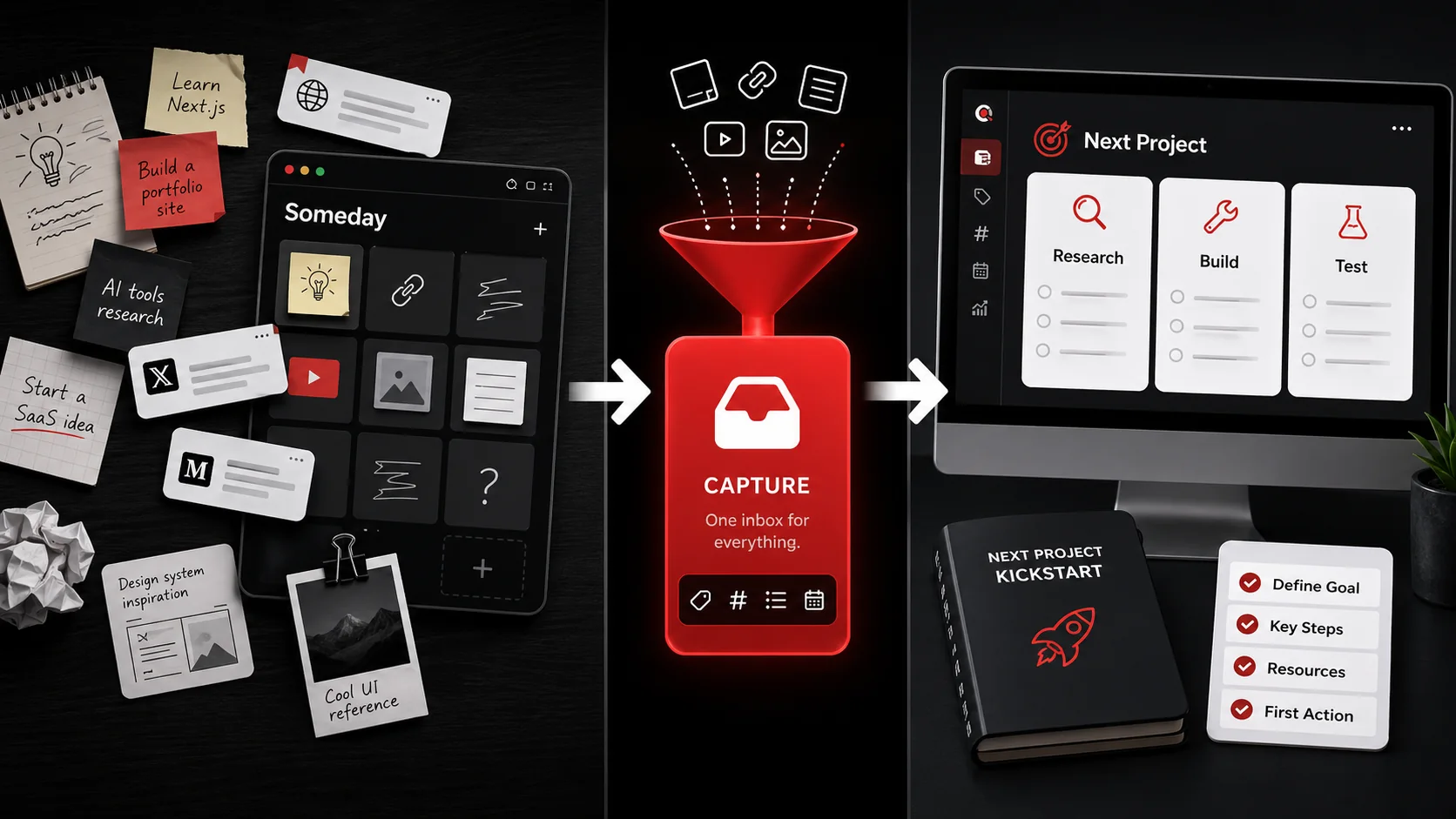
You know the feeling. You’re scrolling through Twitter, and a developer shares a brilliant CLI tool for automating deployments. You think, “I should try that for my next side project.” You save the tweet. Later, you watch a YouTube tutorial on a new CSS framework and think, “Perfect for that redesign idea.” You bookmark it. A week passes. A month. That tweet is buried, the video forgotten. Your “someday” list isn’t a launchpad; it’s a digital graveyard where good ideas go to die.
This isn’t a failure of willpower. It’s a failure of systems. The old PKM (Personal Knowledge Management) gospel of “capture everything” has left us with warehouses of inspiration but no forklifts to move it into production. In 2026, the conversation is shifting. It’s no longer about hoarding links and notes. It’s about building a capture system that actively fuels your next project kickstart. The goal isn’t a perfect archive; it’s a ready-to-ignite engine for your work.
What a Project-Fueling Capture System Actually Is
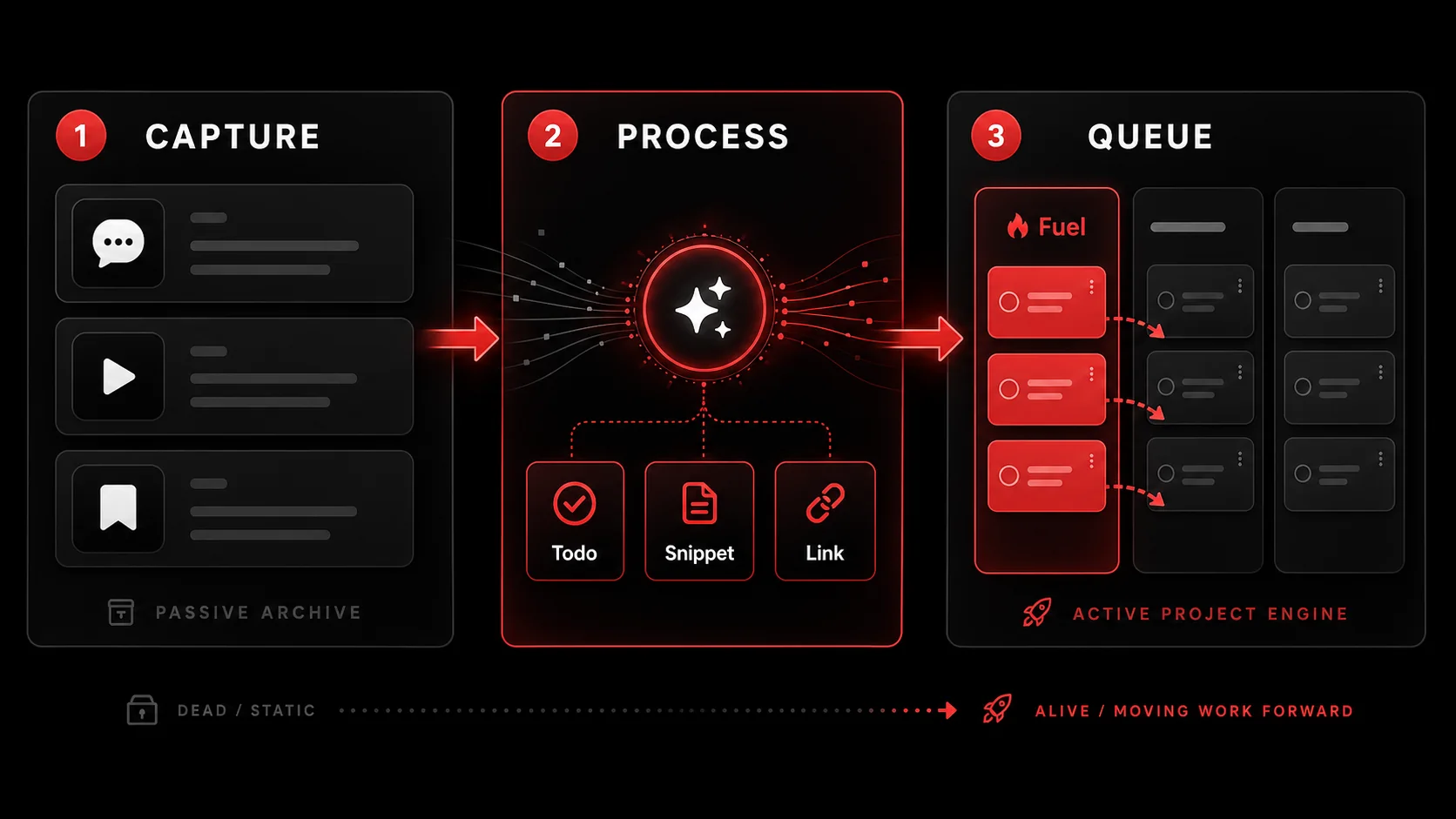 . 2. PROCESS/EXTRACT (with an AI icon and output bubbles labeled 'Actionable Todo', 'Code Snippet', 'Research Link'). 3. PROJECT QUEUE (with columns for 'Next Project Fuel', 'Active Project', 'Archive'. Arrows connect them in a clear flow.)
A project-fueling capture system is a deliberate workflow designed to transform passive consumption into active project components. It’s the difference between a library and a workshop. A library stores information. A workshop has tools, materials, and blueprints organized for the express purpose of building something.
Traditional capture is destination-agnostic. You save something because it’s interesting. A project-fueling system is destination-aware from the moment of capture. You’re not just saving “a cool article about React state management”; you’re capturing “potential solution for the state complexity in Project X” or “reference for the next performance optimization blog post I write.”
The core shift is in intent. The question changes from “Is this worth saving?” to “What future project could this help me start or accelerate?”
The Anatomy of an Actionable Capture
An actionable capture has three key attributes that distinguish it from a generic bookmark:
- It’s tagged with a potential project context. Instead of a tag like
#javascript, you use#next-saas-author#blog-post-ideas. This forces you to briefly imagine the use case. - It includes a next-action seed. The capture isn’t just the link or image. It’s accompanied by a nascent todo. This could be as simple as “Test this library’s API” or “Apply this design pattern to the settings page.”
- It’s stored in a place that feeds a project queue. It doesn’t go into a monolithic “Read Later” list. It goes into a staging area that you review specifically when planning or starting new work.
Goal: Remember information | Goal: Create project momentum Question: “Is this interesting?” | Question: “What could I build with this?” Storage: Monolithic “Someday” list | Storage: Themed buckets feeding a project queue Output: A dense archive | Output: A pre-assembled project starter kit Feeling: Guilty overwhelm | Feeling: Eager anticipation
The Role of AI in Modern Capture
The manual labor of parsing a 45-minute video or a long tweet thread for actionable nuggets is a major friction point. This is where AI-powered extraction becomes a game-changer, not a gimmick. A tool that can watch a video and spit out “Key steps to implement X: 1, 2, 3” or scan a tweet thread and identify the core code snippet transforms capture from an act of storage to an act of distillation.
In my work building developer tools, I’ve seen the transition. The most effective systems don’t just store the raw material; they begin the refinement process immediately. As noted in a 2025 report by the Productivity Futures Institute on knowledge worker trends, “Tools that reduce the cognitive distance between inspiration and first action see 3x higher utilization and project completion rates.” The initial friction of “I’ll parse this later” is where most systems fail.
Why Your Current "Someday" List Is Failing You
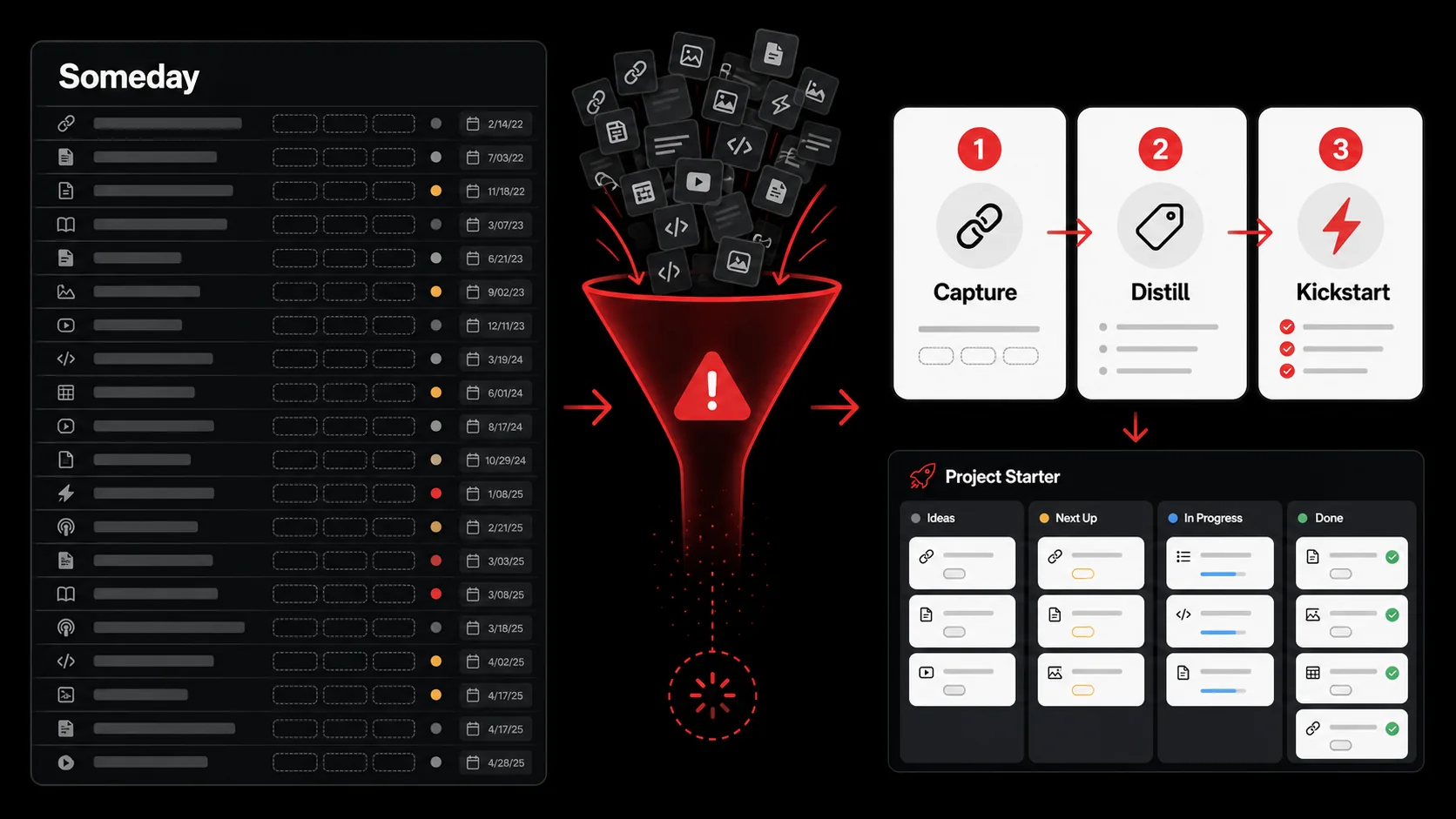 , 'Created' (dates from 3-12 months ago), 'Tags' (mostly empty). The page looks visually dense and overwhelming, with no clear grouping or priority.)
The failure isn’t personal. It’s systemic. We’ve been optimizing for the wrong metric: quantity of captures, not quality of ignition. Let’s break down why the standard approach crumbles under the weight of real creative work.
Problem 1: The Context Evaporation Effect
When you save a link with the vague idea that it “might be useful,” you’re capturing the what but not the why. The context (the specific spark of inspiration, the connection you made to a current problem) evaporates within hours. A week later, you see a link titled “Advanced Vercel Edge Configs” and have zero memory of whether you saved it to solve a caching issue on your blog or to research for a client’s infrastructure audit.
This lack of context makes the item inert. Reviewing your list becomes an exercise in archaeology, trying to decipher your own past intentions. The energy required to re-contextualize each item is often greater than the perceived value of the item itself, so you skip it. This is a primary reason why generic bookmarking tools fail as project fuel.
Problem 2: The Activation Energy Gap
There’s a massive gap between seeing a saved item and turning it into a concrete project step. Let’s say you have a saved tweet about a new animation library. To use it, you need to:
- Re-read the tweet and linked docs.
- Decide which of your projects it fits.
- Figure out the first technical step (install? create a test component?).
- Create a task in your project management tool.
Problem 3: Passive Storage vs. Active Ingestion
Our tools encourage passive storage. A “Read Later” list in Pocket or Instapaper is a holding tank. A “Watch Later” playlist on YouTube is a queue. They are designed for consumption, not creation. Your project-fueling system should feel like an active ingestion engine. It should chew up raw content (tweets, videos, articles) and spit out digested, categorized nutrients (todos, code snippets, references) ready to be absorbed by your projects.
The shift from platforms like Evernote (built for archival) to tools like Glean (built for action) exemplifies this trend. The metric changes from “How many notes do I have?” to “How many captured items became project tasks this week?”
How to Build Your Capture-to-Project Pipeline
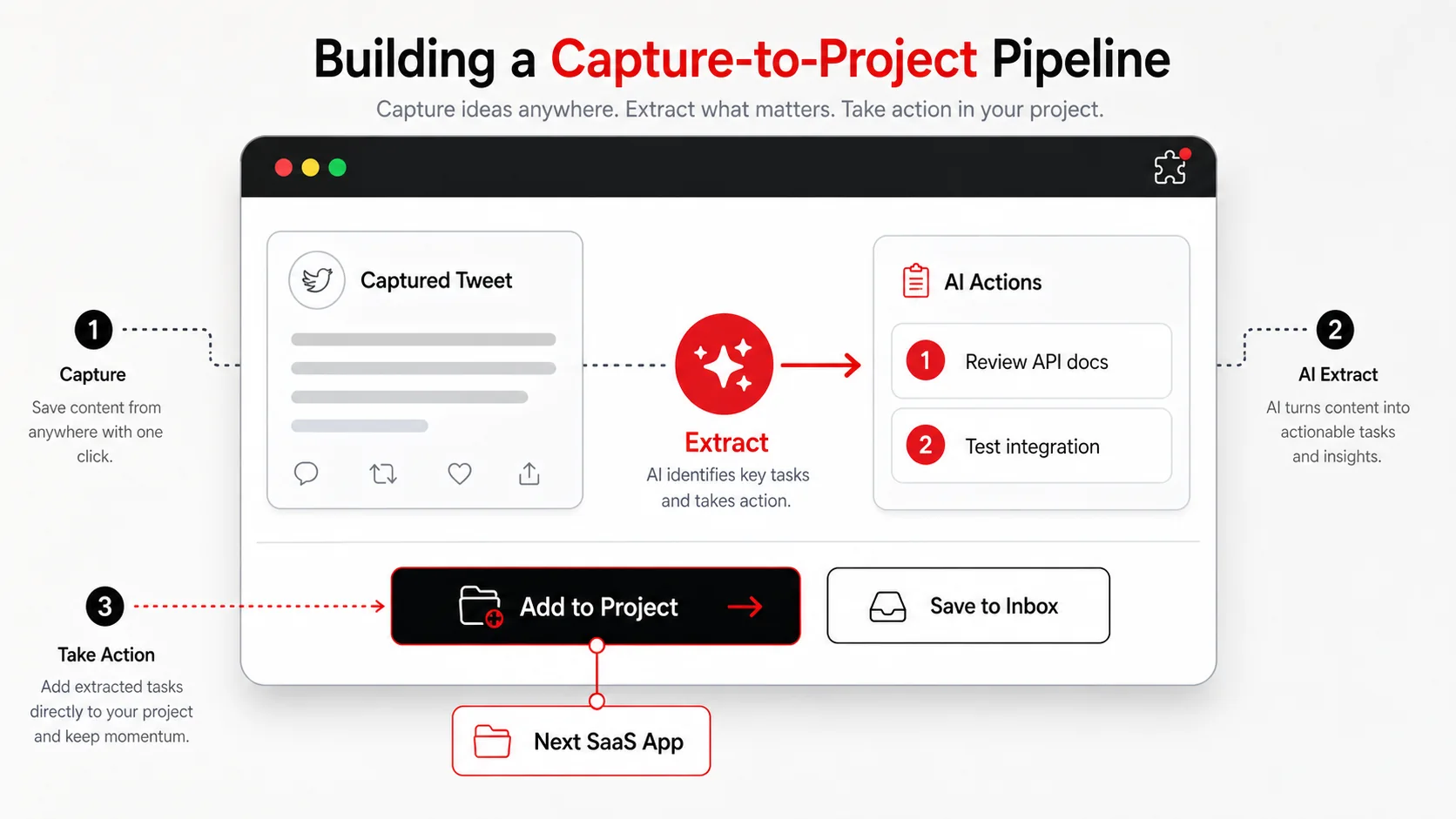
This is the practical core. We’re moving from theory to a buildable, week-by-week system. You don’t need to overhaul everything today. Start with one channel.
Step 1: Audit and Prune Your Existing Graveyard
First, confront the chaos. Open your current “someday” list: be it in Notion, Apple Notes, or a text file. Your goal is not to organize it, but to triage it with a brutal, project-focused lens.
- Create three new lists:
Project Fuel,Reference/Archive, andDelete. - For each item, ask one question: “If I were starting a new project tomorrow, would this item give me a concrete starting point or solution?” If yes, move it to
Project Fueland immediately add a one-sentence “Why” note. (e.g., “This blog post on auth – use for implementing NextAuth in the admin panel.”). - If it’s purely informational (a well-written tutorial, a concept explanation) with no immediate project tie, move it to
Reference/Archive. - If it’s outdated, no longer relevant, or you can’t remember why you saved it, move it to
Delete. Be merciless. This clears the runway.
Step 2: Implement a Multi-Channel Capture Hub
Your capture system must be where your inspiration actually lives. For developers and creators, that’s primarily three places: Twitter/X, YouTube, and your browser.
- For Tweets & Threads: Use a tool that lets you capture more than just the link. You need to capture the specific useful tweet in a long thread, and ideally, extract the key insight. A workflow for how to turn tweets into todos is essential here. The output shouldn’t be a bookmark to a Twitter URL; it should be a note that says: “User @devguru posted code snippet for optimizing database queries. Todo: Benchmark against our current solution in
project-alfa.”
The hub (where all these captures land) must be simple. A single inbox. I use and build tools that centralize this, because switching between a note app for articles, a bookmark manager for links, and a spreadsheet for ideas is a pipeline killer.
Step 3: The 2-Minute Processing Rule (The Secret Sauce)
This is the non-negotiable habit that makes the system work. When you capture something, you must spend 120 seconds processing it before you close the tab or app. This is when context is freshest.
In those two minutes:
- Assign a Project Tag: Even if it’s hypothetical (
#future-mobile-app,#portfolio-redesign). This forces the project connection. - Write the First Todo: Draft the very next physical action. Not “Learn about GraphQL.” Try: “Clone the example repo from the video at 12:30 and run it locally.” Or “Read the ‘Getting Started’ section of the new library’s docs.”
- Move it Out of the Inbox: File it into a “Project Staging” area or a specific project folder. Your main capture inbox must be a transient place, not a permanent home.
#future-mobile-app folder, it’s not a list of links; it’s a list of pre-defined starting tasks.
Step 4: Build a Project Kickstart Ritual
Your captured fuel needs an ignition sequence. This is a recurring, scheduled ritual (bi-weekly or monthly) where you review your “Project Staging” area to start new work.
- Open your “Project Staging” folder. Browse your tagged captures (
#blog-ideas,#tool-experiment,#design-inspiration). - Look for clusters. Do you have 3-4 captures all related to “building a Chrome extension”? That’s not a coincidence; it’s a project trying to happen.
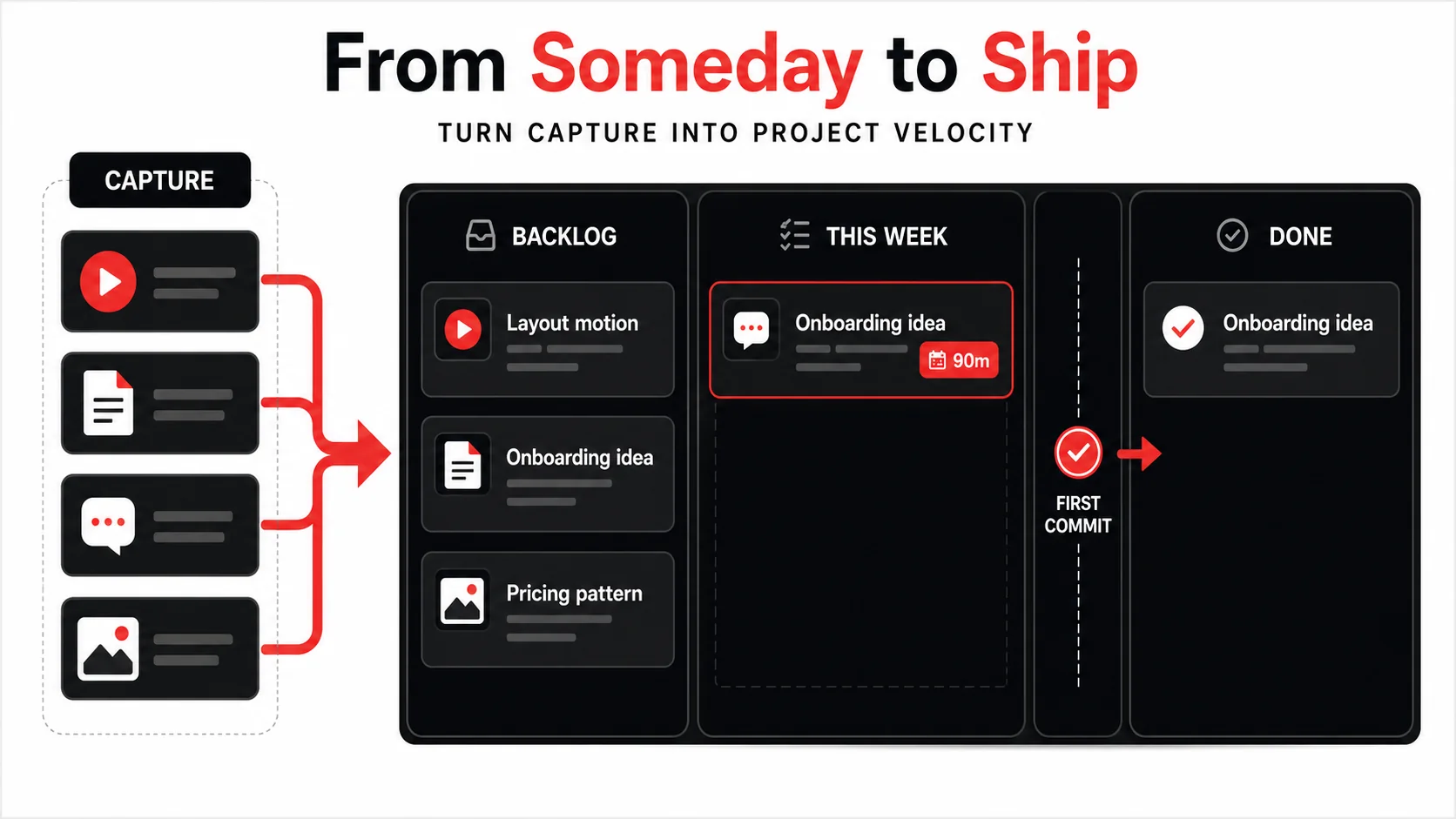
- Create a new project board (in Trello, Linear, Asana). Don’t start with a blank page. Use your captures as the foundation. Create your first tasks directly from the “first todos” you wrote during capture. Import the relevant code snippets or links as task attachments.
- Schedule the first work block. Immediately put a 90-minute block on your calendar to tackle the first todo on that new project board. The system’s job is to get you to “first commit” or “first draft” with minimal friction.
Proven Strategies to Turn Capture into Velocity
 ' and 'Implement user onboarding survey tool (from Article capture 3/1)'. Each task has a small icon indicating its source.)
The basics get you a functioning system. These strategies get you a high-performance engine.
Strategy 1: The "Spark File" Method
Maintain a simple, running document called your Spark File.md. This isn’t for full captures. It’s for the raw, one-sentence project ideas that hit you in the shower or on a walk. The rule: any idea that gets three related captures (a tweet, a video mention, and an article) attached to it within a month gets promoted from the Spark File to a formal “Project Staging” folder. This uses your capture history as a validation mechanism for your ideas. Is the universe giving you resources for this idea? If yes, it’s worth a kickstart.
Strategy 2: Theme Your Capture Tags Around Outputs, Not Topics
Most people tag by input topic: #react, #design, #marketing. This leads to large, useless buckets. Instead, tag by potential output:
-
#could-be-a-blog-post -
#solution-for-performance-bottleneck -
#feature-for-project-nexus -
#inspiration-for-landing-page
#could-be-a-blog-post tag, you’re not looking at “articles about React”; you’re looking at a list of potential article outlines and references, half-written.
Strategy 3: Schedule "Capture Digestion" Time
Capture is easy. The processing and integration is the work. Put a recurring 30-minute “Digestion” block on your Friday afternoon calendar. Use this time to:
- Process any captures from the week that didn’t get the 2-minute rule.
- Review your “Project Staging” area and clean it up.
- Move any matured captures from staging into active project backlogs.
- Delete low-value captures.
Got Questions About Project Capture Systems? We've Got Answers
How often should I review my project staging area? Aim for a formal review every two weeks. This is often enough to spot project clusters forming, but not so frequent that it becomes a chore. The key is that your daily capture process (with the 2-minute rule) does most of the heavy lifting, so these reviews are about synthesis and promotion, not triage.
What if I capture something but can't think of a project for it? That’s a signal. If you can’t imagine a concrete use for it within 10 seconds, it’s likely just interesting, not actionable. Send it to your general reference/archive (tag it with a topic like #cool-tech). Your project-fueling system should be lean. Not everything you find needs to be project fuel. It’s okay to have a separate, low-pressure library for curiosity.
Can I use this system with multiple, simultaneous projects? Absolutely. In fact, it shines there. Your capture tags should include the names of your active projects (e.g., #project-alpha, #client-beta-redesign). When you capture something relevant, tag it immediately. During your project work, you can pull up all captures for #project-alpha and have instant, context-rich references and todos. It turns scattered research into a dedicated project feed.
What's the biggest mistake people make when starting? Trying to build the perfect, all-encompassing system on day one. They spend hours researching tools and designing complex Notion databases before capturing a single thing. Start brutally simple: one capture inbox, the 2-minute processing rule, and two project tags. Use it for a week. The friction points will show you what you actually need to build or adopt. The system should emerge from your real behavior.
Ready to turn your inspiration backlog into your next project launchpad?
Glean is built specifically for this capture-to-project pipeline. It turns tweets, videos, and screenshots into structured todos the moment you save them, so your “someday” list becomes a ready-to-use project starter kit. Stop archiving and start building. Start Glean Pro Trial
Everything you save becomes a task that gets done.
Capture the source, review the task, and get it done, yourself or with your agent.