Stop Bookmarking, Start Doing: Read Later Fails You
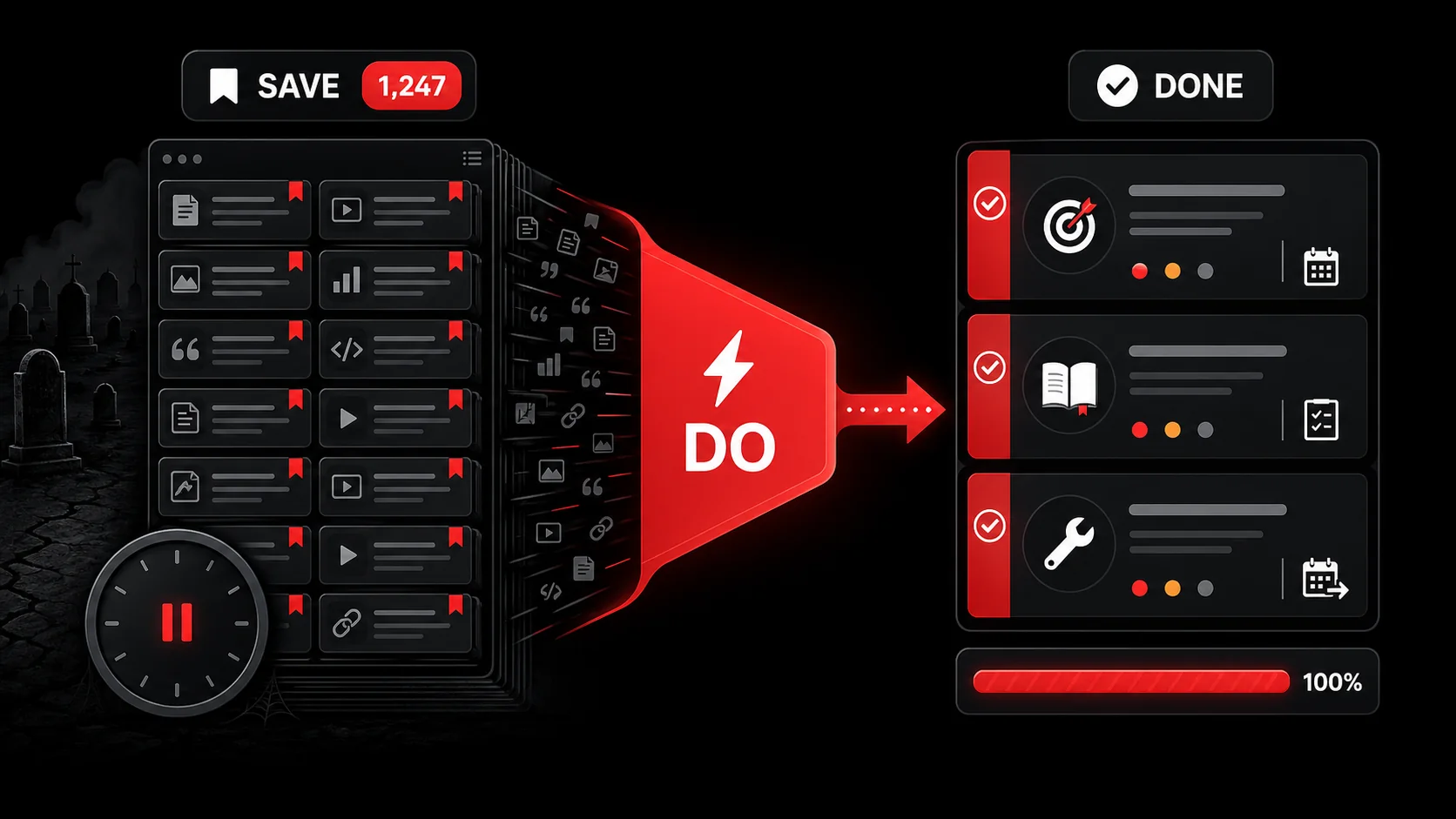
My Pocket account held 4,732 unread articles when Mozilla turned the service off. My Instapaper is a ghost town of forgotten long-form essays. My browser bookmarks folder is a digital landfill, a chaotic taxonomy of “cool-tools,” “to-read,” and “maybe-someday” that I haven’t opened in three years.
That Pocket detail is not nostalgia, it is the argument. According to Mozilla's shutdown notice, Pocket stopped taking new downloads on 22 May 2025, closed on 8 July 2025, and permanently deleted everything users had not exported by 8 October 2025. Nearly five thousand articles I meant to read, and the deadline that finally forced a decision came from a company memo rather than from me. Not one of those articles changed anything I built.
If you’re a developer, designer, or creator, your digital hoard probably looks similar. We’ve been sold a lie: that saving something for later is a productive act. It’s not. It’s a tax on your future attention and a recipe for what psychologists call “decisional procrastination.” The act of bookmarking gives you the dopamine hit of accomplishment without the actual work. You’ve “handled” the information by deferring it, creating a silent, growing debt of cognitive obligation.
This isn’t just a personal failing; it’s a systemic flaw in how we’re taught to manage information. The 2026 conversation, bubbling up on Hacker News and Indie Hackers, is a collective groan of “read later guilt.” People are realizing their meticulously organized bookmark managers are not libraries but mausoleums. The trend is clear: we’re moving from passive information hoarding to active knowledge application. This is the year of the actionable inbox.
The psychology of the black hole
The psychology of the black hole rests on two ordinary biases, not on any failure of willpower. Why does this happen? Bookmarking and “read later” apps exploit a cognitive bias known as the Planning Fallacy. We are notoriously bad at predicting how much time we’ll have in the future. When you see a fascinating 45-minute technical deep-dive on WebAssembly, you think, “I’ll have time for that this weekend.” You won’t. The weekend arrives, and you’re faced with a choice: tackle that dense article or watch a quick tutorial on the immediate problem blocking your current project. The immediate wins every time.
A second mechanism runs underneath: anxiety reduction through avoidance. Hitting save immediately relieves the fear of losing something valuable. It resolves the tension. What it actually does is move the anxiety to a later date, where it compounds. Instead of one article causing a flicker of stress, a list of 4,732 produces a low-grade hum of background dread.
We are not going to hand you a study that measures "read-later guilt", because the one this page used to cite did not survive a check and we took it out. What research does establish is the cost of the switching that these lists provoke. According to Gloria Mark, whose lab has tracked screen attention since 2004 and who set out these figures for the American Psychological Association, the average stretch of attention on one screen now runs about 47 seconds, and that "the faster the attention switching occurs, stress is measured... stress goes up." Every glance at a list you are not going to act on is one of those switches, bought at that price.
This creates what I call the Productivity Black Hole. Matter goes in (links, videos, tweets), but no usable work or insight ever comes out. The gravitational pull is too strong. The energy required to escape (to actually process an item) is greater than the perceived reward.
Let’s be clear: the intention is good. You want to learn, to improve, to stay current. But the system is broken.
From archive to action: the shift that actually works
Moving from archive to action does not mean capturing less inspiration. The solution isn’t to stop capturing inspiration. That’s how progress happens. The solution is to change what happens the moment you capture.
The old model: See → Save → (Maybe) Read → (Rarely) Act.
The new model must be: See → Capture → Define Next Step → Integrate.
The whole shift sits between “Save” and “Capture.” Saving is passive; it says “this might be useful later.” Capturing is the first step of an active process; it says “this is useful, and here’s what I’m going to do about it.”
In my decade of building tools for developers, I’ve observed that the most effective practitioners don’t have better bookmark managers. They have action translators. When they encounter something useful, they immediately force a translation from “information” to “action.”
- A designer sees a stunning UI animation on Dribbble. Instead of bookmarking it, they capture it and note: “Experiment with this spring physics in Framer this Thursday.”
- A developer reads a tweet about a new React optimization. Instead of liking it, they capture it and create a todo: “Benchmark this technique in our user dashboard component (Project: Performance Q2).”
- A content creator watches a YouTube video on storytelling structure. They capture a clip and generate a note: “Use this three-act framework for the upcoming SaaS case study draft.”
How AI changes the capture calculus
AI changes the capture calculus by absorbing the one step nobody does by hand: deciding what the content is for. This is where the 2026 toolkit diverges sharply from the 2016 one. Manually defining a next step for every interesting tweet or video is a tax in itself. This is the bottleneck. The breakthrough of modern AI isn't just summarization; it's intent extraction.
A powerful capture tool shouldn’t just save a link. It should look at the content and answer: “What might a person want to do with this?”
This is the core of moving beyond traditional bookmarking. When you capture a 20-minute YouTube tutorial on Python decorators, the AI shouldn’t just give you a summary. It should analyze the video and propose actionable next steps like:
- “Create a test file to implement the @cache decorator example from 07:35.”
- “Review the
auth_requireddecorator pattern for use in the API project.” - “Add ‘deep dive on decorators’ to next week’s learning schedule.”
We’ve written more about this fundamental shift in our piece on AI Capture vs. Traditional Bookmarks, which breaks down the technical and behavioral differences.
Building your capture-to-action system
Building your capture-to-action system takes four rules and about twenty minutes of setup. Theory is useless without practice, so here is a concrete, tool-agnostic framework you can implement today.
How we arrived at these four rules, and how to falsify them. The method here is plain: we ran our own capture pipeline against each rule for a quarter, kept the rules that survived contact with a busy week, and dropped the ones that only worked when we had spare time. Nothing in this section is a measured finding, so treat it as a protocol to test rather than a result to trust. The table below is the shape of the test — run it on your own captures for four weeks and you will know whether these rules hold for you.
| Rule | What you do | Check that proves it worked |
|---|---|---|
| Ruthless capture trigger | Save only what suggests a next step within 10 seconds | Weekly capture count falls, and you can name the intent behind every survivor |
| 2-minute transform | Convert each capture into a defined action within minutes | No item sits unprocessed when you close the laptop |
| Project home or trash | Every action lands in a project or gets deleted | No floating tasks in your inbox on Friday |
| Weekly review | Empty the buffer once a week | Pipeline returns to zero, every week, without heroics |
1. The Capture Trigger: Ruthless Specificity Your capture tool must be faster than your bookmark shortcut. One tap or click. But more importantly, you must train yourself to capture only what has a clear potential action. Is this a vague “might be cool” or a specific “this solves my auth problem”? Be ruthless. If you can’t imagine a next step within 10 seconds, let it go. The internet is infinite; your attention is not.
2. The Immediate Processing Rule: The 2-Minute Transform This is non-negotiable. Within minutes of capturing (not days, not hours), you must process it. This doesn’t mean doing the task. It means transforming the captured item into a defined action.
- For an article: “Skim conclusion, extract three key points for next blog post outline.”
- For a code snippet: “Drop into
experiments/folder, add a comment on where to use.” - For a screenshot: “Tag with ‘UI-inspiration’ and note the specific color hex to try.”
3. The Integration Point: Project Home or Trash Give every processed action a home. No floating tasks.
- Does this action belong to an existing project (e.g., “Redesign Landing Page”)? Move it there.
- Is it a new, standalone task? It goes into a dedicated “Inbox” in your task manager (Todoist, Things, Jira) for daily review.
- Did processing show you the item has no real next step? Delete it. Immediately. That is the muscle worth building.
This framework turns your consumption into a closed-loop system. For a deeper dive into implementing this for coding, check out our guide on building a modern developer productivity workflow.
The contrarian take: keep a small read-later list
A small read-later list earns its place, and here is the case for keeping one. Let’s add nuance. I am not advocating for the total annihilation of “read later.” That’s unrealistic. The goal is to invert the ratio.
In my own system, I allow a Strictly Curated Read-Later List, capped at 10 items. Its purpose is specific: it’s for long-form, high-value, context-switching content that truly requires dedicated focus. Think a 90-page PDF research paper or an in-depth industry analysis.
The rules are strict:
- It’s not for blog posts or tutorials (those get captured-to-action).
- Every item has a scheduled calendar block for when I will read it. If it doesn’t get a slot this month, it gets deleted.
- It is reviewed and purged every Friday.
The Tools of 2026: Beyond the Bookmark Manager
The market is recognizing this shift. You’re no longer looking for a better Pocket. You’re looking for a system that facilitates the capture-to-action loop. Key features to evaluate:
- One-Tap Capture from Anywhere: Browser extension, mobile share sheet, keyboard shortcut.
- AI-Powered Action Generation: Not just summaries, but suggested next steps derived from content.
- One-click task manager integration: Native push to Todoist, Notion, Linear, etc.
- Contextual Organization: Auto-tagging and sorting based on content and your defined projects.
- A Frictionless Inbox: A place to review processed captures before they’re assigned.
From Anxiety to Agency
The mental shift is profound. You stop seeing your open tabs and saved links as a guilt-inducing monument to your procrastination. You start seeing every piece of online content as a potential lever for progress. A tweet isn’t just a tweet; it’s a potential code optimization. A YouTube video isn’t just entertainment; it’s a project tutorial waiting to be mined for steps.
This turns the endless scroll from a productivity black hole into a source of fuel. It replaces anxiety with agency. You are no longer a passive collector of information, but an active architect of your own knowledge and output.
The goal is to close the loop. To turn the energy of inspiration directly into the motion of execution. Your workflow should have no graveyards, only pipelines.
Ready to stop bookmarking and start doing? The first step is to break the old habit. Start Glean Pro Trial and experience a capture workflow designed for action, not archive. See how turning a tweet into a todo can change how you work.
For more on building systems that minimize busywork and maximize output, explore our hub on productivity fundamentals.
---
Frequently asked questions
These questions come up every time we make the case against bookmarking, so here are direct answers to each.
Q: This sounds like more work upfront. Isn’t it easier to just bookmark and deal with it later? A: It’s a classic investment vs. debt problem. Yes, defining a next step takes 30 seconds now. But bookmarking creates “cognitive debt”: the unresolved stress and decision fatigue of a massive, unsorted list you’ll have to face later. The 30-second investment saves hours of future sorting, re-reading for context, and decision-making under guilt. It’s the difference between paying a small bill immediately and letting interest compound on a credit card.
Q: What about purely reference material, like documentation or a useful API spec? Shouldn’t that just be bookmarked? A: Even reference material should be captured with intent. The action might be: “Add this API endpoint docs link to the ‘Project X - Backend’ notes.” Or, “Reference this CSS spec for the grid layout in the design system doc.” This puts it in the context of use. A bare bookmark to MDN’s Array.prototype.reduce() page is useless. A capture note that says “Use this pattern for data aggregation in reporting script” ties it directly to work.
Q: I’ve tried similar systems and failed because I capture faster than I can process. How do I avoid backlog? A: This is the most common failure point. Two rules: 1) The Daily Process Ritual. Block 10 minutes at the end of your workday to empty your capture inbox. It’s non-negotiable, like checking email. 2) Implement a Hard Cap. If your unprocessed capture list hits a certain number (e.g., 20), you must stop capturing and process until it’s cleared. This creates immediate feedback and prevents the black hole from re-forming.
Q: Can AI really understand context well enough to suggest good next steps? A: It’s surprisingly effective for standard content types (tutorials, articles, code discussions). It won’t read your mind for complex, niche projects, but it’s excellent at proposing starter actions: “Try this code,” “Apply this concept to your writing,” “Research this tool alternative.” The value isn’t perfection; it’s breaking the initial inertia. You can always edit the AI-suggested action. The key is that it provides a starting point other than a blank field, dramatically lowering the barrier to processing.
Q: Doesn’t this constant context-switching to capture and process break deep work? A: Absolutely. That’s why you batch it. Don’t capture-and-process in the middle of a deep work block. Just capture (one tap). The processing happens during your designated administrative times (e.g., after a work block, during a coffee break, at the daily review). The capture should be near-instantaneous; the processing is a separate, batched activity.
Q: My team shares lots of links in Slack. How does this workflow fit there? A: This is a major source of “read later” chaos. Propose a team norm: when sharing a link, add a one-line “So what?” or “Action.” For example, instead of “Check out this new state library,” try “New state library: relevant for our complex form refactor in Q3.” This nudges everyone toward an action-oriented mindset. Some tools also allow you to forward content from Slack or email directly into your personal capture system.
Share what you read. Get your next step.
Every save you share comes back as one task for your project, with the reason it fits you.