Is Your Second Brain Actually Making You Dumber? The 2026 Reality Check

You know the feeling. You’ve just spent 45 minutes meticulously tagging, linking, and filing a brilliant article into your Notion database. You’ve created the perfect Mermaid.js diagram in Obsidian to connect it to three other half-finished ideas. Your PARA structure is immaculate. You feel a warm glow of productivity. Then you close the app. The article’s core insight (the one you were supposed to implement) fades from your mind as quickly as the browser tab. You’ve captured, but you haven’t acted.
This is the 2026 reality of the "second brain." What began as a liberating philosophy for thinkers like Tiago Forte has, for many developers and creators, mutated into a form of high-tech procrastination. We’re building elaborate digital cathedrals to house our thoughts, yet we’re living in intellectual tents, doing no real work inside them. The recent Hacker News thread titled "I spent 6 months building a second brain and have nothing to show for it" didn’t trend because it was unique. It trended because it was a collective sigh of recognition.
This article isn’t an attack on the concept of externalizing your thinking. It’s a targeted critique of how the tool-centric, capture-obsessed implementation has backfired. We’re confusing organization with output, mistaking a well-curated knowledge base for a working mind. For the indie hacker juggling five projects or the developer drowning in RFCs and tutorials, the current second brain dogma might be the very thing slowing you down. Let’s unpack why, and more importantly, what to do about it.
What Exactly Has Gone Wrong with PKM?
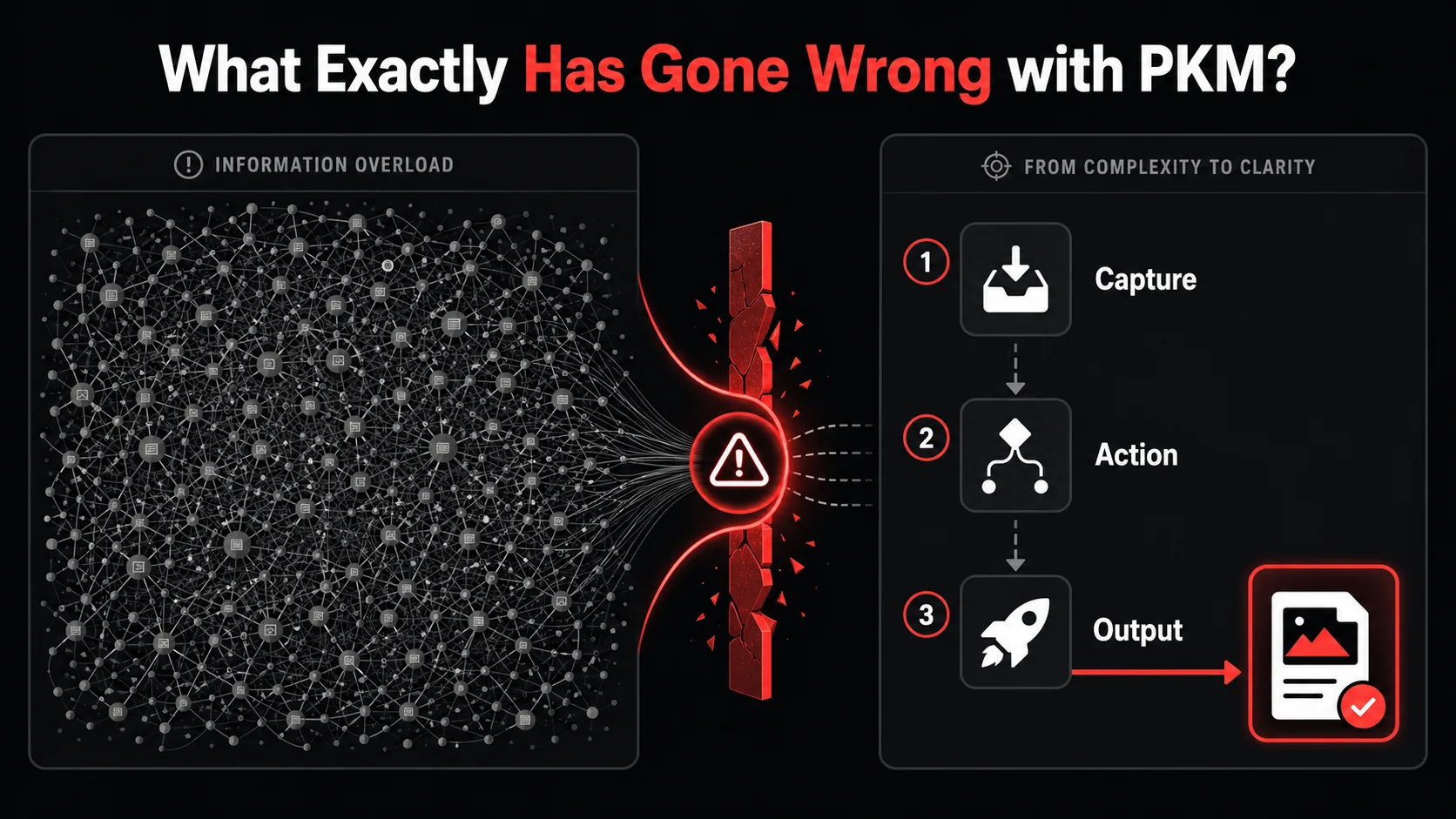
At its best, a Personal Knowledge Management (PKM) system is a cognitive scaffold. It’s designed to extend your biological memory, connect disparate ideas, and surface insights you’d otherwise forget. The core promise is sound: free up mental RAM by storing thoughts externally, so you can use your brain for higher-order thinking. The 2026 problem isn’t the promise; it’s the practice.
The movement has been hijacked by a focus on the container over the content, and on capture over creation. We’ve fallen for what productivity expert Cal Newport calls "productivity porn": the seductive appeal of optimizing systems rather than doing the work they’re meant to support. You see it in the endless YouTube tutorials on "My Perfect Notion Setup 2026" that have more views than tutorials on building actual software. You see it in the subreddits dedicated to tool aesthetics, where the color-coded tag system gets more discussion than the knowledge it organizes.
This shift has tangible costs. A 2025 report from the Developer Efficiency Lab, cited in their "State of Developer Productivity" analysis, found that developers self-report spending an average of 3.1 hours per week managing their notes and task systems. For context, that’s nearly a full workday each month spent not coding, designing, or writing, but simply tending to the digital garden.
The Promise vs. The 2026 Reality
Promise: Offload memory to think bigger. | Reality: Spend hours organizing what you captured. Promise: Connect ideas to spark innovation. | Reality: Create brittle link graphs that are impressive but unusable. Key Metric: Insights generated, projects shipped. | Obsessed Metric: Notes captured, tags created, apps integrated. Feeling: Creative and unburdened. | Feeling: Anxious about "not capturing correctly."
The tools themselves aren’t blameless. Modern PKM apps are marvels of feature creep. They encourage this behavior by offering infinite customization. When your note-taking app has a built-in database, kanban board, calendar, and API, the temptation isn’t just to take notes: it’s to rebuild your entire digital life inside it. This turns a simple tool into a full-time hobby.
From Scaffolding to Straitjacket
The initial setup phase is exhilarating. You choose your methodology: maybe it’s Zettelkasten, PARA, or a custom hybrid. You configure folders, templates, and properties. This phase feels productive because you’re making consequential decisions and building something. Psychologically, it’s identical to the pleasure of setting up a new IDE or configuring a dotfile. It’s meta-work: work about work.
The trouble begins during daily use. Every piece of incoming information (a tweet thread, a newsletter, a meeting note) presents a new decision tree: Which project does this belong to? What tags apply? Should I link it to existing notes? Should I atomize this into smaller notes? This constant decision-making creates cognitive drag. It interrupts the flow of consumption and adds a tax to learning. The barrier to capture gets higher, so you either avoid it (defeating the purpose) or you resent it.
The Illusion of Connected Knowledge
The most seductive feature of modern PKM is the bi-directional link and the resultant graph view. The idea that you can see your knowledge as a network is powerful. In reality, for most people, these graphs become visual clutter. They show connection, but not meaningful connection. A link between a note on "React useEffect" and a note on "making sourdough" might exist because you thought about both on a Tuesday, not because there’s a profound interdisciplinary insight.
We start creating links for the sake of the graph, not for the sake of understanding. The graph becomes a performance, a piece of art to be admired rather than a tool to be used. The time spent curating this network is time not spent writing the code, drafting the essay, or sketching the design that the knowledge was supposed to enable.
Why Your Second Brain Is Making You Less Effective
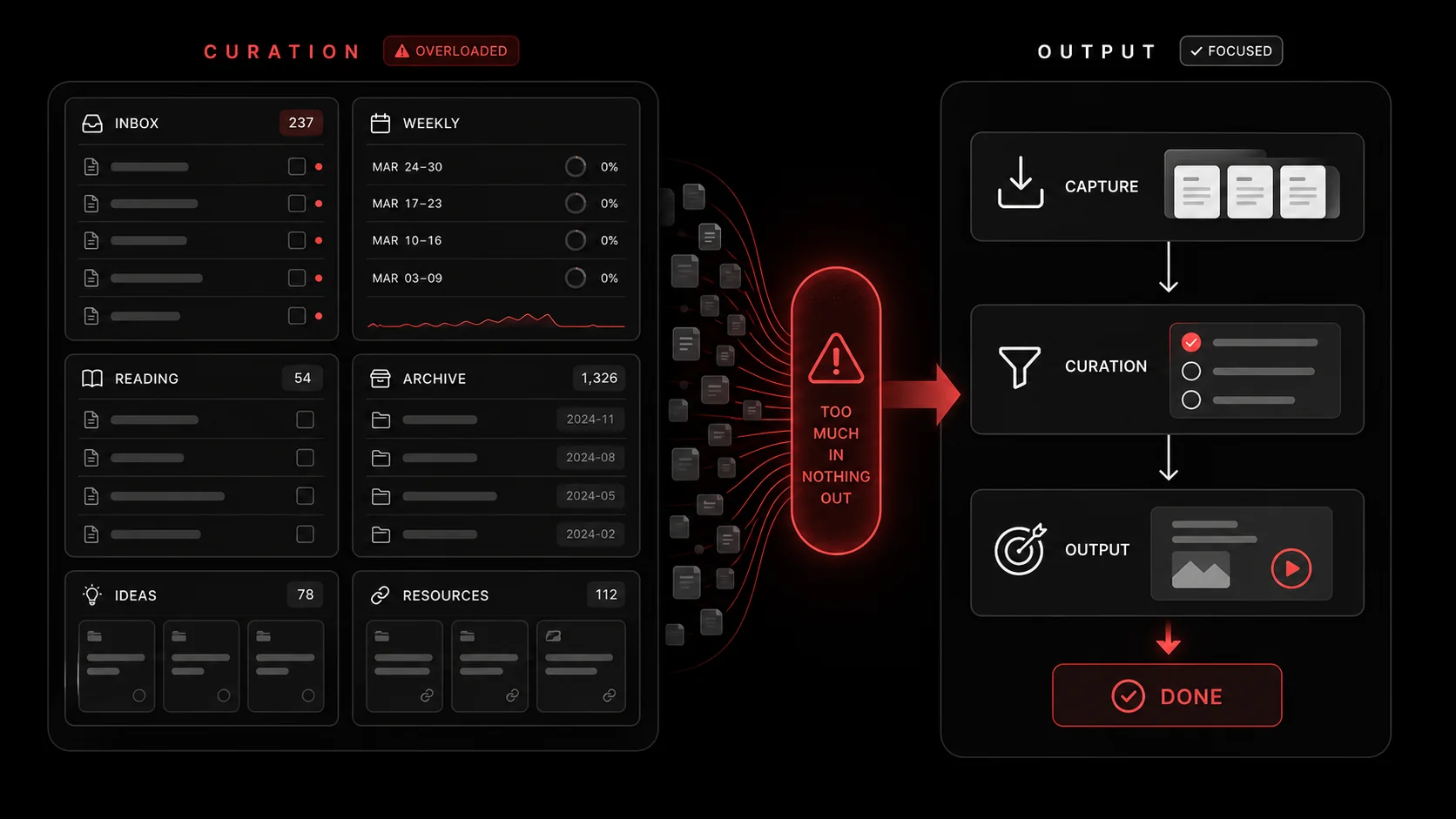
The negative impact isn't just about wasted time. It's about a fundamental misalignment of incentives that rewires your approach to work. When the system becomes the goal, several corrosive things happen.
1. It Rewards Hoarding, Not Synthesis
Your PKM system has one primary, measurable input: the number of things you put into it. It’s much easier to click "save to Readwise" or drag a PDF into your system than it is to sit down, distill the core idea, and decide what to do with it. The system, therefore, passively encourages accumulation. You become a digital pack rat, saving every potentially useful morsel "just in case."
This creates what I call "knowledge debt." Like technical debt, it’s the accumulating cost of all the unprocessed, unsynthesized information you’ve captured. The growing pile creates subconscious anxiety. You know there’s valuable stuff in there, but the effort to mine it feels daunting. The very tool meant to reduce anxiety becomes its source. This is a key reason why many find that a simpler AI-powered capture workflow that forces immediate distillation breaks this cycle.
2. It Prioritizes Organization Over Output
This is the core dysfunction. The act of organizing feels like work. Sorting notes into folders, applying tags, updating MOCs (Maps of Content), these are all concrete, completable tasks. They give you the dopamine hit of checking something off. Writing the first line of a difficult blog post, debugging a gnarly piece of code, or making a risky creative decision does not.
Your brain, seeking the path of least resistance, will naturally drift toward the "work" that feels productive but carries no risk of failure: organizing. You end up with the world’s most beautifully structured notes for a project that hasn’t moved forward in months. The system becomes a theater where you perform productivity for an audience of one, while the real work waits in the wings.
3. It Fragments Your Attention and Context
The dream of a "centralized second brain" is often a myth. In practice, you have meeting notes in Fellow, code snippets in GitHub Gists, design inspiration in Pinterest, long-form reads in Matter, quick captures in Apple Notes, and your "official" thoughts in Obsidian. The effort to synchronize or even remember where you put something becomes a task in itself.
Each tool switch (from your IDE to your browser to your PKM app) carries a context-switching penalty. A study often referenced by the American Psychological Association on multitasking found that even brief mental blocks created by shifting between tasks can cost as much as 40 percent of someone's productive time. Your second brain, intended to be a single source of truth, can often become the hub that necessitates all this chaotic switching.
How to Fix It: A Capture-to-Action Workflow
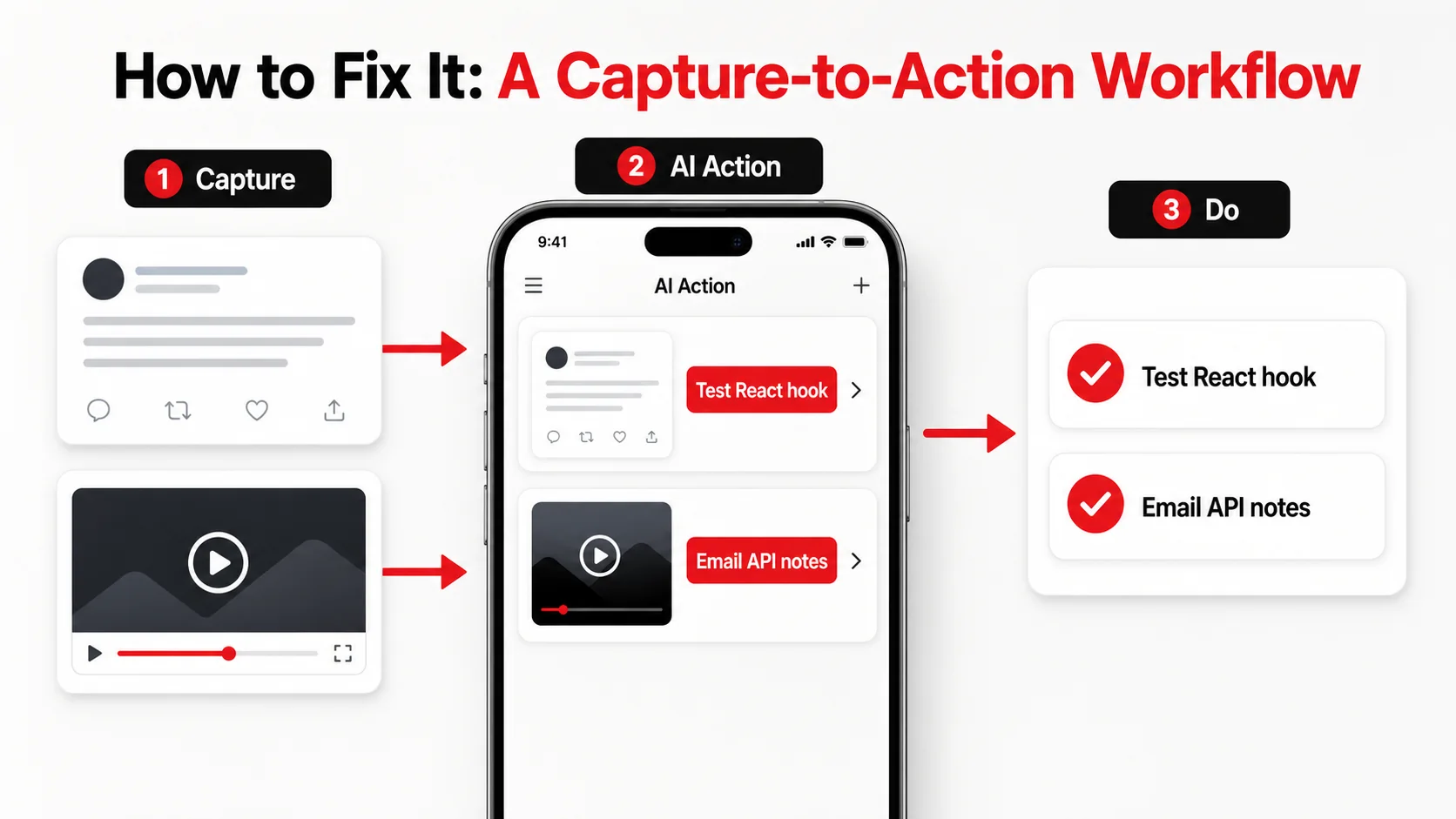
The solution isn't to abandon external thinking. It's to radically reorient your system from being a library to being a factory. A library is for storage and occasional reference. A factory has raw materials (captures) come in one end and finished goods (tasks, outputs, decisions) come out the other. Your system should be judged not by how much it holds, but by what it produces.
This requires a ruthless bias toward action. Every piece of information that enters your system must be forced to justify its existence by spawning a concrete next step, or it gets deleted. Here’s a step-by-step method to build this.
Step 1: Implement a One-Touch Capture Funnel
The goal is to get something from the wild into your system in under 10 seconds, with zero organizational decisions. Any friction here will cause you to skip capturing valuable inputs.
- Tool: Use a dedicated, dead-simple capture tool. This could be the Glean web clipper, a Drafts app on iOS, or a designated "Inbox" note in your app of choice. The key is that it has one button or one destination.
- Action: When you see a useful tweet, an insightful article, or have a random idea, you capture it. You do not tag it. You do not file it. You do not link it. You throw it into the funnel. The only allowed metadata is the source URL, captured automatically.
- Tip: Turn off all notifications for this capture tool. Capturing should be a reflexive, interruptible act, not a session.
Step 2: Process with an "Action Extraction" Mandate
This is the critical pivot. You must schedule a short, regular processing session (daily or weekly). During this session, you review everything in your capture funnel. For each item, you ask one question: "What is the single, specific next action this requires?"
If there is no actionable next step (if it's just "interesting"), you delete it. Harsh, but necessary. Information without an action is clutter.
- Tool: This is where AI can transform the workflow. Instead of you mentally parsing a long video or article, a tool like Glean can analyze the capture and suggest the actionable takeaway. For example, it can watch a 20-minute YouTube tutorial on a new CSS feature and output: "Action: Use
:has()selector to refactor the card component in Project X." - Action: Review your captures. Use AI assistance or your own judgment to convert each item into a clear, actionable next step. This step becomes a task. The original capture can be archived or deleted.
- Tip: The action must be specific and start with a verb. "Think about architecture" is bad. "Sketch 3 high-level service diagrams for the auth system" is good.
Step 3: Integrate Actions Directly Into Your Execution Hub
The extracted actions cannot live in your PKM app. They must go directly into the tool where you do work.
- Tool: Your task manager. This could be Todoist, Things, a GitHub Project, a Linear issue, or even a physical notebook. The rule is: one central list for all "do this" items.
- Action: The action item generated in Step 2 gets copied or sent directly to this task manager. If it's a code-related action, it becomes a ticket or a TODO comment. If it's a writing idea, it goes on your editorial calendar. The link between the original inspiration and the task should be clear (e.g., the task description contains the source URL).
- Tip: This step severs the toxic link between inspiration and endless organization. The knowledge has served its purpose: it created a task. Its job is done. For more on building this kind of integrated system, our guide on creating a bulletproof developer productivity workflow dives deeper.
Step 4: Maintain a "Shipped" Log, Not a "Saved" Log
Change your metric of success. Instead of tracking "notes created" or "articles saved," track "tasks completed from captures." Keep a simple log (a list or a document) where you note what you shipped that week and, if relevant, what capture inspired it.
- Tool: A simple markdown file or a table in your note-taking app.
- Action: Each week, during your review, look at your completed tasks. For any that originated from a capture, jot down the output and the source. For example: "Shipped new landing page copy (inspired by Twitter thread from @copywriter)." "Fixed useEffect dependency bug (inspired by Stack Overflow answer)."
This workflow inverts the traditional model. The PKM system is no longer the center of the universe; it’s a temporary processing station. The center becomes your task manager and your actual projects. The system exists to feed the work, not to become the work.
Putting an Action-Bias to Work: Advanced Tactics
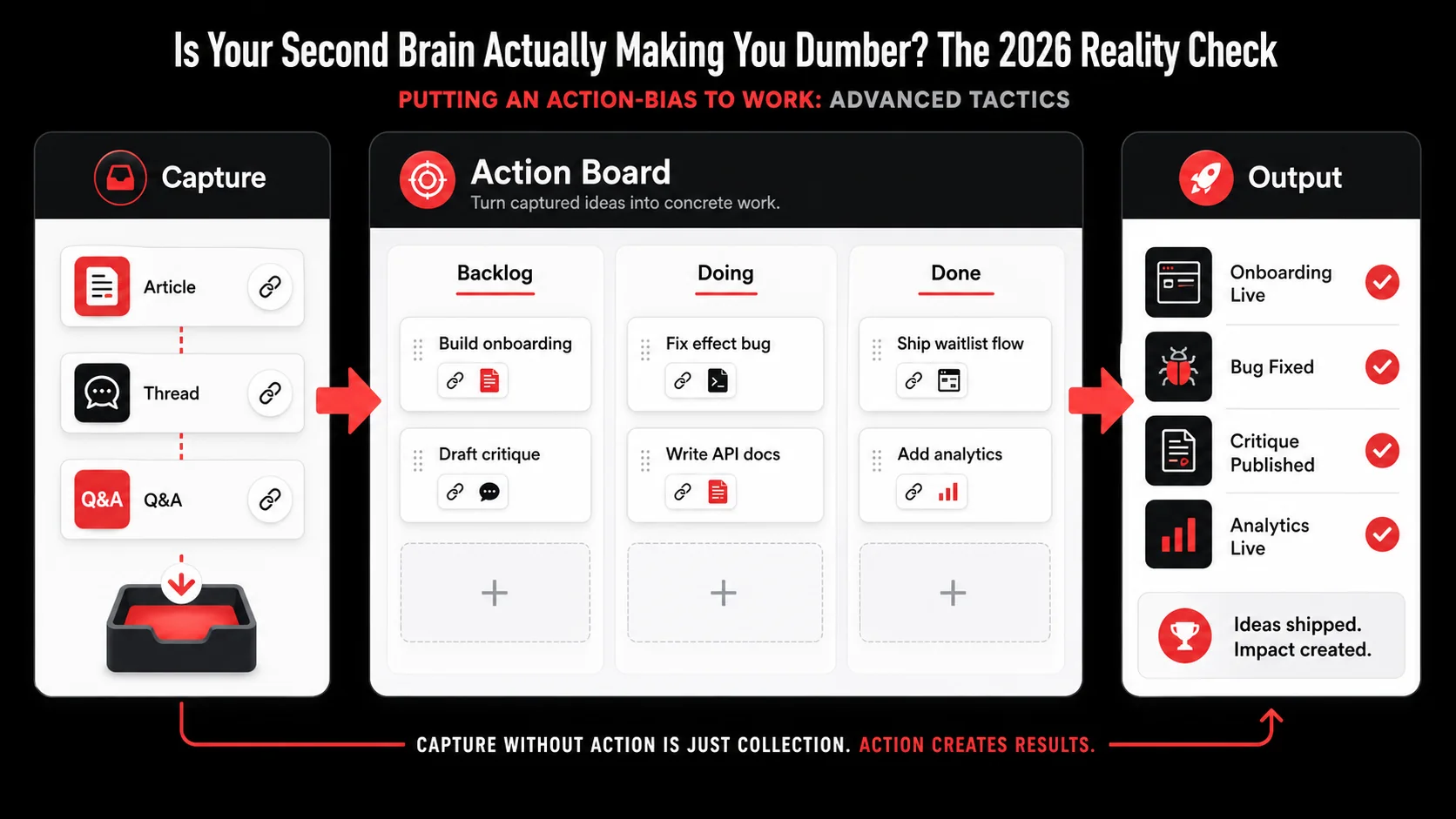
Adopting a capture-to-action mindset is the foundation. To truly weaponize it, you need to apply pressure at specific points. These are tactics I’ve used with engineering teams and solo creators to force output.
The Weekly Triage: Ask the Brutal Question
Your weekly review cannot be a gentle stroll through your notes. It must be a triage session. For every item in your capture funnel and every note in your "active" areas, ask this brutal question: "If I delete this right now, what would I lose?"
If the answer is "a vague sense of potential" or "I might need it someday," delete it. You’re clearing the deadwood. The only things that survive are items with a clear, imminent next action or those that are active, current reference material for a project you are working on this week. This practice aggressively fights knowledge debt and keeps your system lean and relevant. It’s the core discipline behind effective productivity systems that last.
Project-Based Containers, Not Thematic Libraries
Stop organizing knowledge by topic ("JavaScript," "Product Management," "Philosophy"). Start organizing it exclusively by active project ("Acme Inc. Redesign," "Personal Blog Q2," "Learning SvelteKit").
Only create a note, folder, or database when you have a live project that needs it. All knowledge is then subservient to a production goal. When the project is done, archive the entire container. This mirrors how software teams work: you have a project repo, and all documentation, ideas, and tasks live there until ship date. This method ensures your knowledge work is always tied to a tangible outcome.
Design Your System for Forgetting
This sounds counterintuitive, but it’s liberating. A good system should allow you to forget safely. You shouldn’t feel the need to remember where you put something or how it’s connected. This means:
- Powerful, dumb search: Favor apps with excellent full-text search over apps with complex folder hierarchies you must remember.
- Automated tagging: Use AI or simple rules to auto-apply context (e.g., "from Twitter," "related to Project X") rather than manually building a taxonomy.
- Defaults over decisions: Have a default location for everything. If you can’t decide where something goes in 5 seconds, it goes to the default.
Got Questions About Second Brains and Productivity? We've Got Answers
How often should I review and process my captures?
Daily is ideal, but the minimum viable cadence is weekly. The key is consistency, not frequency. A weekly, ruthless 30-minute triage session where you process everything in your inbox is far more effective than a daily glance where you push decisions to "later." Letting captures pile up recreates the very anxiety the system should eliminate. Schedule it like a meeting.
What if something is truly just for reference, with no immediate action?
This is the exception, not the rule. True reference material (like an API documentation page, a company HR policy, or a recurring checklist) has a clear, predictable future use case. It gets a dedicated, searchable home (like a "Reference" folder or a company wiki). The test is: can you name the specific situation when you will next need this? If it's "maybe someday for a project," it's not reference; it's a maybe, and maybes are clutter.
Can I still use tools like Obsidian or Notion with this method?
Absolutely. The problem isn't the tool; it's the workflow. You can use Obsidian as your capture funnel and processing station. The rule is: no note lives there permanently unless it's an active project doc or true reference. Use it to extract actions, then move those actions to your task manager. The app becomes a workshop, not a warehouse. This prevents the common pitfall of getting lost in endless linking and styling.
What's the biggest mistake people make when trying to be more action-oriented?
They mistake activity for action. "Process 50 inbox items" is an activity. "Write proposal based on item #12" is an action. The mistake is spending all your system time on the meta-activities of processing, organizing, and planning, and then having no energy or time left for the actual actions. The 80/20 rule applies: 80% of the value comes from 20% of the captures leading to shipped work. Optimize for identifying and executing on that 20%, not on perfectly managing the 100%.
Ready to turn your inspiration into tasks, not clutter?
Glean cuts through the noise of digital hoarding. Capture tweets, videos, and articles in one tap, and let AI instantly extract the actionable next step. Stop building a library of maybes and start running a factory of results. Start Glean Pro Trial and ship your next idea today.
Everything you save becomes a task that gets done.
Capture the source, review the task, and get it done, yourself or with your agent.