Getting Things Done Method: The 5 GTD Steps, Lists and Weekly Review
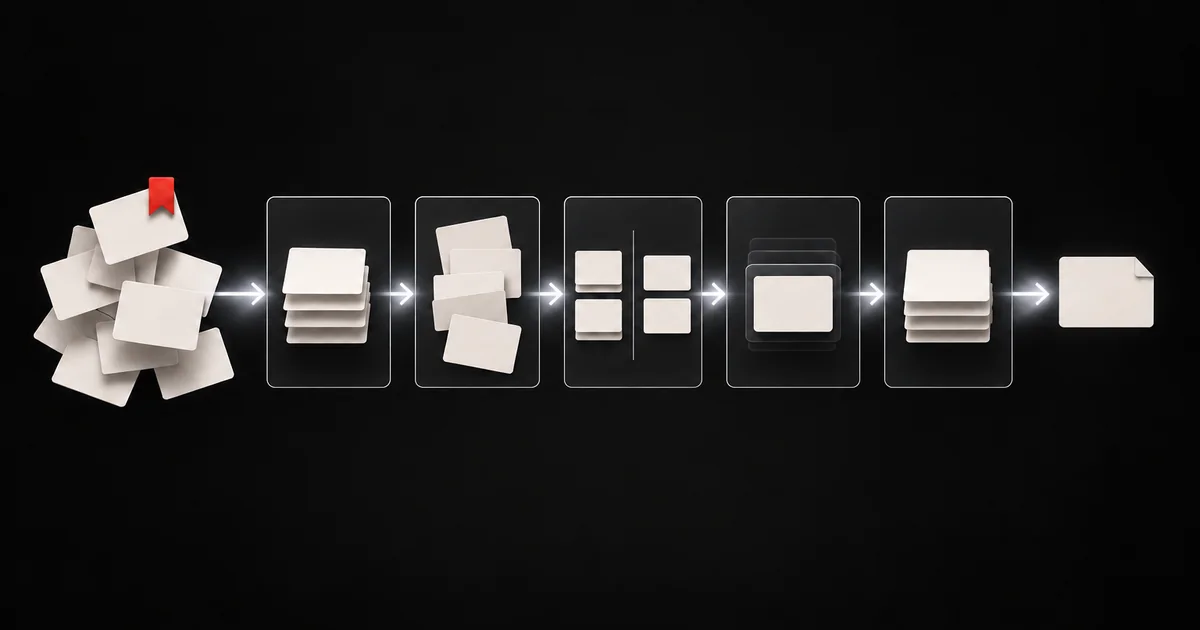
The Getting Things Done method, or GTD, is a productivity system created by David Allen. It runs on five steps: capture everything that has your attention, clarify what each item means and whether it needs action, organize the results into the right lists, reflect on those lists in a weekly review, and engage by choosing your next action. The core idea is simple: your mind is for having ideas, not holding them. Once every commitment lives in a trusted system, you stop carrying it in your head.
The 5 steps of GTD
1. Capture
Collect everything that grabs your attention into a small number of inboxes: a notebook, a notes app, an email inbox, a physical tray. Tasks, ideas, promises, a video you want to learn from, a message you need to answer. Capture it all, and capture it fast. You judge it later.
Keep your inboxes few. Five scattered places you never check leak commitments.
2. Clarify
Empty each inbox one item at a time, top to bottom. For each item, ask:
- What is it?
- Is it actionable?
- Does the next action take less than two minutes? Do it now. This is the two-minute rule.
- Is someone else better placed to do it? Delegate it and track it on a Waiting For list.
- Otherwise, defer it: put it on your calendar if it has a date, or on a Next Actions list.
3. Organize
Put each clarified item in its place:
| List | What goes on it |
|---|---|
| Projects | Every outcome that needs more than one action |
| Next Actions | The very next step for each project and each single task, often grouped by context such as @computer, @phone or @errands |
| Calendar | Only actions tied to a specific day or time |
| Waiting For | Things you delegated or expect from someone else |
| Someday/Maybe | Ideas you might pursue later |
| Reference | Information you might need, but no action |
Keep your calendar sacred. If you put "maybe" tasks on it, you stop trusting it.
4. Reflect
Once a week, run a weekly review. It keeps the system current so you trust it:
- Collect loose papers, notes and messages into your inbox.
- Process every inbox to zero.
- Review your Next Actions and cross off what is done.
- Review your calendar for last week and the next two weeks.
- Review Waiting For and follow up.
- Review every project and make sure each one has a next action.
- Scan Someday/Maybe and move anything you now want to act on.
5. Engage
Choose what to do right now by asking four questions, in order: What context am I in? How much time do I have? How much energy do I have? What has the highest priority? Your lists give you the options; you make the call.
The two-minute rule
If a clarified action takes less than two minutes, do it immediately. Tracking it would take longer than doing it. Only apply the rule while you process your inbox, not every time something pops up, or you spend the day on interruptions.
Why GTD fails, and how to fix it
- Too many tools. Pick one list manager and one calendar.
- Vague next actions. "Website" is not an action. "Draft the About page headline" is.
- Skipped weekly reviews. Without them, lists go stale and you stop trusting the system.
- Saved content that never turns into action. Bookmarked videos, tweets and articles pile up in a separate place and never get clarified. Treat them as inbox items too.
GTD and your saved content
Most people capture more than notes. You save a tutorial, a thread, a screenshot of a checklist. In GTD terms, each of those is an inbox item that still needs clarifying: what is the next physical action it asks of you? If the answer is none, it belongs in reference or the trash. Our guide on what content-to-task means goes deeper, and the CODE method shows a note-first alternative for comparison.
{/ smart-app-plug:start /}
Clarify saved content with Glean
Your next weekly review will hit a pile of saved tweets, YouTube videos and screenshots. Share one of them to Glean on your iPhone. Glean proposes a next action from the capture, and the one you accept becomes a todo document with the source and a reminder beside it. That is GTD's clarify step for the content you save, done while the item is still in front of you.
{/ smart-app-plug:end /}
Common questions
Is the GTD method still relevant?
Yes. The five steps work with any tool, from paper to apps. David Allen revised the book in 2015 to reflect digital tools, and the principles stayed the same.
What is the difference between a project and a next action in GTD?
A project is any outcome that needs more than one step. A next action is the single visible, physical step you can take now to move it forward.
How long does it take to set up GTD?
Your first full capture and clarify session often takes a few hours. After that, daily processing takes minutes, and the weekly review takes 30 to 60 minutes.
Can you use GTD with a simple to-do app?
Yes. Any tool that holds lists works. What matters is that you capture everything, clarify it into next actions, and review weekly.
Sources
- Getting Things Done. What is GTD?
- Allen D. Getting Things Done: The Art of Stress-Free Productivity. Revised edition. Penguin Books, 2015
Everything you save becomes a task that gets done.
Capture the source, review the task, and get it done, yourself or with your agent.