Fix 5 Content Capture Mistakes Developers Make
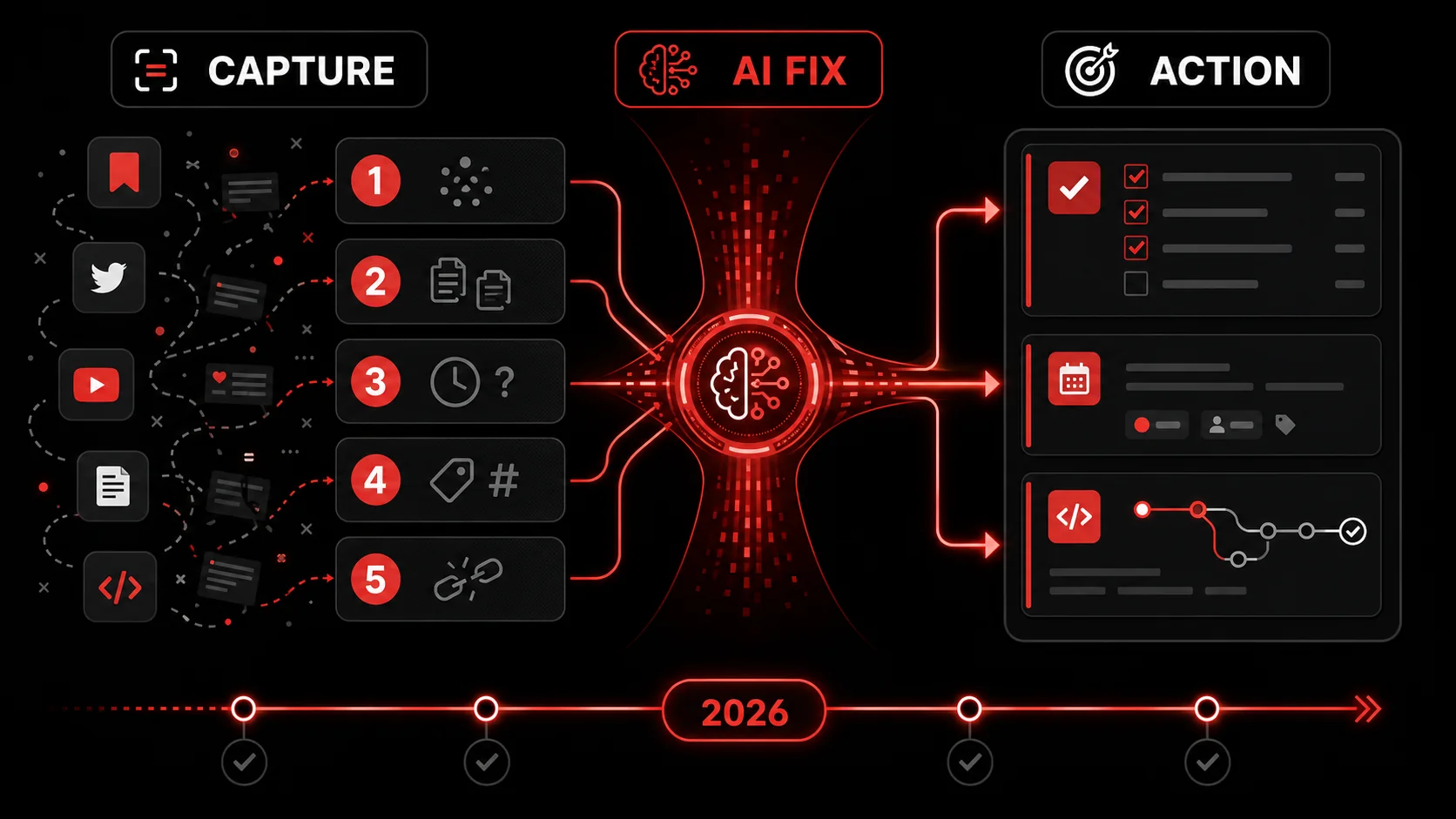
It’s February 2026. You’re scrolling through Hacker News, a brilliant technical thread catches your eye. You think, “I need to implement that pattern.” You bookmark it. A few days later, you see a tweetstorm detailing a new state management library. You “like” it for later. A week after that, a YouTube tutorial solves a problem you’ve been wrestling with for months. You save it to a “Watch Later” playlist you haven’t opened since 2024.
Sound familiar? You are not alone, and the numbers back the feeling. According to the 2025 Stack Overflow Developer Survey, which collected more than 49,000 responses from 177 countries, the single biggest frustration developers report with AI tooling, named by 66% of them, is "AI solutions that are almost right, but not quite," with 45.2% adding that debugging AI-generated code eats more time than it saves. Trust follows the same curve: 46% distrust AI output accuracy against 33% who trust it. Read those numbers together and the lesson lands. Volume is not your problem. Almost-right output that still needs your judgment is.
How we put this list together. We build Glean, a capture-to-task app, so these five mistakes come from watching our own captures rot and then fixing the workflow. In March 2026 we rewrote this page and cut every statistic we could not trace to a primary source, including a "5.1 hours per week" figure and two study references that did not survive a check. What remains is either linked to a source you can open in one click, or clearly labelled as our own practice. If a number is missing where you expected one, that is deliberate.
The mistake isn't consuming content. It's how we try to save it. We treat inspiration like a squirrel treats nuts, burying it in places we’ll never find again. This article breaks down the five most common, costly mistakes developers make when capturing online content and provides the actionable, 2026-ready fixes to turn your feed into a functional to-do list.
Mistake #1: Treating Bookmarks as a To-Do List
Treating bookmarks as a to-do list is the first mistake, and it is the one that feeds all the others.
The Problem: The browser bookmark bar is a cemetery of good intentions. That article on React Server Components, the blog post about Postgres indexing, the GitHub issue describing a clever workaround. They all go in, but they never come out. Bookmarks lack context, urgency, and actionability. They’re a passive “save for later” that almost always means “save for never.”
The 2026 Fix: Capture with Intent and Immediate Processing. The fix is to stop saving links and start capturing tasks. The moment you see something valuable, you must attach a next step.
- The Manual Method: When you save something, immediately open a note in your task manager (Todoist, Things, etc.) or a project file. Don’t just paste the URL. Write the specific action: “Implement the caching strategy from [URL] in the
user-apiservice,” or “Evaluate the library in [URL] for the Q3 project spike.” - The AI-assisted version: This is where tools built for this purpose shine. Instead of just bookmarking, use a capture tool that asks, “What do you want to do with this?” An AI can parse the content of a tweet, article, or video and suggest the actionable next step for you. For example, capturing a complex tweet about a new CSS feature could automatically generate a task like: “Experiment with
@scopein the design system sandbox.” This transforms a vague bookmark into a concrete, project-connected todo.
Mistake #2: Capturing Without Context (The "What Was This For?" Problem)
The Problem: You find a gem of a solution on Stack Overflow, screenshot it, and save it to a folder named “Reference.” Two months later, you’re facing the same bug. You find the screenshot… and have zero memory of why you saved it or which part of the codebase it was relevant to. The context (the why) is lost, rendering the capture useless.
The 2026 Fix: Enforce Context at the Point of Capture. Context is king. A capture without context is data garbage. Modern workflows must bake context-adding into the capture step.
- The Manual Discipline: Make it a non-negotiable rule. When you save anything (a screenshot, a code snippet, a link), you must also add a one-line note. Use a tool that allows annotations. That note should answer: “Project?” and “Why?”. For example: “Screenshot: Fix for Next.js dynamic import error in
/app/auth- usenext/dynamicwithssr: false.” If the capture is a screenshot of an error or a code fix, copy its text with the free screenshot to text tool and paste it under the note, so a search for the error message finds it later. - The AI-assisted version: Advanced capture tools can automate this. By connecting to your project management tools (Linear, Jira, GitHub Issues) or noting your recent active files in your editor, an AI can suggest relevant projects or tags at the moment of capture. Capturing a UI animation tutorial could prompt: “Tag this with ‘Design System’ and ‘Q2 Dashboard Redo’?” This creates a self-documenting library of inspiration tied directly to your work.
Mistake #3: Letting Captures Live in Siloed Apps
Letting captures live in siloed apps is what turns a small pile into five small piles you cannot search across.
The Problem: Your content is scattered across a dozen prisons: tweets in Twitter’s “Bookmarks,” articles in Pocket, videos in YouTube’s “Watch Later,” code snippets in a notes app, screenshots on your desktop. This fragmentation guarantees that nothing gets synthesized. The connection between a design inspiration (Dribbble), its technical implementation (a GitHub repo), and the relevant tutorial (a YouTube video) is lost because they live in different kingdoms.
The 2026 Fix: Implement a Centralized, Searchable "Capture Hub". Your second brain needs one central cortex. All captures must flow into a single, powerfully searchable repository.
The Manual Architecture: Choose a central note-taking app with strong tagging, linking, and search capabilities (like Obsidian, Notion, or even a well-organized GitHub repo with markdown files). The discipline is to immediately* transfer any capture from its source app into this hub, applying consistent tags (#api, #ui-bug, #optimization).
- The AI-assisted version: Use a capture tool that acts as a universal funnel. A good Chrome extension and mobile app should let you send tweets, articles, videos, and screenshots directly to the same place. Even better, AI can automatically tag and categorize incoming content based on its analysis. A video about Python async would be auto-tagged
#pythonand#backend, making it instantly findable later alongside your relevant code snippets and articles.
How bad is tool fragmentation?
Tool fragmentation is bad in a specific, measurable way: it multiplies the number of places you must search before you can start working. We are not going to hand you a tidy "hours lost per week" figure here, because we could not find one from a primary source that actually measured it. The number this page used to carry did not survive a check, so we removed it.
What you can measure is your own. Time yourself the next three times you go looking for something you know you saved. Count the apps you open before you find it. Two apps is a workflow. Five is a scavenger hunt. A centralized hub cuts the cost by giving you one indexed search endpoint for everything from CLI flags to conference-talk timestamps, and the win shows up in your own stopwatch rather than in someone's slide.
Mistake #4: Confusing Consumption with Progress
Confusing consumption with progress is the mistake that feels the best while you are making it.
The Problem: There’s a seductive dopamine hit in “saving for later.” It feels like productivity. You’ve curated a personal library of potential knowledge! But in reality, you’ve just created a backlog of mental debt. The “collector’s fallacy”, named on Zettelkasten.de back in 2014, is real: as that essay puts it, "'to know about something' isn't the same as 'knowing something,'" and "kept isn't read." Hoarding information creates the illusion of learning without the substance of action. Your “Watch Later” playlist has 300 videos. That’s not a todo list; it’s a monument to procrastination.
The 2026 Fix: Prioritize and Prune with a "Capture Queue" Workflow. Treat your captures like a product backlog. It needs grooming, prioritization, and, crucially, deletion.
- The Manual Process: Schedule a weekly 15-minute “Capture Review.” Go through everything you saved that week. For each item, ask: 1) Is this still relevant? 2) What is the very next action? If you can’t define an action, delete it. Move actionable items to your real task manager, prioritized. This ruthless review prevents pile-up.
What's the pile-up rate?
The pile-up rate is the one statistic you should generate yourself, because yours is the only one that changes your behaviour. Open your bookmark manager right now and sort by date added. Count how many items from a month ago you have opened since. That ratio is your pile-up rate, and it is usually uglier than any survey.
This page previously quoted a "70% never revisited" figure and a journal study to back it. Neither held up when we tried to trace them, so both are gone. The advice survives without them: a scheduled weekly review is what stops your hub becoming another graveyard, and you will know within two weeks whether it works for you.
Mistake #5: Ignoring the "Friction of Activation"
The Problem: The biggest barrier to using a saved piece of content is the friction to reactivate it. Opening a bookmark, finding the key paragraph in a long article, scrubbing through a 20-minute video to find the 30-second solution. This activation energy is often too high. So the capture dies from inertia.
The 2026 Fix: Pre-Process Captures for Zero-Friction Reuse. The goal is to make your past self’s work instantly usable for your future self.
- The Manual Tactic: When you save something, do a bit of the work upfront. For an article, copy the load-bearing paragraph or code block into your note, not just the link. For a video, note the timestamp of the key moment. For a tweet thread, summarize the core insight in your own words. This extra 60 seconds of effort saves 10 minutes of re-discovery later.
- The AI-assisted version: This is where AI truly changes the game. A modern capture tool should do this pre-processing for you automatically.
This turns a passive link into an active, ready-to-use knowledge asset. The friction of activation drops to near zero.
Does pre-processing actually save time?
Pre-processing saves time whenever the cost of re-finding a detail is higher than the cost of writing it down once. Adding a two-line summary and the one code block that mattered takes us under two minutes at capture time. Re-deriving that same detail three weeks later means reopening the article, re-skimming it, and rebuilding the context you already had. You do not need a study to feel which of those is longer, and we are not going to invent one.
The read-later world already proved the shape of this. According to Readwise, its Reader product ingests articles, RSS, PDFs, YouTube videos with transcripts, X threads, EPUBs, and newsletters for $9.99 a month billed annually, precisely because extraction at capture time is worth paying for. The 2026 shift is that the same treatment now reaches video and screenshots.
Building Your 2026 Content Capture System
Fixing these mistakes isn’t about adding more work; it’s about building a smarter, leaner system. Here’s a practical stack for 2026:
- A Universal Capture Tool: Your primary weapon. It must handle links, videos, tweets, and screenshots from both desktop and mobile, sending everything to one place. (Start Glean Pro Trial for a tool built on this principle).
- A Centralized Hub: Where all captures live. It must have excellent full-text search, tagging, and linking capabilities.
- Your Task Manager: This is where actionable captures graduate to. The link between your capture hub and task manager should take one click.
- The Weekly Review Habit: The essential maintenance ritual to prune and prioritize.
Summary and Key Takeaways
The goal is to stop building a digital graveyard. An effective 2026 capture system does three things: it captures with a defined action, stores everything in one searchable hub, and gets reviewed weekly. AI now handles the tedious parts (tagging, summarizing, suggesting next steps) but your judgment directs it. Start by fixing one mistake, like never bookmarking without a next action. The return isn't just fewer lost links; it's less context switching and more time for real work. Your saved content should accelerate your projects, not haunt them.
Frequently Asked Questions (FAQ)
These are the questions we get most often about the content capture mistakes above, answered in the order they usually arrive.
Q: Isn't this just over-engineering? Can't I just bookmark things? A: You can, and most developers do. The question is about ROI (Return on Investment). The "over-engineering" of a 30-minute setup and a 15-minute weekly habit pays for itself many times over by preventing hours of lost time searching for lost solutions, re-researching topics, and suffering context switches. It's the difference between a junk drawer and a labeled toolbox.
Q: How do I handle capturing sensitive code or information from work? A: Treat this one carefully. Your capture system must align with your company's security policy. Many modern tools offer local-first or self-hosted options. The principle remains the same: capture with context. Use internal wikis (Confluence, Notion) or secure note-taking apps approved by your IT department as your "central hub." The key is having a system, even if it's walled off from your personal one.
Q: I've tried note-taking apps before and they become a mess. How is this different? A: Traditional note-taking often becomes a "write-only" database. The difference here is the action-orientation. You're not capturing to write a thesis; you're capturing to complete a task. The AI-assisted step of auto-generating a "next action" and the mandatory weekly review where you delete or act on items force the system to remain functional, not archival. It's a workflow, not a library.
Q: Can AI really understand the context of what I'm saving well enough to be useful? A: As of 2026, the answer is a qualified yes. For well-defined content like technical articles, tutorial videos, and code-heavy tweets, AI is exceptionally good at extracting the core concept, technology used, and potential action. It's not perfect and won't replace your judgment, but it acts as a powerful first pass, doing 80% of the tedious work (summarizing, tagging, suggesting an action) so you can focus on the 20% that requires your expertise.
Q: How do I get started without getting overwhelmed? A: Start tiny. For one week, focus on fixing just Mistake #1. Every time you go to bookmark something, stop. Open your task manager or a text file and write the next action instead. Once that feels habitual, add Mistake #3 by moving all new captures to one app. Iterate on the system. The goal isn't perfection on day one; it's consistent improvement of a leaky process.
Q: This sounds good for tutorials and articles, but what about capturing visual inspiration (UI/UX designs)? A: The same principles apply! A screenshot of a beautiful dashboard is a capture without context. The 2026 fix? When you capture it, the system should allow you to annotate what you like ("this data visualization layout," "this color hierarchy") and tag it to a relevant project ("Mobile App Redesign"). Some AI tools can even describe the visual elements, making them searchable by terms like "dark mode sidebar" or "gradient button." The goal is to move from a folder of pretty pictures to a curated, project-specific design resource.
---
Developer productivity in 2026 is less about finding more hours and more about reclaiming the hours lost to inefficient systems. Your content capture workflow is a prime candidate for a strategic upgrade. By identifying and fixing these five common mistakes, you stop building a digital graveyard and start building a launchpad for action. The inspiration you find online should propel your projects forward, not vanish into the abyss of "saved for later." It's time to build a system that works as hard as you do.
Ready to fix your capture workflow? Start Glean Pro Trial and turn your next tweet, video, or screenshot into an actionable todo in one click.
Share what you read. Get your next step.
Every save you share comes back as one task for your project, with the reason it fits you.