Run the C.O.D.E Method in One Tool, Not Five Apps
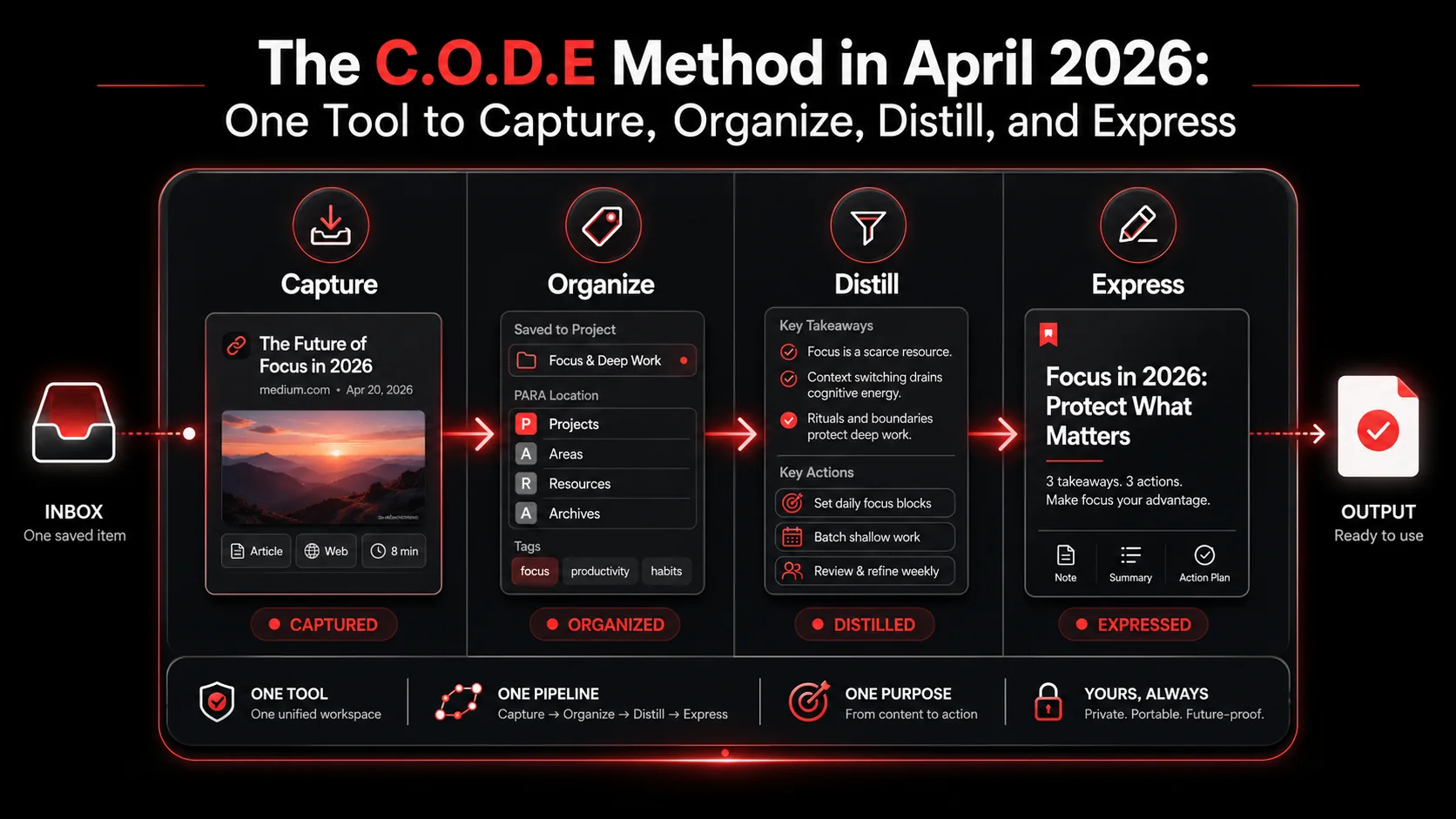
I read Building a Second Brain the week it came out in 2022. Tiago Forte's CODE method made immediate sense to me. Capture what catches your attention, Organize it by where you will use it, Distill it down to its useful core, Express what you have learned. Four verbs. Clean loop. I bought it.
Then I went and built the recommended stack. Notion for Organize. Things 3 for Express. Readwise for highlights. Apple Notes for fleeting capture in elevators. Drafts as a launcher because Drafts is faster than every other text app on iOS. Five apps, three sync engines, two subscriptions per year, and a daily ritual of moving things between inboxes that started feeling exactly like the email triage I had built the second brain to escape.
It is now April 2026. The CODE method is still right. The five-app stack is wrong. This article walks through why the original implementation broke, what changed in the tooling landscape over the past three years, and how to run all four phases of CODE in a single tool without losing the parts that made the framework valuable in the first place.
What is the CODE method, in plain terms?
CODE is the four-part workflow Tiago Forte introduced as the engine of a personal knowledge management system. It stands for Capture, Organize, Distill, Express. Each letter is a verb you do to information.
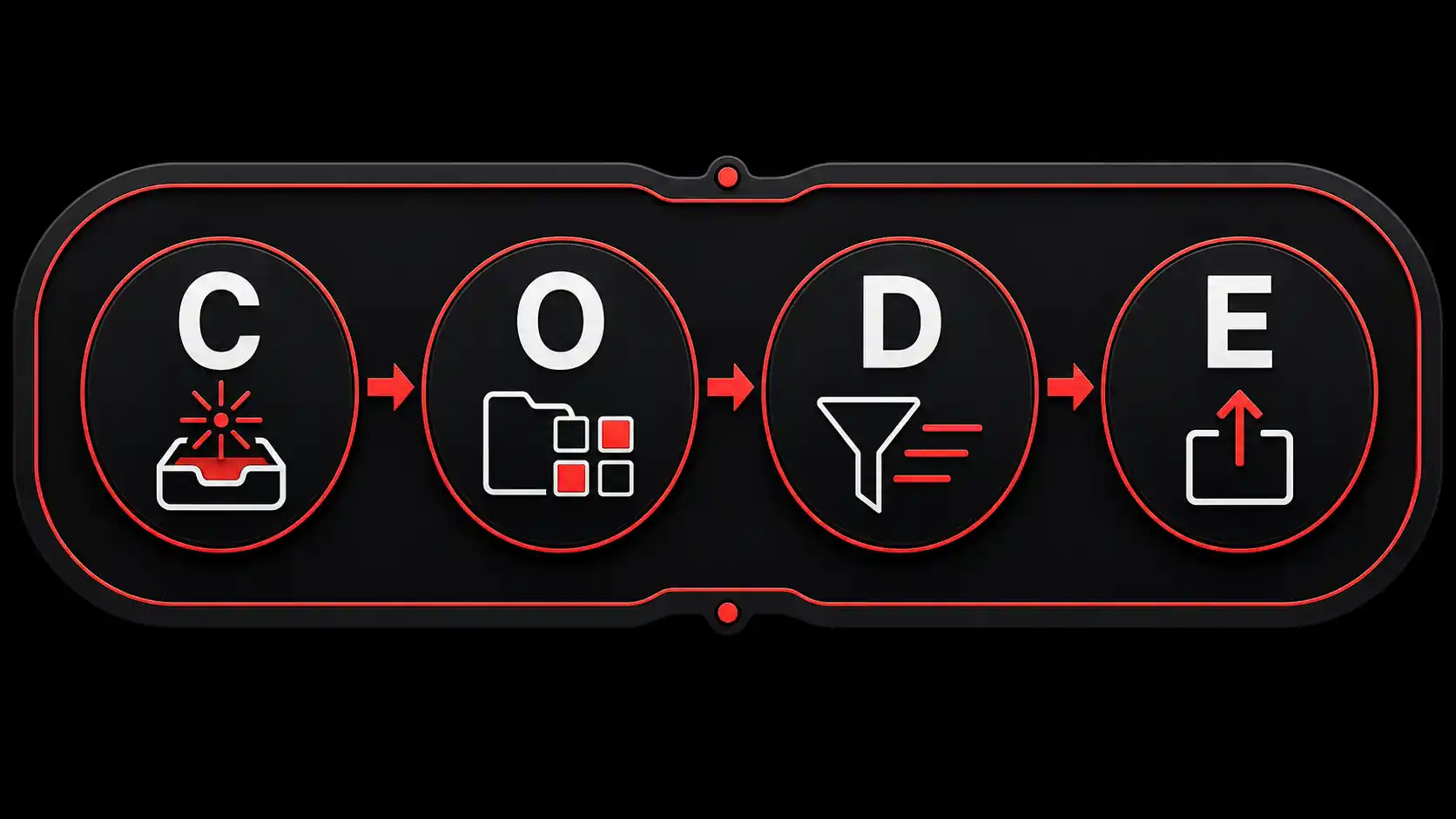
- Capture is the act of saving anything that resonates. An article. A tweet. A line from a podcast. A photo of a whiteboard. The principle: if it catches your attention, save it now, decide later.
- Organize is the act of putting saved items somewhere you will actually use them. Forte popularized PARA here, which sorts everything into Projects, Areas, Resources, and Archives based on actionability rather than topic.
- Distill is the act of progressively summarizing saved items so the useful core is visible at a glance. Highlight, then re-highlight the highlights, then write a one-sentence summary.
- Express is the act of actually using your captured material to ship something. A doc. A tweet. A talk. A pull request. Anything that converts knowledge into output.
Why the original 5-app stack worked in 2022
In 2022, no single tool did all four jobs well. Readwise was the only credible highlight aggregator. Notion was the only flexible-enough database for PARA. Things 3 was the cleanest task manager and had the best iOS keyboard shortcuts. Apple Notes had iCloud sync that beat every third-party app. Drafts had the fastest cold-start time on iOS, which made it the natural inbox for thoughts you needed to write down in 4 seconds before they vanished.
So the stack made sense as a Pareto-frontier compromise. Each app was best-in-class for one slice. Stitching them together with shortcuts and Zapier filled the gaps.
Why that same stack feels wrong in April 2026
Three things changed.
First, AI capture tools became fast enough to replace human Distill in real time. In 2022, summarizing a 4,000 word article was a 6 minute job you postponed and never finished. In 2026 you expect the summary to be waiting when you come back, and you get annoyed when it isn't. The mental model shifted from "save now, summarize later" to "save and summarize in one click."
Second, sync got worse, not better. Your stack kept growing, and every new app you added is another sync surface and another notification source. Open your login manager and count the work apps you actually touched this month. The CODE pipeline used to leak between 3 to 5 of them. Now it leaks across everything on that list.
Third, task managers stopped being the right Express layer for most people. Express is supposed to mean "ship something useful from what you saved." Things 3 is a task manager. It tells you what to do, not what to make. A lot of second brain users discovered around 2024 that they were endlessly grooming task lists made of context-free verbs ("write blog post," "research API") and never actually writing or researching. The Express phase had quietly become a queue.
The combined effect: people running the full 2022 stack in 2026 spend an estimated 4 to 6 hours per week on maintenance. That is not a second brain. That is a part-time job.
What does the CODE method look like inside one tool?
The simplest version: each of the four verbs maps to a state your saved item passes through, not a separate app it lives in. One inbox, four states, one pipeline.
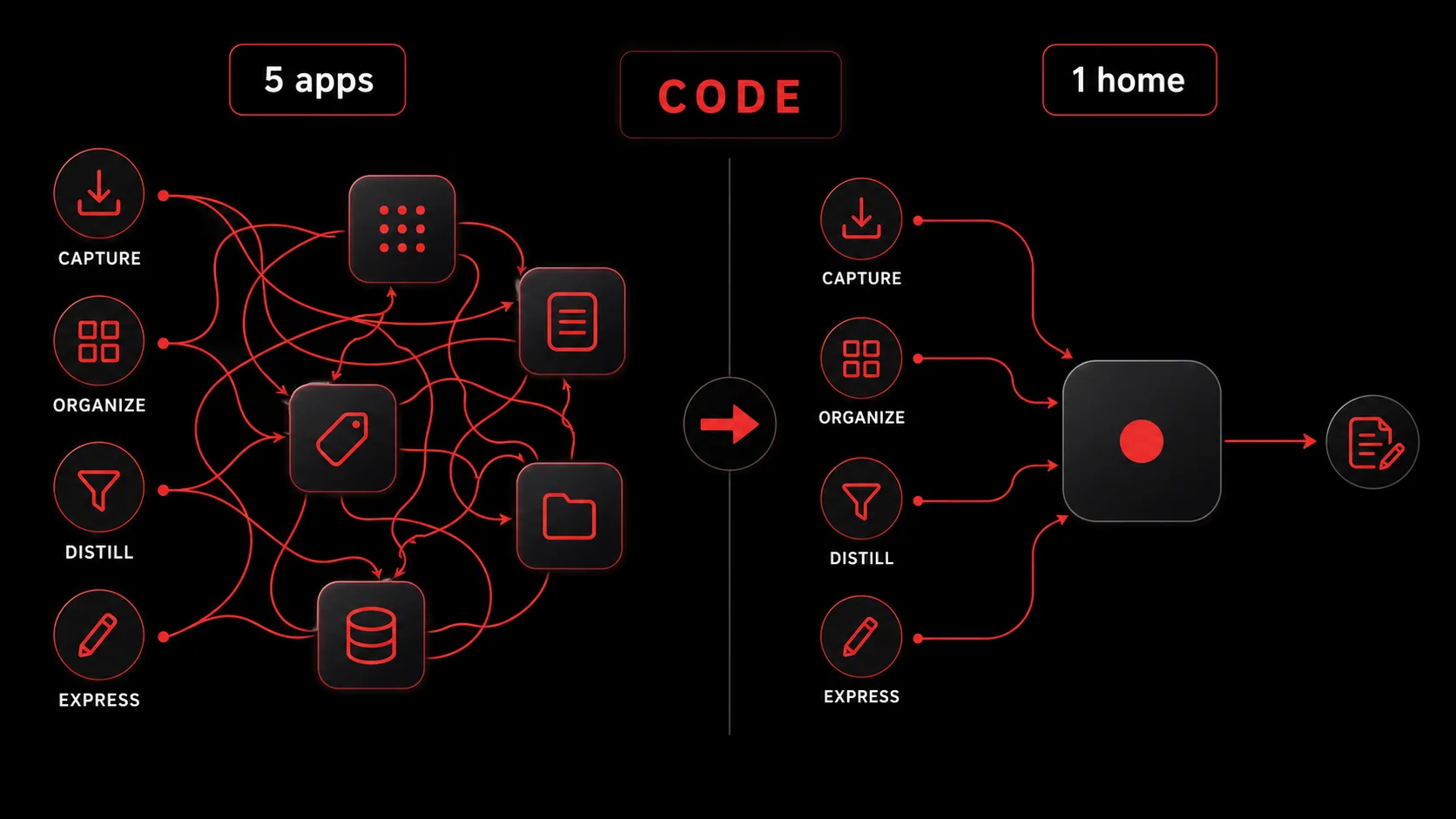
In a consolidated tool like Glean, the flow looks like this. You hit the share sheet on a podcast episode in your phone. The capture lands in your inbox with a transcript already pulled and a draft list of 3 action items extracted by the model (that is Capture and the front edge of Distill happening at the same time). You assign it to a project tag, which puts it in the right slice of your PARA-style filter (that is Organize). The action items are now real tasks, dated, ranked, ready to act on (that is the back edge of Distill). When you sit down to actually do one of those tasks, you open the source again and either ship the work in your code editor, your writing app, or directly inside Glean (that is Express).
Same four verbs. One context.
The honest concession: Express still wants its own surface
Capture, Organize, and Distill collapse cleanly into one inbox. Express does not. If you write code, you ship from your editor. If you write essays, you ship from a writing app like iA Writer or Bear. If you make videos, you ship from your NLE. The right interpretation of "one tool" is not "literally one app for everything." It is "one home for the second brain itself, with thin handoffs into wherever your actual making happens."
This matters because every time you hear someone say "just use Notion for everything," they are usually quietly running a separate writing app, a separate task manager, and a separate calendar. The single-tool claim is about the second brain, not about the entire OS.
How does this compare to the original 5-app stack?
A side-by-side helps. The CODE phase is on the left. The 2022 stack is in the middle. The 2026 consolidated stack is on the right.
| CODE phase | 2022 stack | 2026 consolidated stack |
|---|---|---|
| Capture | Apple Notes, Drafts, Readwise highlights, browser bookmarks | One capture tool with share sheet on iOS, browser extension, audio capture |
| Organize | Notion databases with PARA folders | Tags or smart filters inside the capture tool, archived after 90 days |
| Distill | Readwise weekly highlights review, manual progressive summarization in Notion | AI extraction at capture time, plus optional weekly review for important items |
| Express | Things 3 tasks, Notion docs, exported to Bear or Ulysses for writing | Native action items inside capture tool, handoff to writing app or code editor |
| Sync surfaces | 5 apps, 4 cloud accounts, 1 to 2 automation tools | 1 to 2 apps, 1 cloud account |
| Weekly maintenance | 4 to 6 hours | 30 to 60 minutes |
The maintenance delta is the part that matters. In 2022 you needed willpower to keep the stack running. In 2026 you need a tool that does most of the connective tissue for you.
Where Glean fits in this picture
Glean was built to be the single inbox for Capture, Organize, and the front edge of Distill. The bet is that for most knowledge workers, those three phases account for 80% of where the second brain leaks, and consolidating them into one app removes the most friction per dollar of effort.
It is not a Notion replacement and it does not pretend to be a writing tool. It sits where Readwise plus Apple Notes plus Drafts plus your browser bookmarks used to sit, and it pushes ready-to-act tasks into your task manager or stays as a self-contained inbox if you do not have one.
If you are already running a heavy Notion or Tana workspace and you like it, Glean slots in as the capture front-end. If you are starting clean, Glean replaces the entire capture-and-distill half of the stack and you only add a writing surface on top.
How to migrate from a 5-app stack to a 1-tool flow
This is the part most second brain articles skip. Migrations are where systems die. Here is the order I have used with around a dozen people who wanted to consolidate without losing 4 years of saved material.
Step 1: Freeze the old stack instead of deleting it
Do not export, do not migrate, do not delete anything. Just stop adding to the old apps for 30 days. The reason is simple: most of what you saved over the years is dead weight you will never look at again, and migrating dead weight is the fastest way to abandon a new system.
Set a calendar block 30 days from today called "Old stack archive review." Until then, the only rule is: every new capture goes into the new tool.
Step 2: Set up your new capture surfaces in 30 minutes
You need three capture surfaces working before you can claim consolidation:
- Browser extension. Install the Glean extension or your equivalent. Test it on a long article and a tweet. Confirm it extracts action items.
- iOS share sheet. Open Safari on your phone, hit share, find the new tool, mark it as a favorite so it appears in the top row of the share sheet. Same for any podcast app you use.
- Inbox view. Open the tool to its main inbox view and pin that tab or pin the app to your home screen. This is the new center of gravity.
Step 3: Run the new flow for 14 days, untouched
Two weeks of pure use, no tinkering. The point is to see whether the consolidated flow holds up under your real reading and listening volume. Most people I have watched try this realize within 14 days that around 60% of what they used to save is content they never needed in the first place. The friction of the old multi-app stack was masking a capture-volume problem.
Track only one metric: how many captured items did you actually act on? If the number is above 30%, the consolidated flow is working. If it is below 15%, you are still over-capturing and need to be more selective at the share sheet.
Step 4: Archive the old stack on day 31
By day 31 you should know whether the new tool sticks. If it does, archive your old apps. Export your Readwise highlights to a single Markdown file (Readwise has a built-in exporter). Export your Notion second brain workspace to Markdown. Tar the whole thing up, name it second-brain-archive-2022-2026.zip, and stick it in cloud storage.
Cancel the subscriptions you no longer need. The dollar savings are usually $25 to $40 per month, which is not why you did this, but is a pleasant side effect.
Step 5: Schedule a 30-minute weekly review
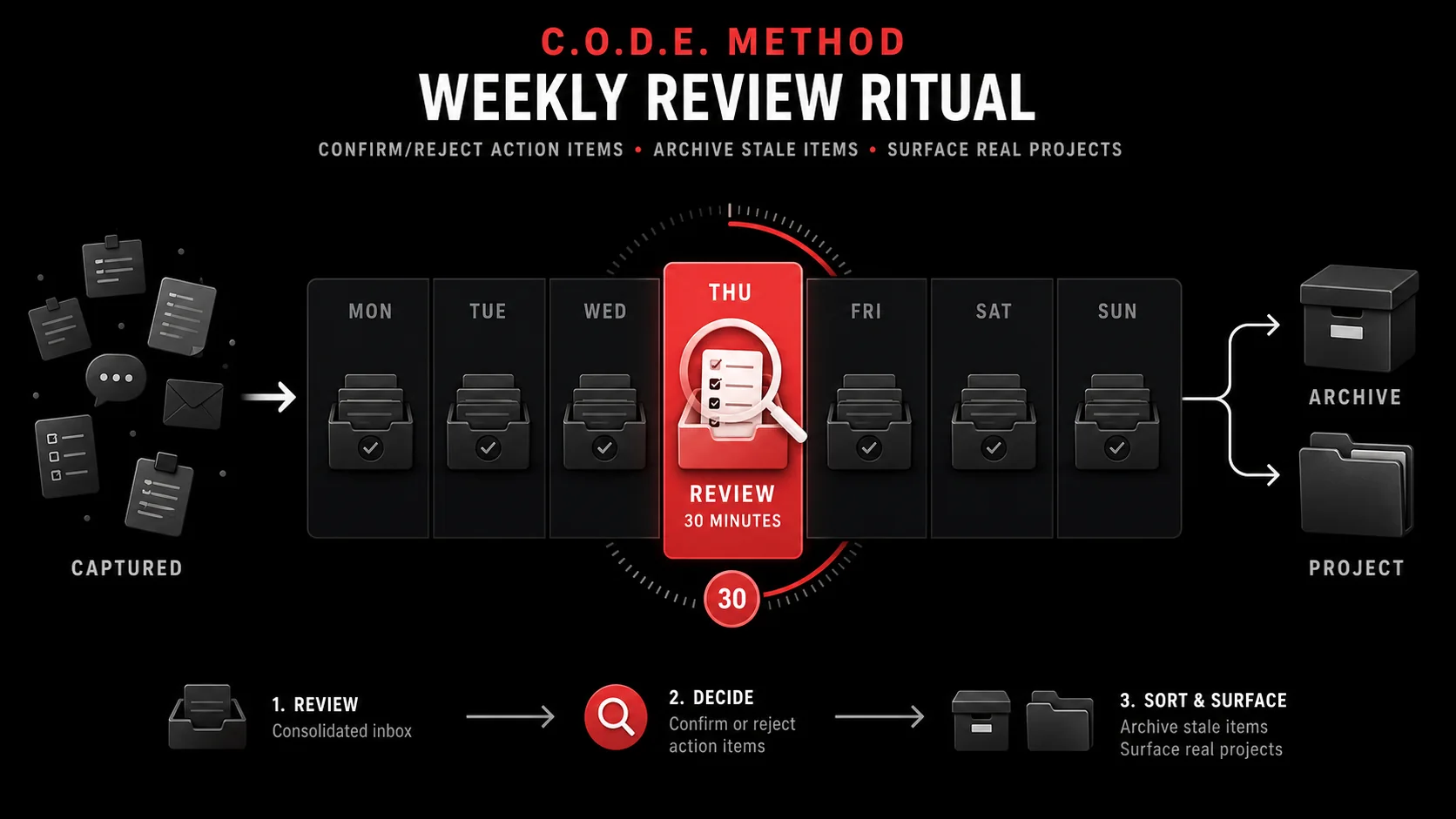
The single non-negotiable ritual. Once a week, open your consolidated inbox, look at everything you captured, and confirm or reject the auto-extracted action items. Mark anything stale as archived. Surface anything that should become a real project.
Forte's own guidance calls for a longer review. In a one-tool flow, 30 minutes is enough because the AI has already done the first pass.
Realistic limits of the one-tool approach
This article would be dishonest if it pretended consolidation has no downsides. It has three.
First, vendor risk. If your one tool changes its pricing, gets acquired, or shuts down, your second brain is at that vendor's mercy. The fix is to export weekly to Markdown, which most consolidated tools support natively. I export every Sunday night via a 1-line shortcut. The export takes 6 seconds and lives in iCloud Drive.
Second, AI extraction is not perfect. Auto-generated action items are right around 80 to 85% of the time. The rest are either off-topic or rephrased in a way that loses the original nuance. The weekly review is what catches the misses. If you skip the review for a month, the inbox starts to drift and you lose trust in the system.
Third, some content genuinely benefits from manual progressive summarization. Forte's original progressive summarization workflow, where you bold the most important parts on a third pass, is still the right approach for foundational books or papers you plan to revisit for years. AI summaries are great for tactical content. Manual highlights are still better for material you want to think with for a decade.
In practice this means: 90% of your inbox runs on AI extraction, 10% gets the manual treatment. Do not feel guilty about the split.
Key takeaways
- The CODE method (Capture, Organize, Distill, Express) is still the right framework in 2026. The 5-app implementation that became popular in 2022 is the part that broke.
- AI capture tools collapse Capture and the front edge of Distill into one click, which removes the maintenance overhead that killed the original stack for most people.
- "One tool" realistically means one tool for Capture, Organize, and Distill, plus a thin handoff to a writing app or code editor for Express.
- Migrating from a 5-app stack to a 1-tool flow takes around 30 minutes of setup and 14 days of pure use before you can trust it.
- Weekly reviews of 30 minutes are the only non-negotiable ritual. Skip them for a month and the inbox drifts.
- Export to Markdown weekly to mitigate vendor risk. The second brain is too valuable to lock into a single proprietary format.
Frequently asked questions about the CODE method in 2026
Is the CODE method still relevant in 2026?
Yes. The four verbs map cleanly to what knowledge workers actually do with information: save it, file it, condense it, use it. What changed is the implementation. The 2022 stack of Notion + Things + Readwise + Apple Notes + Drafts has been replaced for most users by a single capture tool plus one writing surface. The framework is durable. The tooling caught up.
Can I run CODE without buying any new tools?
Yes. A working minimum is Apple Notes plus a calendar plus the share sheet. You will do Distill manually, which adds 2 to 4 hours of weekly review. That is fine if your capture volume is low. If you save more than 5 items per day, manual Distill stops being sustainable around month 3, which is why most people add an AI capture tool.
What is the difference between CODE and PARA?
CODE describes what you do. PARA describes where you put it. CODE is a verb-centric workflow (Capture, Organize, Distill, Express). PARA is a noun-centric organizational scheme (Projects, Areas, Resources, Archives). They are designed to work together. The Organize step in CODE is usually implemented using PARA. You can use one without the other, but most people who follow Forte use both.
How is this different from just using Notion for everything?
Notion is a database. It expects you to model your knowledge before you save anything. That makes it powerful for Organize but slow for Capture. The flow most Notion-only users actually run is "save to Apple Notes or browser bookmarks first, migrate to Notion when I have time." That is a 2-app stack with extra steps. A capture-first tool collapses those two steps into one and lets Notion focus on what it is good at, which is structured project work.
Where do task managers fit in this flow?
If you already have a task manager you trust, the consolidated capture tool should push action items into it. Glean syncs to Todoist, Things 3, TickTick, and most major task apps. The handoff is one-way: the inbox holds the source material, the task manager holds the dated action item. If you do not have a task manager, the inbox can hold both, but most people find a dedicated task surface clearer for things with deadlines.
What if I prefer plain text and Markdown?
You will be fine. Most modern capture tools export to Markdown. The flow looks like this: capture into the tool, let it run extraction, export your weekly inbox to a Markdown folder, edit and write in your favorite plain-text app. This is the workflow used by people running Bear, Obsidian, or Affine as their primary writing surface. The capture tool handles Capture and Distill. The plain-text app handles Express. Organize is a folder structure in the Markdown vault.
How long should I run my weekly review?
30 minutes is enough if your capture tool does AI extraction. 60 to 90 minutes is closer to right if you are doing manual progressive summarization. The hard rule: never skip the review entirely, even if you only have 10 minutes. Skipping the review for one week costs about 15 minutes of catch-up. Skipping for a month usually means abandoning the system, because by then the inbox feels too overgrown to face.
Ready to collapse your second brain into one inbox?
The CODE method earned its place in the productivity canon because it described something real about how people work with information. The five-app stack was a 2022 workaround that nobody loved. In April 2026 you do not need it.
Pick one capture tool. Set up the share sheet, the browser extension, and the inbox view. Run it for 14 days. Schedule the weekly review. Keep your writing app or code editor for Express. Archive the rest.
If you want a capture tool that does the Distill work at the moment of save and gets out of your way the rest of the time, start a Glean Pro trial and see whether one inbox can replace your stack. For a deeper look at how this compares to the rest of the 2026 productivity tooling landscape, read our breakdown of why most productivity stacks make you less productive and our practical review of cross-platform second brain workflows.
Share what you read. Get your next step.
Every save you share comes back as one task for your project, with the reason it fits you.