Capture-First Workflow: Start with Saving, Not Sorting
It’s February 2026, and the top post on Hacker News this week isn’t about a new JavaScript framework or a billion-dollar funding round. It’s a rant titled “My Productivity Stack is Killing My Productivity.” The author, a senior engineer, meticulously details the 45 minutes each morning spent triaging notifications, sorting saved articles into the “right” folders in their note-taking app, and tagging inspiration in their “second brain” tool. All before writing a single line of code.
The comment section is a chorus of agreement. Developers, designers, and creators are collectively hitting a wall. We’ve been sold a vision of frictionless organization, but the reality is a productivity tax: a significant portion of our cognitive energy and time is now levied by the very tools meant to free it.
The culprit? The organize-first paradigm. For decades, productivity philosophy has been built on a simple, seductive premise: to be effective, you must first create a perfect system. Capture has always been the secondary, trivial step. But this model is fundamentally broken for the modern information worker. Our content consumption is too fast, too fragmented, and too voluminous. The friction of deciding “where does this go?” in the moment of discovery is the single biggest killer of potential action.
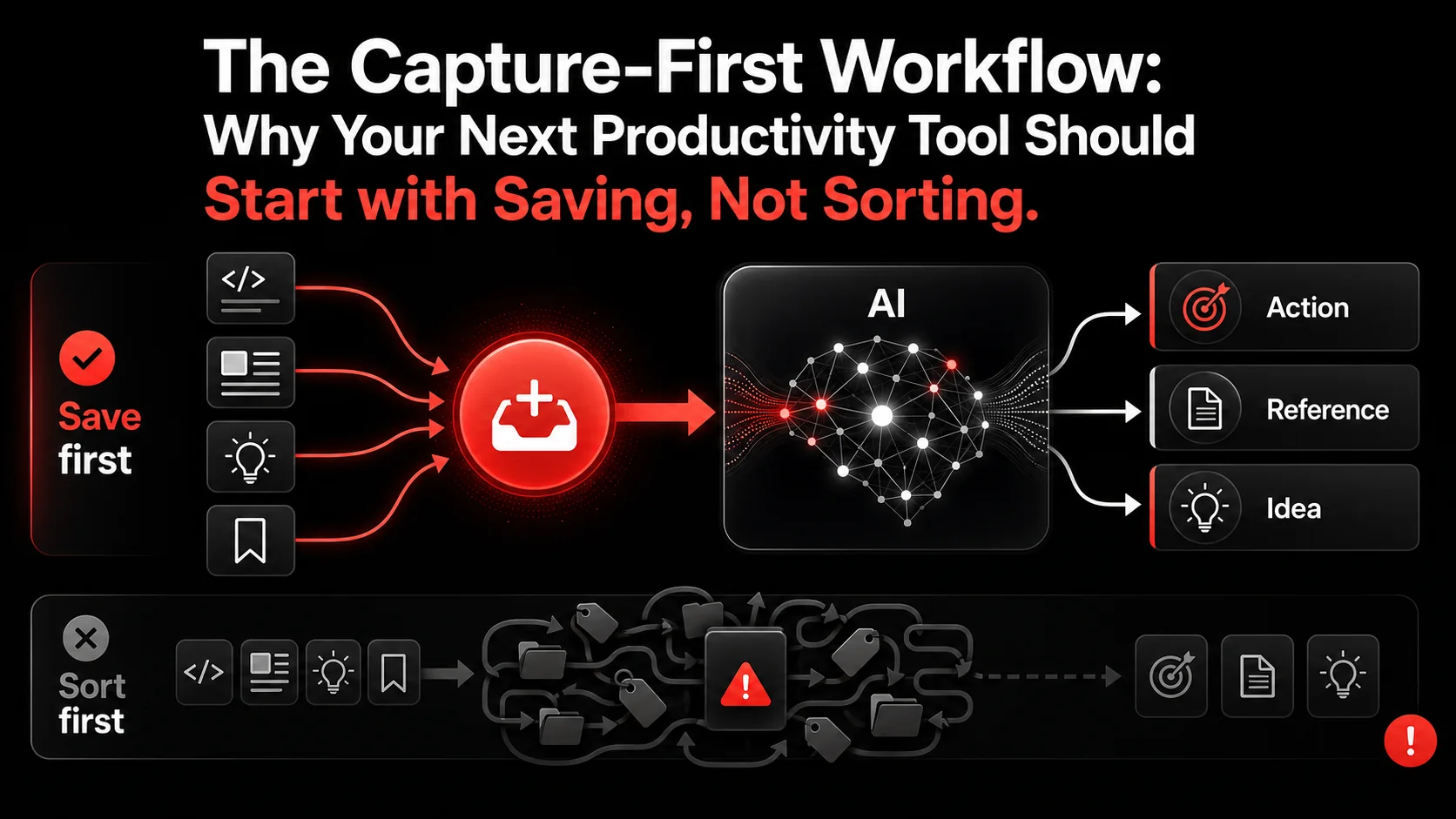
It’s time for a new core philosophy: Capture-First. Stop sorting. Start saving. Let the organization happen after the moment of inspiration has been secured. And in 2026, with AI’s ability to understand and contextualize information post-capture, this isn’t just a theory: it’s the only workflow that scales.
The Broken Promise of "Organize-First"
The organize-first approach is rooted in physical-world logic. You have a filing cabinet. Before you can file a document, you need folders with clear labels. This logic was digitized with apps that forced you to build your taxonomy upfront: notebooks, tags, categories, statuses, and complex relational databases for your thoughts.
This creates immediate friction at the point of capture, which is the most critical moment in any creative or productive workflow.
The Cognitive Cost of Context Switching
When you’re deep in a flow state (debugging a complex issue, designing a UI, or researching a topic) and you stumble upon a crucial piece of information, what happens?- You see a brilliant solution in a tweet.
- Your brain halts its current task.
- It now must load the “organization schema”: “Is this for the ‘Q2 Infrastructure’ project or ‘API Refactor’? Should I tag it #backend #scaling? Do I save it to Notion, Obsidian, or my browser bookmarks?”
- By the time you decide, your original flow is shattered. The inspiration often dissipates, or you make a quick, poor organizational choice just to get back to work.
The Volume Problem
A developer’s daily input might include:- 10-20 technical tweets with code snippets or architecture ideas.
- 3-5 long-form articles or documentation pages.
- 2-3 YouTube tutorial segments.
- Countless screenshots of error messages, UI inspiration, or CLI outputs.
The Capture-First Manifesto
The capture-first workflow flips the script. Its core tenets are simple:
- Frictionless Capture is the Highest Priority. The act of saving something must be near-instantaneous: one click, one keyboard shortcut. No decisions, no dropdowns.
- Organization is a Separate, Asynchronous Phase. Sorting, tagging, and processing happen later, in dedicated, low-focus time (or are handled automatically).
- The System Trusts Future-You (or Future-AI). It assumes that the value of securing the information now far outweighs the cost of figuring out what to do with it later.
Why 2026 is the Tipping Point
This philosophy has been aspirational for years. The missing piece was a system intelligent enough to make sense of the captured chaos without constant manual intervention. That’s no longer the case.Recent advancements in AI, particularly in large context windows and multimodal understanding (like those discussed in Anthropic's early 2026 research updates), have changed the game. An AI can now look at a captured tweet, a screenshot of a GitHub issue, and a segment of a YouTube video and understand not just the text, but the context and potential action.
This means the “asynchronous organization” phase can be largely (or entirely) automated. The tool can:
- Extract actionable todos from a video transcript.
- Categorize a screenshot based on its visual and textual content.
- Link related captures from different sources (e.g., a tweet thread about a new database and a benchmark article you saved last week).
- Surface relevant past captures when you’re starting a new project.
The Glean Workflow: Capture-First in Action
Let’s make this concrete. How does a capture-first tool actually function in the wild? Let’s follow a developer, Sam, through a typical morning.
Scenario 1: The Scattered Research Sprint Sam is researching edge computing for a new feature. As they browse:
- They see a benchmark chart on Twitter. One tap with the Glean Chrome extension. Captured.
- They find a relevant 15-minute YouTube explainer. They click the Glean widget on the video. A 30-second clip is captured.
- They read a blog post with a key code example. A screenshot of the crucial section is captured.
Later, when Sam opens Glean, the AI has already processed these captures: From the video clip transcript, it generated a TODO: “Evaluate Fly.io’s global edge network vs. Cloudflare Workers for latency-sensitive functions.*”
- It grouped the tweet chart and the blog post screenshot together under a suggested project name “Edge Compute Benchmarks.”
- The extracted TODO is already sitting in Sam’s task list, linked back to the original video source.
Scenario 2: From Bug to Fix Sam encounters a cryptic error in their logs. They take a screenshot. Captured. They copy a relevant stack trace snippet. Captured to Glean via the system-wide keyboard shortcut.
Two days later, while working on a related service, Glean surfaces that error screenshot and stack trace in the “Related to your current work” panel. The context is instantly restored. The capture-first habit turned a transient frustration into a persistent, connected piece of project memory.
This is the essence of turning your feed into your todo list. The barrier between consumption and action dissolves. For more examples tailored to code and systems, explore our guide on building a modern developer productivity workflow.
Building Your Own Capture-First Habit (Even Without AI)
You can adopt a capture-first mindset today. The tools are secondary; the habit is primary.
- Designate a “Blind Inbox.” Choose one app or location (a simple notes app, a designated Discord channel, even an email address) as your capture destination. The rule: No organizing allowed at capture time. Just get it in.
- Master the Shortcut. Whether it’s a browser extension,
Cmd+Shift+N, or a phone widget, make the physical action of capturing as fast as possible. Remove all optional fields. - Schedule “Processing Time.” Put 20 minutes on your calendar twice a week. This is when you open your Blind Inbox. Now, with a clear, organizational mindset, you sort, delete, and act. The key is that this is a separate, dedicated task.
- Embrace Messy Captures. A screenshot with no title. A pasted URL with no comment. This is not failure. This is the system working. You preserved the seed of an idea. Processing time is when you give it a label.
The Competitor Blind Spot: Feature Fatigue
Look at the productivity tool landscape in 2026. The dominant trend among established players is feature addition. More nested tags. More database views. More integration buttons. More complex rules for automation.
They are competing on the depth of organization, which increases the friction of capture. They are solving for the person who has time to curate, not for the person who is trying to ship.
This creates a massive gap. Users are suffering from feature fatigue. They don’t need more ways to sort; they need a way to stop sorting and start doing. The capture-first narrative addresses this fatigue head-on by simplifying the initial commitment and leveraging AI to do the heavy lifting later. It’s a classic case of a paradigm shift that existing players, invested in the old paradigm, are structurally slow to see.
FAQ: Capture-First Workflows & AI Organization
1. Doesn’t this just create a huge pile of unsorted stuff I’ll never look at?
This is the classic fear. The difference with a true capture-first system powered by AI is that the “pile” is not inert. It’s being actively processed and organized in the background. AI extracts tasks, suggests connections, and surfaces relevant information contextually. The pile becomes a dynamic resource, not a static guilt-inducing list. It’s the difference between throwing clothes on a floor and having a robot that folds, hangs, and puts them away for you.2. How is this different from just bookmarking everything?
Traditional bookmarks are dead links in a hierarchical folder. They lack context, action, and content. You bookmark a page, but the bookmark doesn’t remember why you saved it or what part was important. AI capture saves the content (text, image, video clip) and analyzes it to extract meaning and action. It turns a passive reference into an active project asset. We explore this distinction in detail in our article AI Capture vs. Bookmarks.3. I’m a developer with specific, technical needs. Can AI really understand my code snippets and error logs?
This is where modern multimodal AI shines. It’s not just parsing plain text. It can understand that a block of text is a Python function, recognize common error patterns in logs, and differentiate between a code snippet for a library installation vs. a configuration example. The actionable TODO might be “Try implementing this error handling pattern from the snippet” or “Research this specific HTTP 429 error.” The context is preserved with the capture.4. When should I not use a capture-first approach?
Capture-first excels at handling incoming, unpredictable information and inspiration. It is less suited for structured, long-form knowledge creation (like writing a book or maintaining detailed, hierarchical project documentation). In those cases, a more intentional, organize-first tool may be better for the output phase. The ideal setup often uses a capture-first tool as the “front door” for all inputs, which then feed into more structured project workspaces.5. How do I trust an AI to categorize my important work correctly?
You don’t have to trust it blindly. Think of AI organization as a brilliant, over-eager intern. It does the first pass: drafting the TODO, suggesting the project, grouping related items. Your job is to review, approve, and tweak. This is still 90% less work than doing it all yourself from scratch. The system learns from your corrections over time, improving its suggestions.6. Isn’t this just another tool to manage?
The goal of a true capture-first tool is to be invisible at the point of inspiration and helpful at the point of action. It’s not another dashboard to check. It’s a utility. The measure of success is that you think about the tool less, because it seamlessly turns the content you’re already consuming into the work you need to do. For a broader look at tools that fit this philosophy, check out our /blog/hub-productivity.---
The productivity tax is real, and it’s levied every time you interrupt your flow to answer a dropdown menu. The organize-first era is ending, buckling under the weight of our information-rich reality.
The capture-first workflow, supercharged by the AI capabilities of 2026, isn’t just a new feature set: it’s a fundamental re-alignment of how productivity tools should serve us. They should capture our momentum, not kill it. They should handle the administration so we can focus on the action.
Stop sorting. Start saving. Let the tool do the rest.
Ready to eliminate the productivity tax? Start Glean Pro Trial and experience the capture-first workflow.
Share what you read. Get your next step.
Every save you share comes back as one task for your project, with the reason it fits you.