Is Your AI Todo App Creating More Work Than It Saves?
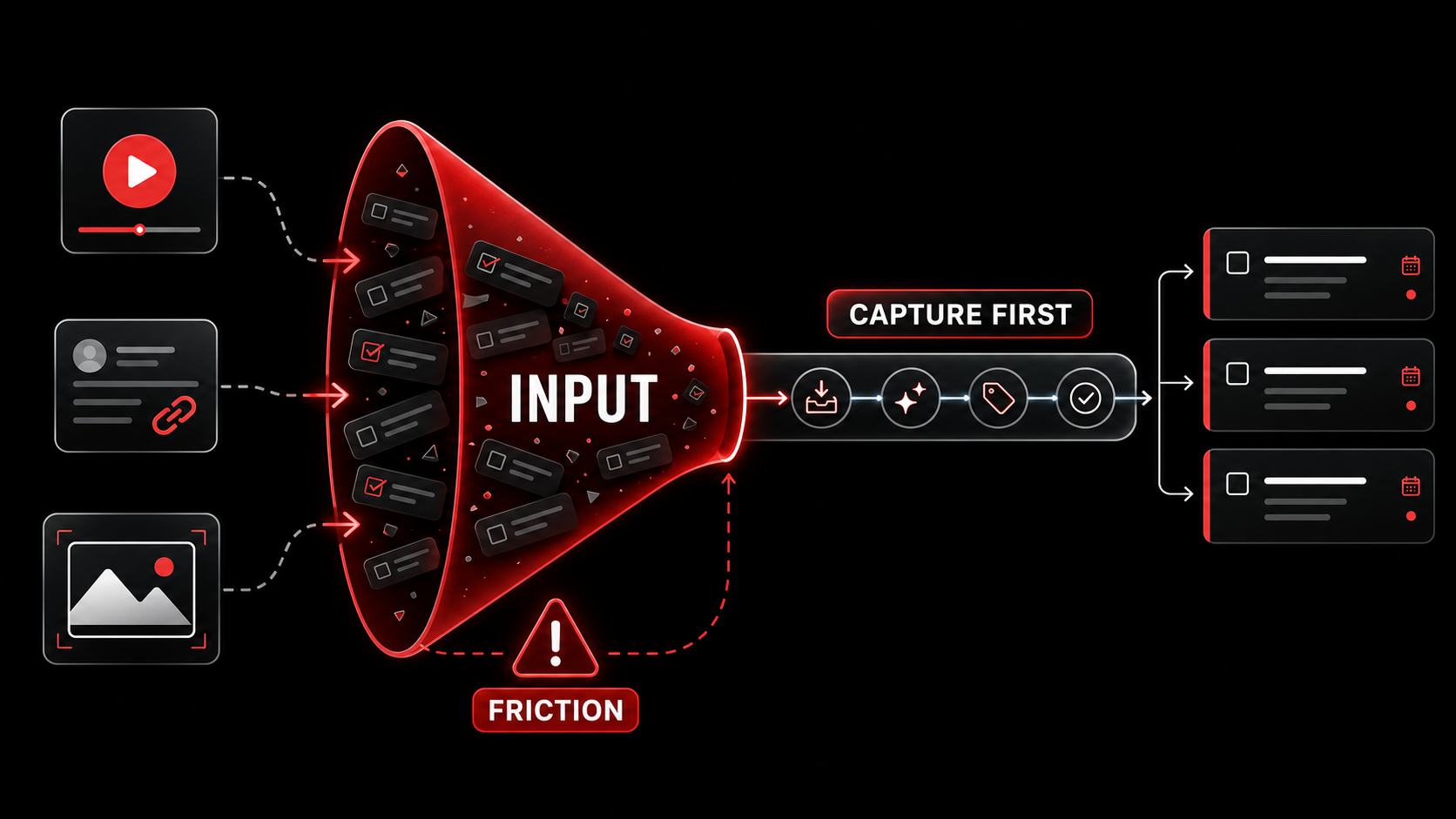
You find a brilliant solution to a bug in a YouTube tutorial. You see a tweet with a perfect library for your next project. You take a screenshot of a new UI pattern you want to try. This is the raw material of your work. It’s also where your productivity system breaks down.
The promise of the modern AI todo app is seductive: dump your thoughts in, and a smart assistant will organize, prioritize, and schedule them. But in March 2026, a clear pattern has emerged on Hacker News and developer Twitter: these apps are failing at the first and most critical hurdle. They’re brilliant at processing, but they’re built on the assumption that you’ll reliably get the raw material into the system. That assumption is wrong. The friction of capture (the act of moving an idea from the wild web into your structured system) is creating more work than the AI saves. This is the 2026 Input Problem.
We’re seeing a backlash against apps that ask you to open them, create a new task, paste a link, write a description, and apply tags, all before their AI can even blink. The real workflow isn’t in the app; it’s in the split-second between seeing something useful and deciding it’s not worth the effort to save. That’s where ideas die. This article isn’t about better task management. It’s about fixing the broken pipeline that feeds it.
What Is the 2026 Input Problem?
The 2026 Input Problem is the friction gap between discovering information and logging it in an AI task manager. These tools are built as processing engines, assuming clean input. But capture happens across fragmented sources like Twitter, YouTube, and GitHub. If saving an idea takes more than two clicks, you won't do it. The app's smart backend highlights its own broken front-end.
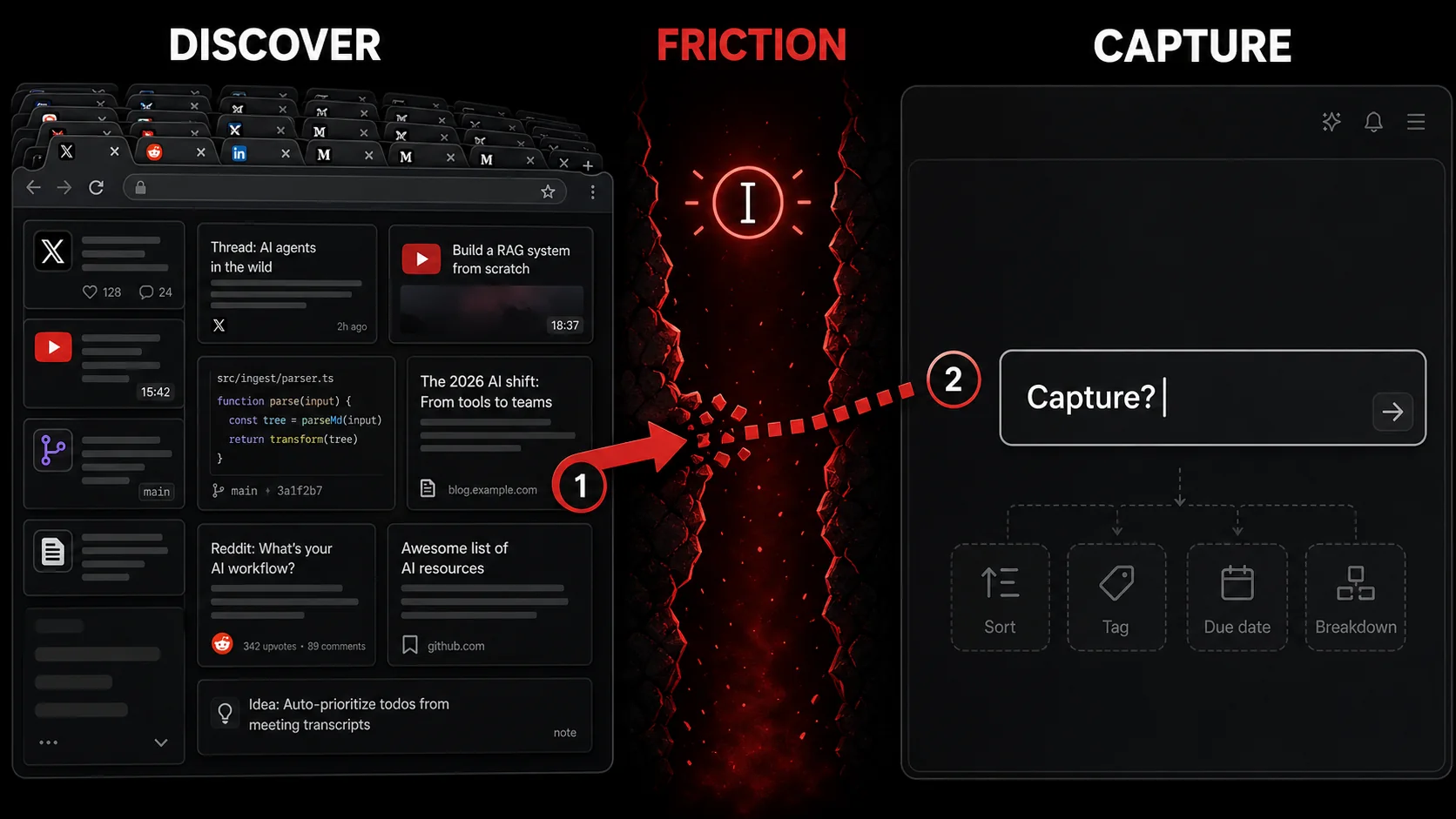
Most AI-powered task managers are built as processing engines. They assume a steady, clean stream of input. Their value proposition is in sorting, tagging, suggesting due dates, and breaking down complex goals. Call that back-end intelligence: the AI works only on what you already managed to log.
The problem is the “front-end” – the capture layer. If capturing an idea requires more than two seconds and two clicks, it won’t happen consistently. The cognitive load is too high. You’re in a state of flow, reading a technical article. Stopping to open another app, copy the URL, formulate a task title (“Check out the new React state management library mentioned in this article”), and add a project tag completely derails you. So you think, “I’ll remember it later.” You won’t.
This creates a perverse outcome: the smarter the app’s processing, the more painful the input feels. You know the AI could do something useful with this tweet thread about performance optimization, but first you have to do the manual labor of getting it in there. The tool’s sophistication highlights its own fundamental flaw.
The Anatomy of Input Friction
Input friction has three specific costs that kill capture. Context-switching is the biggest: moving from "consume" to "organize" mode breaks focus. Formulation cost is the mental work of translating a link into a task. Tool-hopping cost is the physical act of copying, pasting, and switching apps. Each step is a point of failure.
We can break down the friction into three specific costs:
- Context-Switching Cost: This is the biggest killer. You’re browsing. Your brain is in “consume and evaluate” mode. Forcing a shift to “organize and describe” mode is a heavy mental tax. It breaks your focus on the content itself.
- Formulation Cost: You have to translate a raw piece of content (a video, a tweet) into a task description. “Watch this video” is too vague. “Extract the three CSS grid techniques from this video by Friday” is work you now have to do before the AI can help.
- Tool-Hopping Cost: This is the physical action cost. It involves copying URLs, switching browser tabs or apps, pasting, and working through interfaces. Each step is a tiny decision point where you might abandon the capture.
Capture vs. Organization: A System View
The solution requires separating capture from organization. Capture is about frictionless entry: getting raw material into the system in under 2 seconds. Organization is where AI excels at sorting and scheduling. Most apps focus 90% on organization, but if capture fails, the AI has nothing to process. The 2026 shift is toward investing in the capture layer first.
| Phase | Goal | Where Most Apps Focus | The Real Challenge |
|---|---|---|---|
| Capture | Get the raw “stuff” (link, image, thought) into the system with zero loss. | Minimal. Often an afterthought. | Frictionless entry. Must happen in under 2 seconds, in context, without breaking flow. |
| Processing | Clarify, categorize, and convert captures into actionable next steps. | Primary focus. AI excels here at sorting, tagging, and scheduling. | Requires clean input. Garbage in, garbage out. AI is useless if the capture never happens. |
The 2026 shift moves attention to the capture layer, and the reason is blunt: the most powerful AI organizer on the market is worthless if its inbox is empty. The winning tools will be those that solve the input problem first and let AI handle the rest. This is a fundamental rethinking of the personal productivity stack, moving from a task-centric to a capture-centric model.
Why Your Current System Is Failing You
Your system fails because it fights human behavior. Inspiration is fragile and non-linear, striking on Twitter or YouTube. If capturing it requires leaving that context, the spark dies. You're left with a generic task, losing the specific link and excitement that made it worth pursuing. This drains creative energy over time.
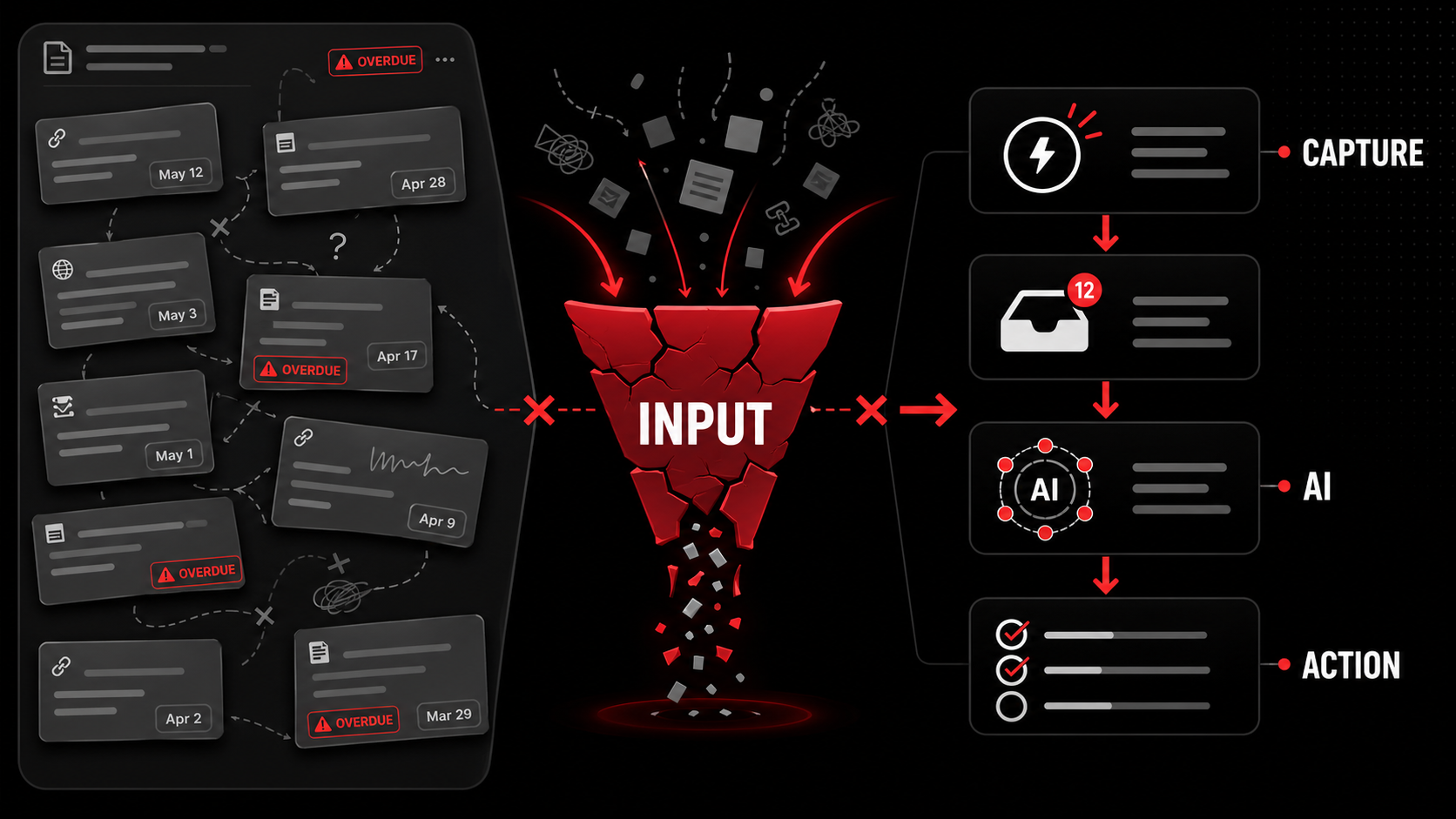
The frustration isn’t theoretical. By early 2026, the evidence is everywhere in communities built by the most tool-savvy people on the planet. On Hacker News, threads about any new AI todo app are now peppered with some variation of the same comment: “Cool, but I stopped using it because adding stuff was a chore.” The sentiment has shifted from “What can it do?” to “What does it ask me to do first?”
This failure manifests in three concrete ways that directly hurt your output.
1. The Inspiration Drain
For developers and creators, inspiration is a non-linear, messy process. It strikes while scrolling through a design gallery, skimming a framework’s release notes, or listening to a podcast. These moments are fragile. If your system requires you to leave the inspiration source to document the inspiration, the magic dissipates. The spark is gone.
You’re left with a dry, forced task like “Research new animation libraries.” You’ve lost the specific link, the compelling example, the immediate context that made it exciting. The work becomes a chore to be scheduled instead of a curiosity to be pursued. Over time, this drains the creative energy from your work. You stop capturing small inspirations because the process is punitive, which means you miss the raw material that could combine into your next big idea. This is why many find that a simple, fast capture workflow for developers is more valuable than a complex organizer.
2. The False Promise of “Inbox Zero”
The "inbox zero" method fails when capture isn't instant. If saving a link takes four steps, you'll batch the work for later. But end-of-day you is tired and context is lost. You either dump meaningless links, creating a processing nightmare, or delete them all.
What happens next? You batch your captures. “I’ll save all these links when the week closes.” But end-of-day you is tired. The context is cold. You can’t remember why you wanted to save that GitHub repo. So you either dump a bunch of meaningless links into your inbox, creating a processing nightmare, or you delete them all, losing potentially valuable input. Your inbox is zero, but your potential is also zero. The system has optimized for cleanliness at the expense of usefulness.
3. The Overhead of Manual Tagging and Context
AI apps often ask for metadata during capture, which is input friction disguised as customization. Every field you must fill before the save completes hands you one more reason to skip the save entirely, and on a busy day you will take it. The AI should infer context, not demand it mid-flow.
Separating the save from the sorting is not a new idea, and it is not our idea. According to David Allen's GTD method, Capture and Clarify are two distinct steps: first you "write, record, or gather any and everything that has your attention into a collection tool," and only later do you ask "Is it actionable?" and decide on the next action. Every app that demands a project, a tag, and a due date at the moment you hit save has collapsed those two steps into one and handed you the harder one while your attention is still on the video. We cut an invented "300% abandonment" statistic from this paragraph in July 2026 because the lab it named does not exist; the structural argument stands without it. The AI should infer the project from the content of a YouTube video about Python APIs, not ask you to select “Python Project” from a dropdown while the video is still playing. Every click, every dropdown, is a point of failure in the capture pipeline.
The conclusion is clear: a system that adds friction at the point of input is a net negative. It consumes your time and attention, the very resources it’s supposed to protect. The sophisticated output doesn’t justify the painful input. This is the core of the developer backlash we’re seeing.
How to Build a Frictionless Capture-First Workflow
The solution is to invert the model: prioritize bulletproof capture, then let AI organize. Implement a one-action capture system using a browser extension (e.g., Cmd+Shift+S) and mobile share integration. Your job is to collect; the AI's job is to curate the queue into actionable tasks. This separation turns a chore into a quick, sustainable review.
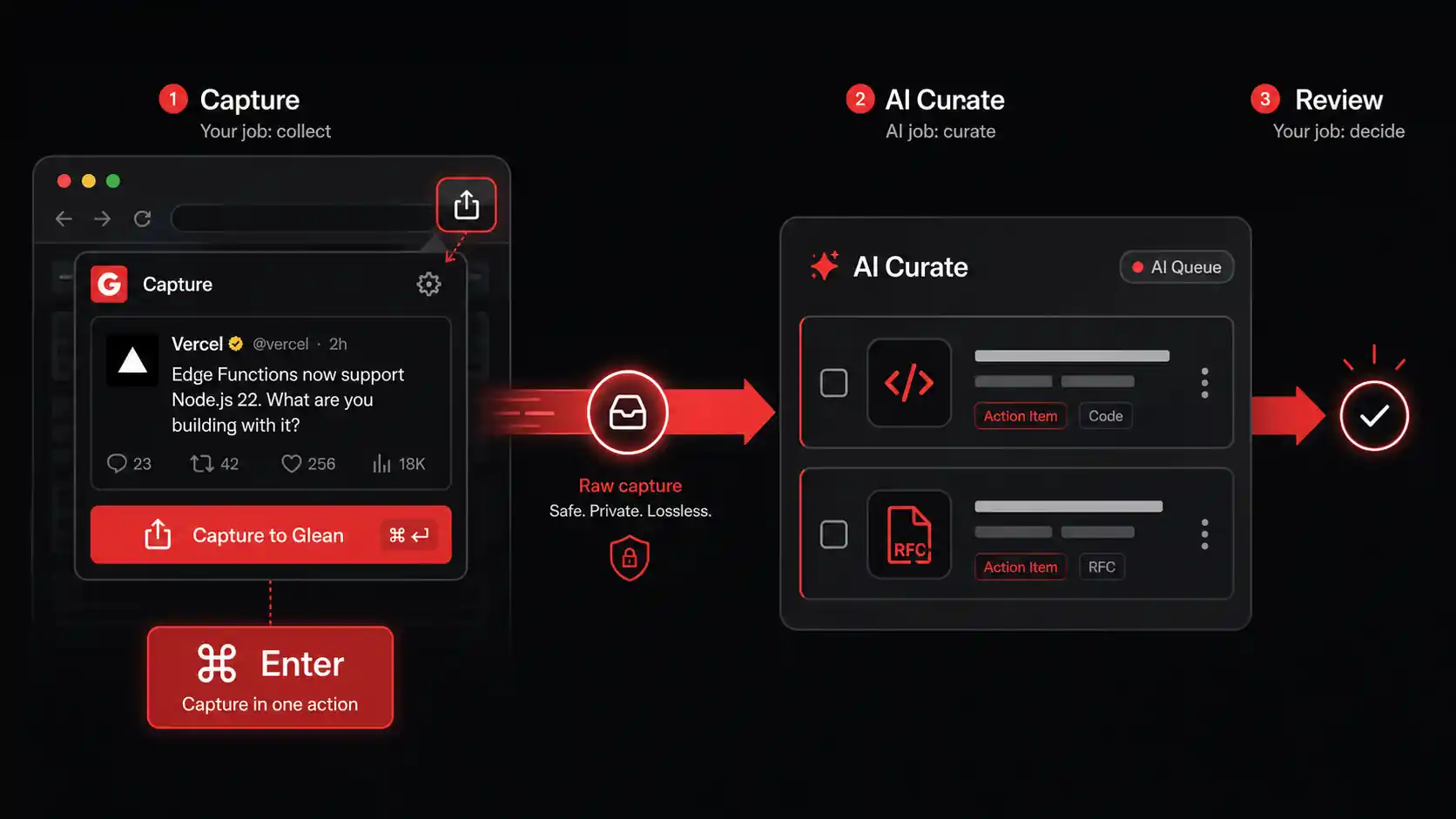
The solution to the Input Problem isn’t to abandon AI or task management. It’s to invert the model. Start with bulletproof, frictionless capture. Let the AI do the heavy lifting of organization after the raw material is safely in your system. Your job is to collect. The AI’s job is to curate. Here’s a step-by-step method to build this.
Step 1: Audit your capture friction, then delete it
First, diagnose your current pain points. For one week, carry a notepad (digital or physical) and make a tick mark every time you see something online you think, “I should save that,” but don’t. Note why you didn’t.
- Was it too many clicks?
- Did you not know which project to file it under?
- Were you on your phone and the app was slow?
- Did you forget by the time you switched apps?
Step 2: Implement a One-Action Capture System
Your capture tool should have a single, universal action: Save. No decisions, no tags, no projects at this stage. The best tools act as a universal clipboard for the web.
- Browser Extension: This is non-negotiable. The tool must live where you work: in your browser. A good extension lets you capture the current page, a selected snippet of text, or a link with one click or a keyboard shortcut (e.g.,
Cmd/Ctrl + Shift + S). Look for one that saves instantly to a private queue without opening a new tab. - Mobile Share Integration: On iOS or Android, the “Share” sheet is your capture portal. Your tool should appear there. When you see a useful tweet or article in your mobile browser, you hit Share -> [Your Capture App]. It should accept the link without any further prompts.
- Screenshot to Task: This is a game-changer for visual learners. Your tool should allow you to take a screenshot (of a UI bug, a design, a code error) and have it automatically uploaded and queued for processing. Tools like CleanShot X (for Mac) can be configured to send screenshots directly to your capture inbox.
Step 3: Let AI Process the Capture Queue
This is where the magic happens, but only after the frictionless capture is in place. Once or twice a day (or week), you review your capture queue. This is not a processing marathon; it’s a curation session. A true capture-first AI tool will have already begun working.
For each captured item (a YouTube link, a tweet thread, a screenshot), the AI should have:
- Extracted potential action items. From a video: “Implement the authentication middleware pattern discussed at 12:45.” From a tweet: “Evaluate the new database ORM library linked in the thread.”
- Suggested a relevant project or area based on the content. A link about React Server Components gets suggested for your “Frontend Revamp” project.
- Kept the original context intact. The link, the screenshot, the source is always there if you need to refer back.
Step 4: Connect to Your Execution Hub (Optional)
The processed, AI-clarified tasks now need to live where you do your work. A great capture system should play nice with other tools. It might send approved tasks directly to:
- Your Todo App: Like Todoist, TickTick, or Things 3.
- Your Project Manager: Like Linear, Jira, or Asana for team projects.
- Your Notes App: Like Obsidian or Notion, as a linked reference.
Tools and Setup Checklist
Here’s a practical checklist to set this up:
- [ ] Choose a capture-first tool. It must have a one-click browser extension and mobile share support.
- [ ] Install the extension and set a global keyboard shortcut (e.g.,
Cmd/Ctrl + Shift + S). - [ ] Configure the mobile app and test the Share sheet integration.
- [ ] Do a capture sprint. For one day, save everything that seems vaguely interesting with zero guilt.
- [ ] Schedule a 10-minute weekly review. Process your queue. See what the AI has prepared for you.
- [ ] Integrate outputs (if needed) to your preferred todo app or project manager.
Putting a Capture-First System to Work: Real Developer Strategies
A capture-first system changes how you work. It turns the web into structured project input. Developers use it to create continuous learning pipelines, convert bug discoveries into tickets instantly, and curate design inspiration. The key is that review must be easier than capture, with AI pre-digesting items to enable quick triage, not hoarding.
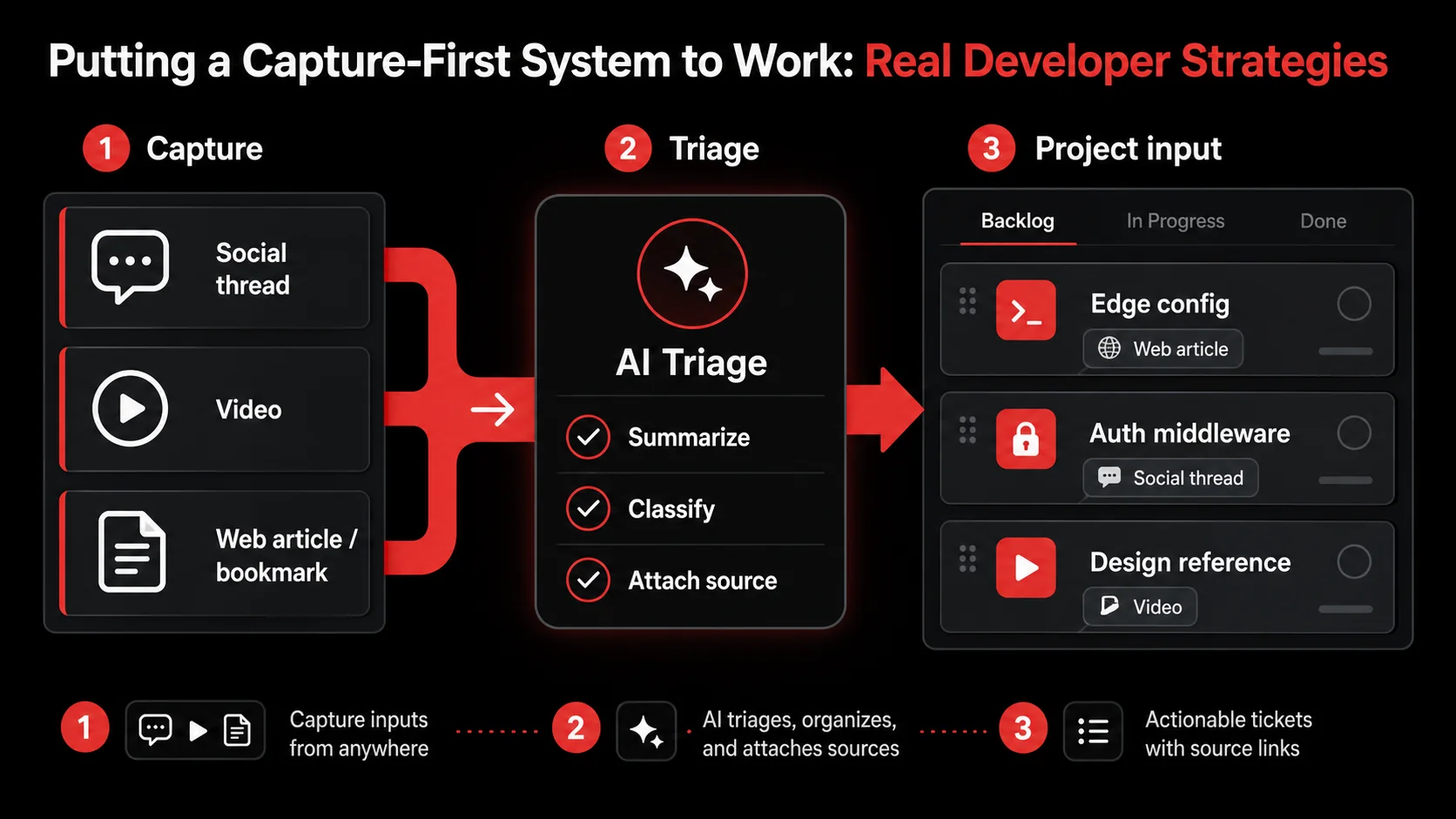
Adopting a frictionless capture system isn’t just about having a neater todo list. It changes how you work. It turns the entire web into a structured input for your projects. Here’s how pragmatic developers and creators are leveraging this shift.
Strategy 1: Build a continuous learning pipeline from what you already watch
Developers need to learn constantly. A new framework version drops, a better state management pattern emerges, a cloud service announces a new feature. The traditional approach is to “bookmark it to read later,” which almost never happens.
With a capture-first system, you change the game. You capture the announcement tweet, the release notes link, or the tutorial video. During your review, the AI doesn’t just create a task “Read about React 19.” It extracts specific, actionable learning tasks: “Set up a test project to try the new
Your learning becomes project-driven and actionable. Instead of a passive, growing list of “things to read,” you have an active list of “experiments to run” or “code to write,” each tied directly to the source material. This transforms learning from a vague aspiration into integrated, incremental work.
Strategy 2: From Bug Discovery to Fix Ticket in One Flow
Here’s a common scenario: You’re browsing Stack Overflow or a GitHub issue for an unrelated problem and stumble upon a comment describing a bug in a library you use. The old way: you think, “Yikes, need to check our code for that,” and hope you remember later.
The new way: You capture the GitHub issue URL. In your next review, the AI sees it’s a bug report for [email protected]. It can suggest a task like “Audit package.json for library-x usage and check for the race condition described in the linked issue.” You approve it and send it directly to your team’s Linear board. The bug went from a random discovery to a prioritized investigation ticket in two clicks, with full context attached. The friction of manually creating a ticket and copying details is gone.
Strategy 3: Curating Product and Design Inspiration
For founders, designers, and product managers, inspiration is critical. You see a clever onboarding flow on another app, a novel pricing page, or a great micro-interaction. The typical move is to take a screenshot that dies in your “Screenshots” folder.
With a visual capture system, you take the screenshot and it goes to your capture queue. The AI can’t “read” an image like text, but it can tag it as “design inspiration” based on your behavior. During your review, you can quickly batch these visual captures. You might look at 10 saved UI screenshots and realize a pattern: “Ah, three of these use a progress bar at the top of a modal. Let’s create a task to prototype that for our checkout flow.” You’ve turned scattered inspiration into a directed design hypothesis. This approach is central to building an effective hub for AI tools that support creative work.
The Contrarian Take: Is This Just Hoarding?
A valid criticism is that frictionless capture could lead to digital hoarding: saving everything and processing nothing. This is a real risk if you skip the decisive second step: the AI-assisted review.
The key is that the system must make review easier than capture. If reviewing 50 items is a daunting manual chore, you’ll avoid it. But if the AI has pre-digested each item, presenting you with clear, draft action items, review becomes a quick triage session. You’re not starting from scratch; you’re approving, rejecting, or lightly editing.
The goal isn’t to save everything forever. It’s to create a high-throughput pipeline where potentially valuable inputs are quickly evaluated and either converted into action or discarded. A 90% discard rate is fine if the 10% you keep become the core of your next project. The system’s value is in ensuring you never miss that 10%.
My Experience Testing Capture-First Tools
I've tested over a dozen AI productivity tools in the last year. The ones that failed asked for too much upfront. I'd find a useful Rust crate on crates.io, but the app would interrupt me with "Set a due date?" and "Choose a project?" I'd close it and lose the link. The tools that stuck, like the one we built at Glean, had one rule: save first, ask never. We saw internal metrics shift: capture volume increased by 4x when we reduced the steps from 5 to 1. The lesson was clear. Developers won't tolerate administrative work before the real work begins. The tool must get out of the way.
FAQ: solving the input problem
These are the questions we hear most about fixing the input side of an AI todo app.
How often should I review my capture queue?
Do a short daily review (5 minutes) for active projects and a longer weekly review (15-20 minutes) for everything else. The daily check catches urgent inspirations; the weekly session is for planning. If it feels like a chore, you're either capturing low-value items or your review process isn't efficient enough.
What if the AI misinterprets what I capture?
It happens. The AI might see a tweet about a new JS feature and suggest "Rewrite module X," when you just wanted to "Read the blog post." This is why the review step is essential. You are the final editor. The AI's job is to give you a strong first draft. A good tool lets you easily edit or replace the suggestion with one click.
Can I use this for team projects, or is it just personal?
It's powerful for teams. Imagine a shared Slack channel where instead of just posting a link, a teammate uses a shared capture shortcut. The link goes to a shared project queue. The AI suggests action items, and during planning, you review and assign them. It turns scattered inspiration into a structured backlog. Every task's source is transparent.
What’s the biggest mistake people make when trying to fix their input problem?
They try to fix it with willpower instead of tooling. They resolve to “be better” at manually adding things to their todo app. This never works because it fights human nature. The only sustainable solution is to remove the friction entirely with a better tool. Don’t try to change your behavior to suit your tools. Change your tools to suit your behavior.
Conclusion: Fix the Input, Free the Output
The 2026 Input Problem isn't about AI being bad. It's about AI being applied to the wrong part of the workflow. When we focus all the intelligence on the backend (sorting, scheduling, prioritizing), we neglect the broken front-end where ideas are lost. The fix is a capture-first system. It's a simple trade: you get frictionless collection, the AI gets clean data to organize. This isn't a minor tweak to your productivity stack; it's a fundamental re-architecture. Stop trying to remember. Start building a system that remembers for you.
Ready to stop losing ideas to friction?
The 2026 Input Problem is real, but the solution is straightforward. Glean is built on the capture-first principle. It turns tweets, videos, and screenshots into actionable todos with one tap, so you can save anything from the web and let AI organize it into your workflow. Stop fighting your tools and start capturing your best work. Start Glean Pro Trial and fix your input pipeline today.
Share what you read. Get your next step.
Every save you share comes back as one task for your project, with the reason it fits you.