Your AI Capture Tool Is Probably Lying to You (Here's How to Spot the Fakes)
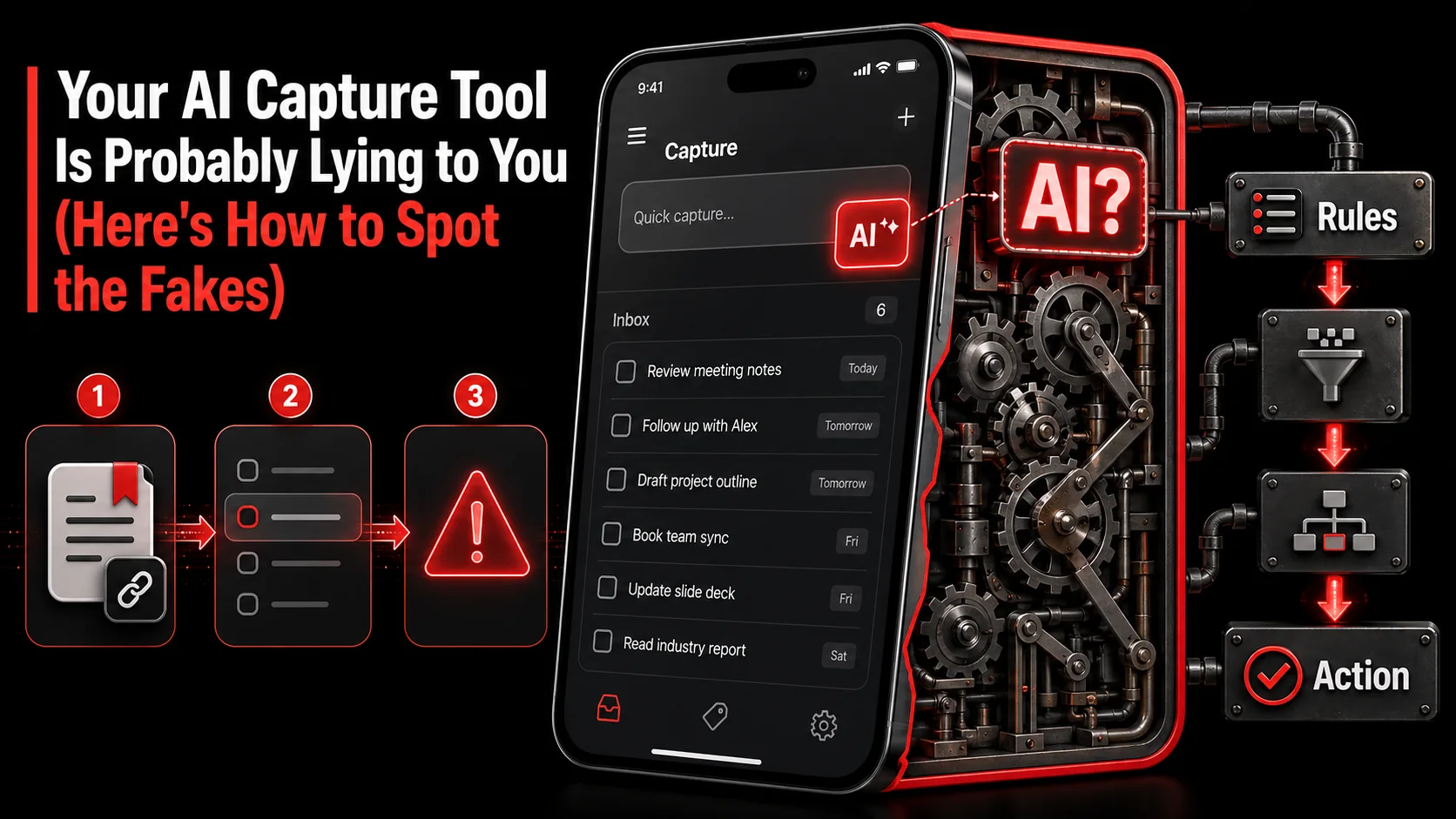
You save a tweet about a new JavaScript framework. Your tool says, "Todo created: 'Check out new JS framework.'" You capture a 45-minute YouTube tutorial on system design. The AI summary reads, "Watch the video." If this sounds familiar, you've been AI-washed. The promise was a digital assistant that turns your overflowing feeds into a clean, actionable workflow. The reality is a glorified bookmark manager with a chatbot vocabulary. In 2026, slapping an "AI" label on a product is the easiest marketing trick in the book. For developers, designers, and creators who live online, this isn't just annoying. It's a workflow tax. You're spending time managing a tool that was supposed to save you time. This guide cuts through the hype. We'll show you how to spot the fakes and find a capture tool that actually understands context, extracts intent, and integrates with how you work.
What Is AI-Washing in Productivity Tools?
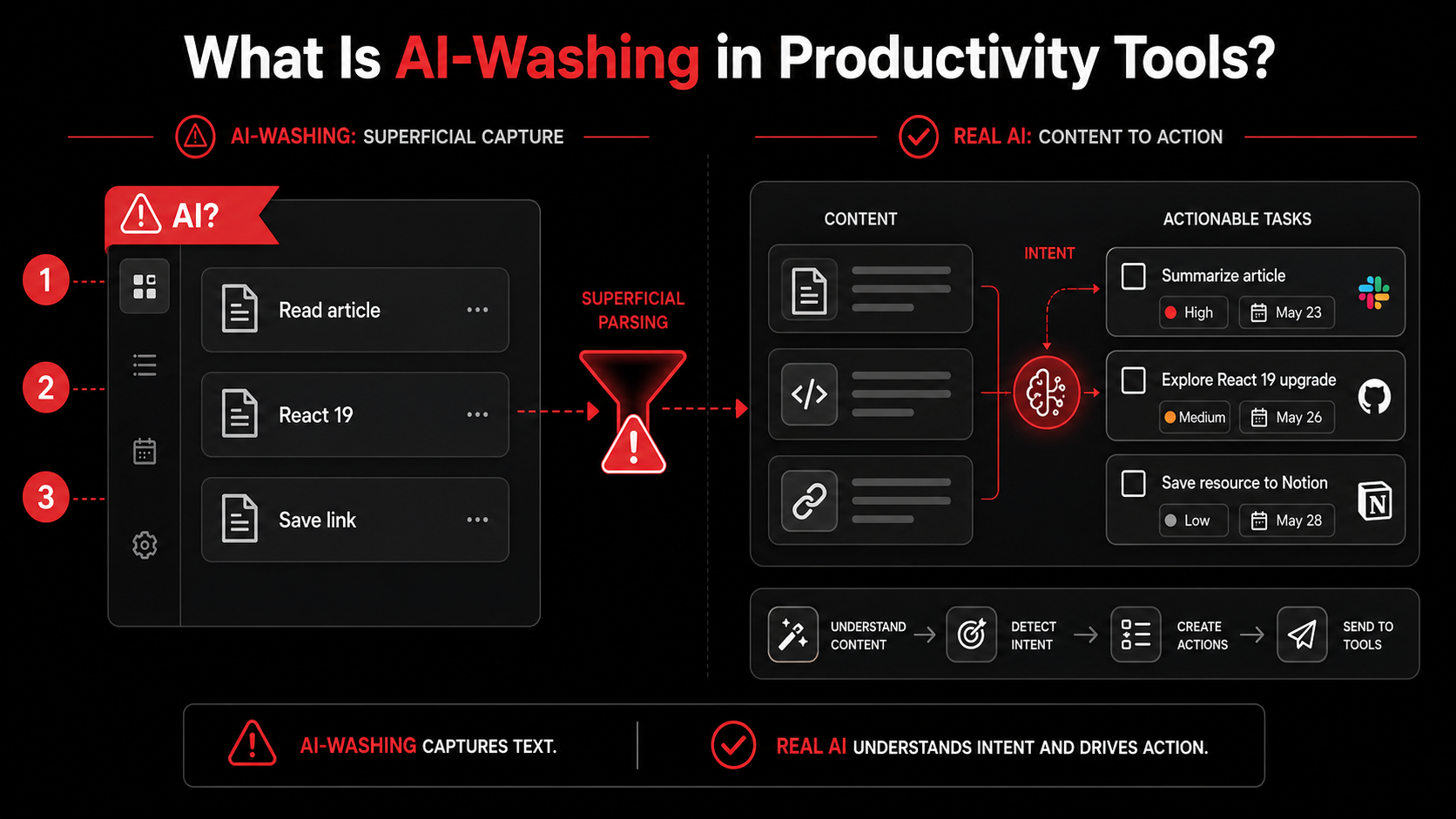
AI-washing is the practice of overstating a product's artificial intelligence capabilities to appear more advanced than it is. In the context of capture tools, it means marketing basic text parsing or rule-based tagging as intelligent task extraction. A 2025 Forrester report on the knowledge management market noted a 300% increase in vendors claiming AI features, while actual user-reported workflow transformation remained flat. The core deception is selling automation as intelligence. True AI in this space should understand why you saved something and what you need to do next, not just what you saved.
How Can You Tell If a Tool Is Just Automating vs. Actually Thinking?
A tool is merely automating if its output is a direct, shallow reformatting of the input. Actual thinking involves synthesis, context-awareness, and intent extraction. For example, saving a tweet that says, "Just open-sourced my new CLI tool project-gen for scaffolding web apps. Docs: [link]. Would love feedback on the DX!" reveals the difference. An automated tool might create: "Todo: Check out project-gen." An intelligent tool understands you're a developer who saves CLI tools. It should create a task like: "Test project-gen CLI: scaffold a basic Next.js app and evaluate developer experience for potential use in side projects," and perhaps tag it with #tools and #side-project. The latter requires understanding "DX" means developer experience, inferring a test action, and connecting it to your existing project context.
What Are the Hallmarks of Genuine AI-Powered Capture?
Genuine AI-powered capture exhibits three key behaviors: contextual understanding, project-aware organization, and actionable specificity. First, it doesn't treat all inputs the same. A YouTube video transcript, a tweet thread, and a screenshot of a code snippet are parsed with different models tuned to those formats. Second, it organizes captures into your existing projects or areas without manual drag-and-drop. It uses semantic similarity to guess that a capture about "React Server Components performance" belongs in your "Frontend Refactor" project. Finally, it creates specific, verb-driven tasks. Instead of "Learn about edge functions," it generates "Implement a Vercel Edge Function to handle API rate-limiting for the /api/webhook endpoint." This specificity is the clearest sign of real intelligence at work.
Why Does the Distinction Between AI and Automation Matter for Your Workflow?
The distinction matters because automation adds steps, while intelligence removes them. A basic automation tool saves a link. You then have to open it, read it, decide what to do, formulate a task, and add it to your list. The tool did one step; you did five. An intelligent tool aims to do steps two through four for you. According to McKinsey's research on workplace productivity, knowledge workers spend nearly 20% of their time searching for and consolidating information across disparate apps. A fake AI tool contributes to this fragmentation. A real one reduces it by creating a closed loop from capture to action within your workflow, which is the core promise of moving beyond basic bookmarking.
Feature | AI-Washed Tool (Automation) | Genuine AI Tool (Intelligence)
Task Creation | Creates a generic reminder (e.g., "Read article") | Creates a specific, contextual next action (e.g., "Implement the useOptimistic hook in CommentForm.tsx") Organization | Requires manual tagging/filing into folders | Suggests or auto-files into projects based on content semantics Input Handling | Treats a tweet, video, and article the same way | Uses specialized models for different media (NLP for text, vision for screenshots) Output Value | Saves you a click to copy-paste a URL | Saves you 10-15 minutes of processing, decision-making, and task formulation
Why Most "AI" Capture Tools Are Set Up to Disappoint You
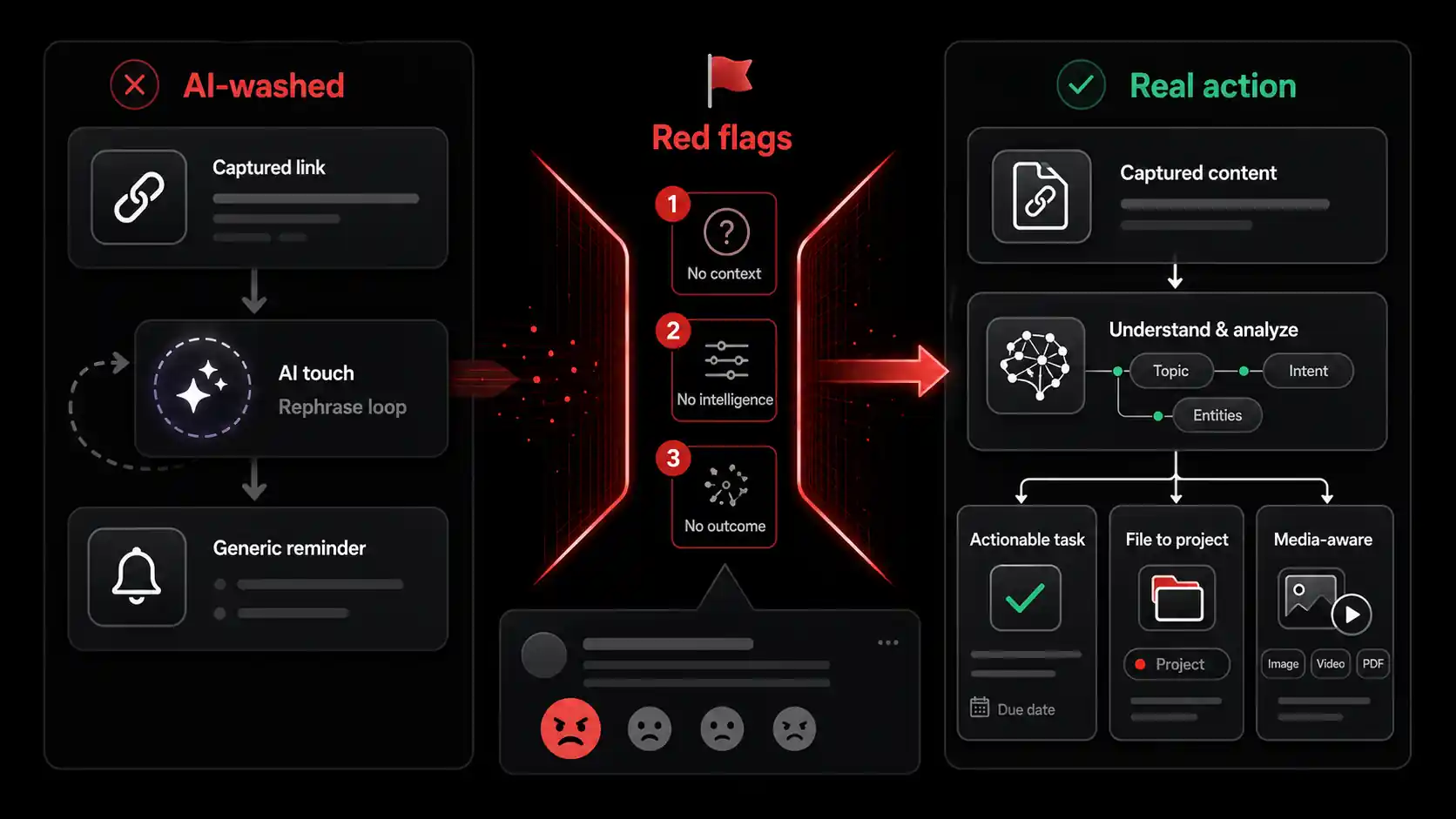
The disappointment stems from a fundamental market misalignment: venture capital rewards growth and buzzwords, while users reward utility and time savings. Many tools are built to check the "AI" feature box for a funding round or a launch headline, not to solve the nuanced problem of knowledge fragmentation. When every tool claims intelligence, user expectations are high, but the technical bar to meet them is even higher. Real task extraction isn't a weekend project; it requires robust machine learning models, continuous training on diverse data, and deep workflow integration.
Why Is "Task Extraction" So Hard to Get Right?
Task extraction is hard because it requires moving beyond summarization into the realm of intent inference and contextualization. Any LLM can summarize a text. Inferring that a saved article about "CSS container queries" means a front-end developer should "update the product card component in the design system to use container queries instead of media queries" is a different challenge. The tool needs knowledge of the user's role (developer), their active projects (design system), the specific technologies mentioned (CSS), and the actionable gap between the current state and the new information. Most tools fail at this contextual leap. They operate in a vacuum, analyzing the captured content in isolation without a model of your work, which is why their outputs feel generic and useless.
How Does AI-Washing Erode Trust in Useful Tools?
AI-washing creates a "boy who cried wolf" scenario. When users are repeatedly burned by tools that overpromise and underdeliver, they become skeptical of all AI claims, including those from legitimate, powerful tools. This skepticism forces genuine innovators to work harder to prove their value, often through extended trials or complex demos. It also wastes collective time. Developers who might benefit from a truly intelligent hub for AI tools might dismiss the entire category after a few bad experiences. The McKinsey State of AI 2025 report found that while AI adoption is growing, "expectation gaps" where technology fails to meet business promises remain a top barrier, often stemming from early overhyped implementations.
What's the Real Cost of Using a Low-Quality Capture Tool?
The cost isn't just the subscription fee. It's the cognitive load and opportunity cost. Every time you capture something and get back a low-value task, you have to reprocess the information manually. This constant context-switching between the capture tool and your actual task manager or notes breaks your flow. For a developer in deep work, this interruption can cost 15-20 minutes of regained focus. Over a week, with multiple failed captures, you could lose hours. Furthermore, a cluttered, ineffective capture tool becomes digital guilt, a graveyard of good intentions you avoid because it's a mess. The tool that was supposed to relieve anxiety about missing information ends up creating more of it.
How to Vet an AI Capture Tool: A Step-by-Step Evaluation Framework
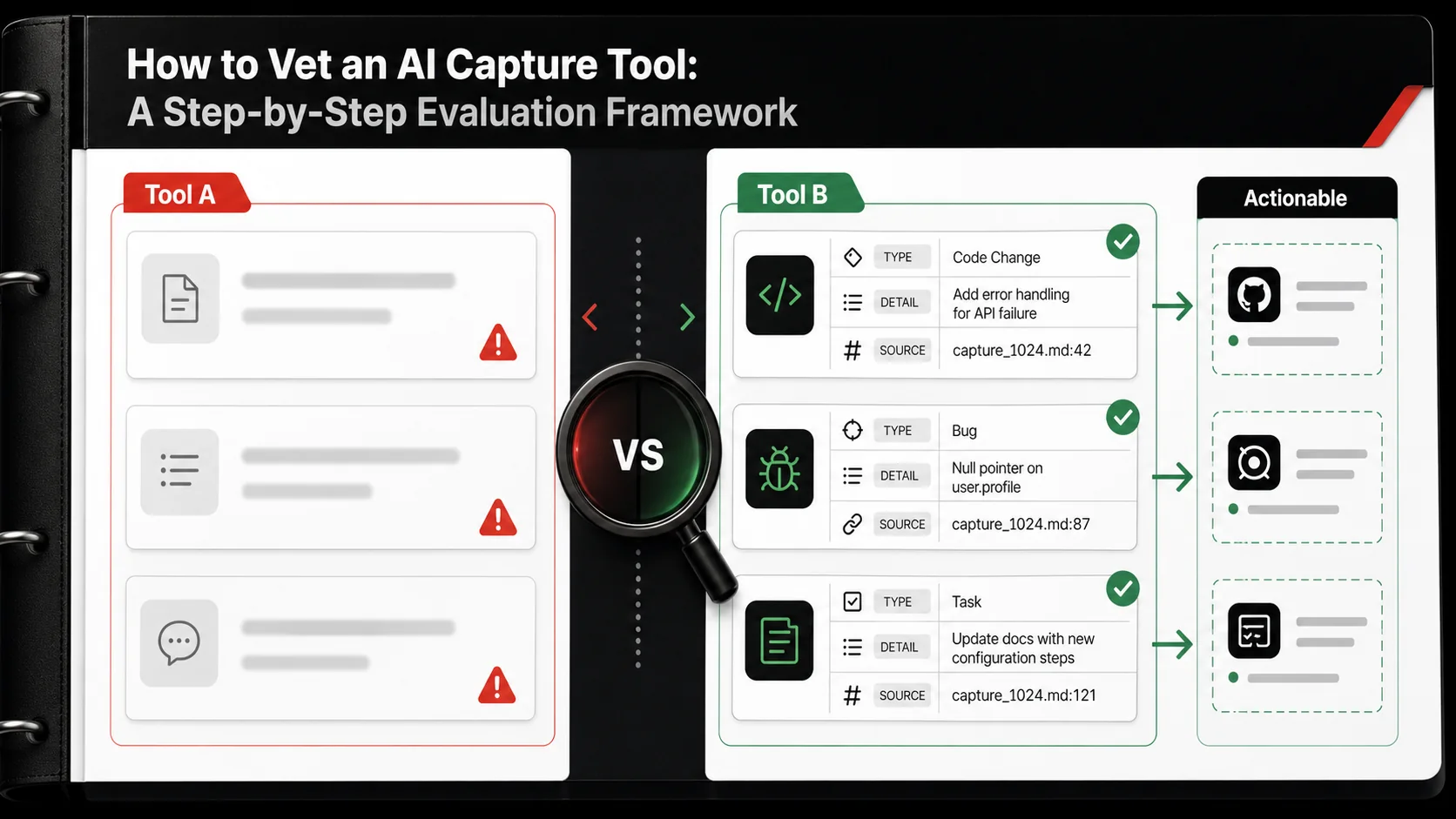
Don't take marketing copy at face value. You need a developer's approach: test with controlled inputs and evaluate the outputs. Your goal is to determine if the tool's "intelligence" is a core, integrated capability or a superficial feature layer. This framework uses real-world content you encounter daily.
Step 1: The Twitter Test – Can It Parse a Technical Thread?
The Twitter test evaluates a tool's ability to handle concise, technical, and often informal language. Find a detailed tweet thread from a developer or founder. For example: "Spent the weekend optimizing our Next.js bundle. Key finding: Using next/dynamic with loading... for below-the-fold components cut our LCP by 40%. Also, moved icons to a sprite sheet. Code example: [Gist link]." Paste this into the tool. A weak AI will output: "Todo: Read about Next.js optimization." A strong AI will generate tasks like: "Analyze our Next.js project's bundle size using @next/bundle-analyzer. Identify heavy below-the-fold components to wrap in next/dynamic. Research implementing an SVG sprite sheet for icon assets." It should extract the specific techniques (dynamic imports, sprite sheets) and the metric (LCP) and turn them into investigatory or implementation actions.
Step 2: The YouTube Transcript Challenge – Does It Find Action in a Lecture?
This test assesses depth over breadth. Take a 2-3 minute segment from a technical YouTube video transcript (e.g., a segment explaining how to use React.forwardRef). Don't give it the whole video. Give it a dense paragraph. A lazy tool will summarize the transcript segment. An intelligent tool will identify the teachable concept and create an application task. For the forwardRef example, a good output would be: "Practice: Refactor the CustomInput component in the ui-kit to use React.forwardRef to expose its internal input DOM node to parent forms." It moves from "this is what was said" to "here is how you practice or apply this knowledge in your codebase." This shows the tool is thinking about skill acquisition, not just information storage.
Step 3: The Screenshot Interrogation – Can It "Read" Code and UI?
True multimodal AI can derive meaning from images, not just text. Take a screenshot of a UI component you like or a snippet of interesting code from a blog (without the surrounding article text). Upload it. A basic tool might tag it as "screenshot" or attempt weak OCR to pull out any words. A sophisticated tool with vision capabilities should describe the content and suggest an action. For a UI screenshot, it might say: "UI Reference: Modal dialog with a non-destructive cancel action and a prominent primary button. Consider this pattern for the 'Delete Workspace' confirmation in settings." For a code screenshot, it should identify the language and purpose: "Code Snippet: Python FastAPI route with dependency injection. Useful reference for refactoring the auth middleware in the main API." This test is a direct probe for computer vision integration, not just text processing.
Step 4: The Project Context Evaluation – Does It Connect Dots?
A tool working in isolation is useless. This test evaluates if the tool can connect a new capture to your existing work. First, ensure you have a project named "Q3 Dashboard Redesign" in the tool. Then, capture an article titled "5 Data Visualization Principles for Clarity." A simple tool will file it under "Inbox" or create a generic task. A context-aware tool will ask: "This seems related to your 'Q3 Dashboard Redesign' project. Should I add it there?" or, even better, auto-add it and create a task like: "Review 'Q3 Dashboard Redesign' mockups against the 5 data viz principles from the captured article." This requires the tool to maintain an internal representation of your projects and perform semantic matching between new content and old. It's the difference between a filing cabinet and a research assistant.
Step 5: The Output Specificity Audit – Are Tasks "Doable" Now?
The final test is the "next action" test. Review the tasks the tool creates. Are they formulated as clear, verb-driven next physical actions? David Allen's Getting Things Done methodology emphasizes this, and it's a hallmark of useful AI. Vague: "Learn about GraphQL." Specific: "Read the official GraphQL docs on mutations and draft a schema update for the createUser mutation." Vague: "Improve website speed." Specific: "Run a Lighthouse audit on the homepage and list the top 3 'Opportunities' to address." A tool that consistently produces the latter is saving you the mental work of breaking down a topic into an action. This is where the real time savings happens. If you constantly have to edit the AI's tasks to make them actionable, the AI isn't doing its job. For more on this transformation, see how we think about turning tweets into todos.
Step 6: The Integration Check – Is It a Silo or a Hub?
An intelligent capture tool shouldn't be a dead end. Check its native integrations. Can it send tasks directly to Todoist, Asana, Linear, or GitHub Issues? Can it save refined notes to Notion or Obsidian? The best tools act as a smart intake valve for your entire productivity system. If you capture something and the resulting task is stuck inside the capture app, you've created another silo to check. The workflow should be: Capture -> AI processes -> Task lands in your main task manager. This seamless handoff is critical. Look for tools with robust APIs or built-in, two-way sync with the platforms where you actually do work. A tool that only works within its own walled garden is often a sign of a feature, not a platform.
Proven Strategies to Integrate a True AI Capture Tool Into Your Workflow
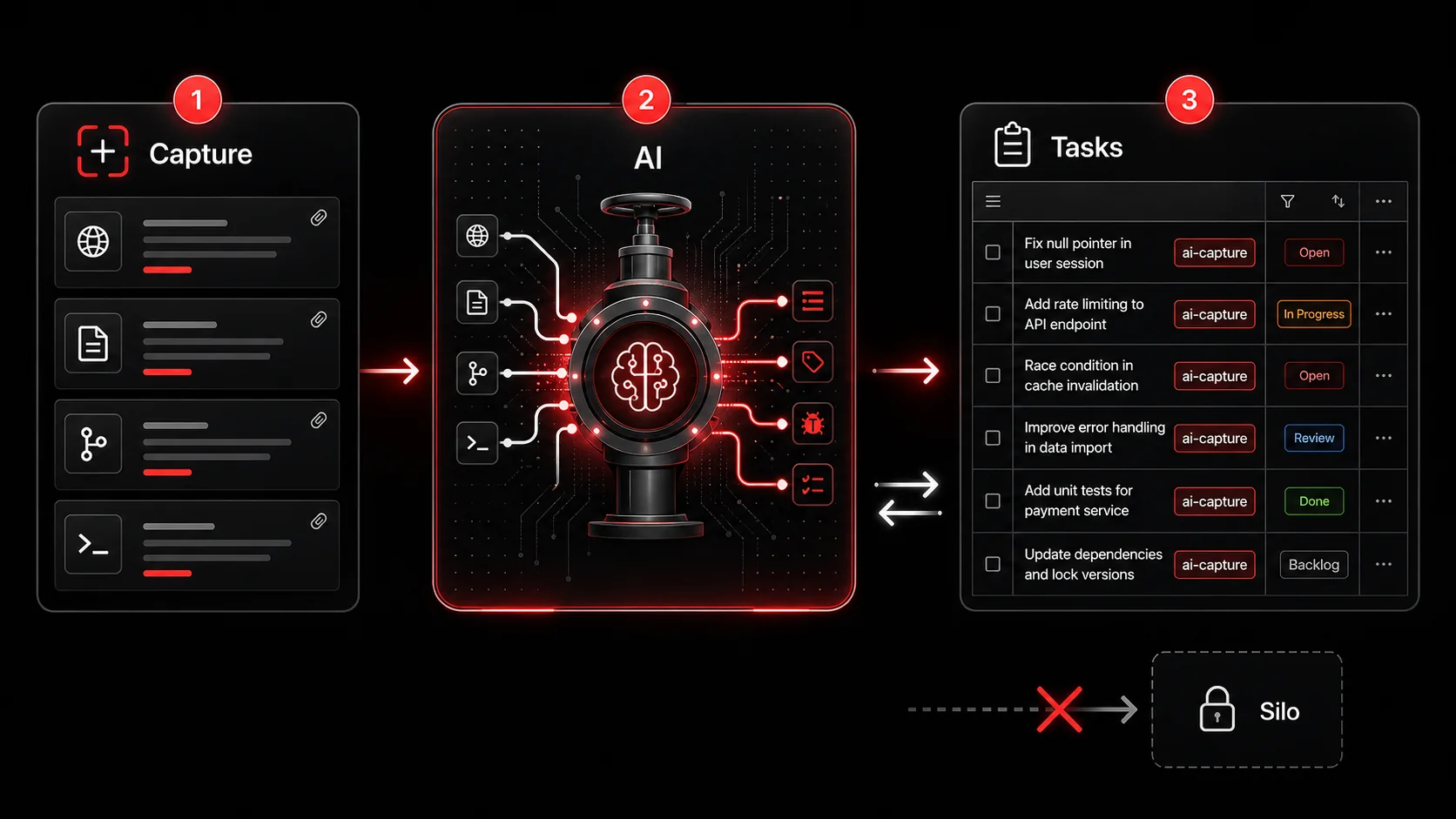
Finding a good tool is half the battle. Making it a frictionless part of your daily routine is the other half. The goal is to make capture the easiest possible response to any spark of inspiration or reference, so you can stay in flow.
How Do You Build a "Capture-Anywhere" Habit?
The habit forms when the tool is faster than the alternative. Install the browser extension and mobile app. Then, practice the one-touch capture. See a useful tweet? Use the extension shortcut (e.g., Cmd+Shift+S). Watching a tutorial? Share the YouTube link directly to the tool's mobile app. The key is to not judge in the moment. Don't think, "Is this worth it?" or "What will the AI make of this?" Just capture. Let the tool's intelligence handle the filtering and processing later. This removes the decision fatigue from the initial save. Over time, this becomes as reflexive as hitting a bookmark button, but with the downstream payoff of processed tasks, not just a list of links.
What's the Best Way to Review and Refine AI-Generated Tasks?
Schedule a weekly "Capture Review" session, separate from your daily task planning. Open your capture tool's "Processed" or "Ready" queue. The AI won't be perfect 100% of the time. Your job in this 15-minute session is to be the editor. Look at the tasks it created. Maybe combine two related tasks from different captures. Maybe clarify a vague verb. Then, approve them to be sent to your main task manager. This lightweight human-in-the-loop step ensures quality control without burdening you with the initial heavy lifting of task creation. It turns you from a creator of tasks to a curator of a smart assistant's work, which is a significant cognitive downgrade.
How Can You Use Capture to Feed Your Learning & Development?
Frame your captures intentionally. Instead of just capturing random tech news, capture with a learning goal in mind. For example, if you want to learn about edge computing, capture articles, tweets, and videos on that topic for two weeks. Then, use your tool's project or tagging feature to group them. A true AI tool will start to connect the dots across these captures, potentially creating a synthesis task like: "Based on 5 captured articles, write a one-page summary comparing Vercel Edge Functions, Cloudflare Workers, and Deno Deploy for a global middleware layer." This transforms your capture tool from a passive saver into an active research assistant for skill-building, a core part of a modern developer workflow.
When Should You Override the AI's Suggestion?
Override the AI when it lacks crucial personal context. The AI might brilliantly parse a blog post about a new database and suggest "Benchmark PostgreSQL vs. this new DB for the analytics service." But only you know that your team has a company-wide mandate to stay on PostgreSQL for the next year. In that case, you'd edit the task to "Read about [new DB]'s architecture for general knowledge, but note PostgreSQL is locked in." Similarly, override its project filing if it guesses wrong. This isn't a failure of the tool; it's a collaboration. You provide the intimate context of your priorities and constraints; the tool provides the brute-force processing of information. The best workflow is a partnership.
Got Questions About AI Capture Tools? We've Got Answers
How accurate should I expect the AI task generation to be? Don't expect 100% accuracy. If a tool is generating perfectly actionable, context-aware tasks 70-80% of the time, it's exceptional. The other 20-30% will require minor edits or project reassignment during your weekly review. The benchmark is whether it saves you more time editing its tasks than you would spend creating them from scratch. If you're spending 30 seconds to fix a task that would have taken you 3 minutes to write, it's a net win. Perfection is the enemy of a useful implementation.
What if I work in a niche field with specialized jargon? This is a key test for the tool's underlying model. During your trial, feed it content specific to your niche (e.g., quantum computing algorithms, legal tech compliance, niche game engine devlogs). See if it creates coherent tasks or spits out nonsense. The best tools use large, general-purpose models fine-tuned on technical and productivity-oriented data, which can often handle niche jargon surprisingly well. If it fails, check if the tool allows you to provide feedback on bad tasks. This can help it learn your domain over time.
Can a capture tool replace my note-taking app or task manager? No, and be wary of tools that claim to do everything. A capture tool's job is intelligent intake and initial processing. Your task manager (like Todoist or Linear) is for prioritization and day-to-day execution. Your note-taking app (like Obsidian or Notion) is for deep reference and knowledge building. The capture tool should feed into both, not replace them. It's the specialized front-end to your productivity stack.
What's the biggest mistake people make when evaluating these tools? The biggest mistake is testing with trivial content. People save a simple news article and judge the tool. You must test with the complex, messy, technical content that actually clogs your brain and workflow. Use the framework in this article: test a technical thread, a code screenshot, a dense tutorial segment. That's where the difference between marketing hype and real engineering becomes painfully (and usefully) clear.
Ready to stop collecting links and start completing tasks?
Glean cuts through the AI-washing by focusing on one job: turning your saved content into specific, actionable next steps. Capture a tweet, video, or screenshot, and our AI extracts the technical task, suggests the relevant project, and sends it to your task manager. Stop managing a graveyard of bookmarks. Start building from your inspiration. Start Glean Pro Trial and see the difference real intelligence makes.
Everything you save becomes a task that gets done.
Capture the source, review the task, and get it done, yourself or with your agent.