Is Your AI Assistant a Context-Switching Machine?
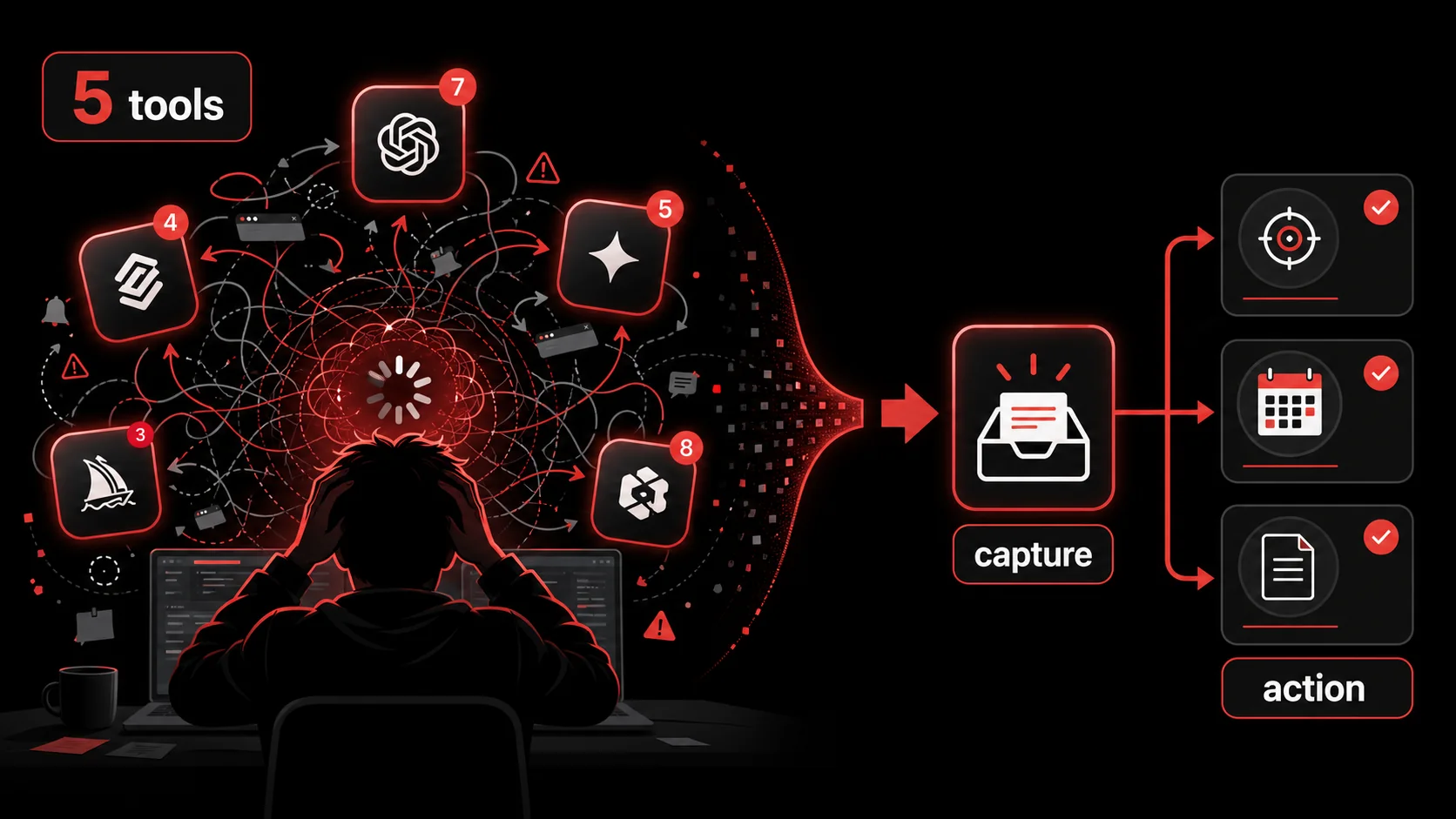
You added an AI assistant to your workflow to save time. Now you have five. One for code, one for writing, one for meeting notes, another for research, and a fifth you only use because it has a cool name. Your day is a constant shuffle between browser tabs, notifications, and login screens. The promise of AI assistant productivity has quietly been replaced by a new job: managing your AI tools.
This isn't a personal failing; it's a design flaw in how we adopt technology. Stack Overflow's 2025 Developer Survey puts 84% of developers on AI tools or planning to adopt them, up from 76% the year before, with 51% of professionals reaching for one every single day. Adoption sprinted. Nobody stopped to wire the tools together. The result is fragmentation. The very tools meant to streamline work are now the primary source of interruption, creating a hidden tax on your focus. This article breaks down that cost and argues for a simpler, capture-first approach to AI assistant productivity that reduces, not increases, your mental overhead.
What Is the Real Cost of AI Tool Sprawl?
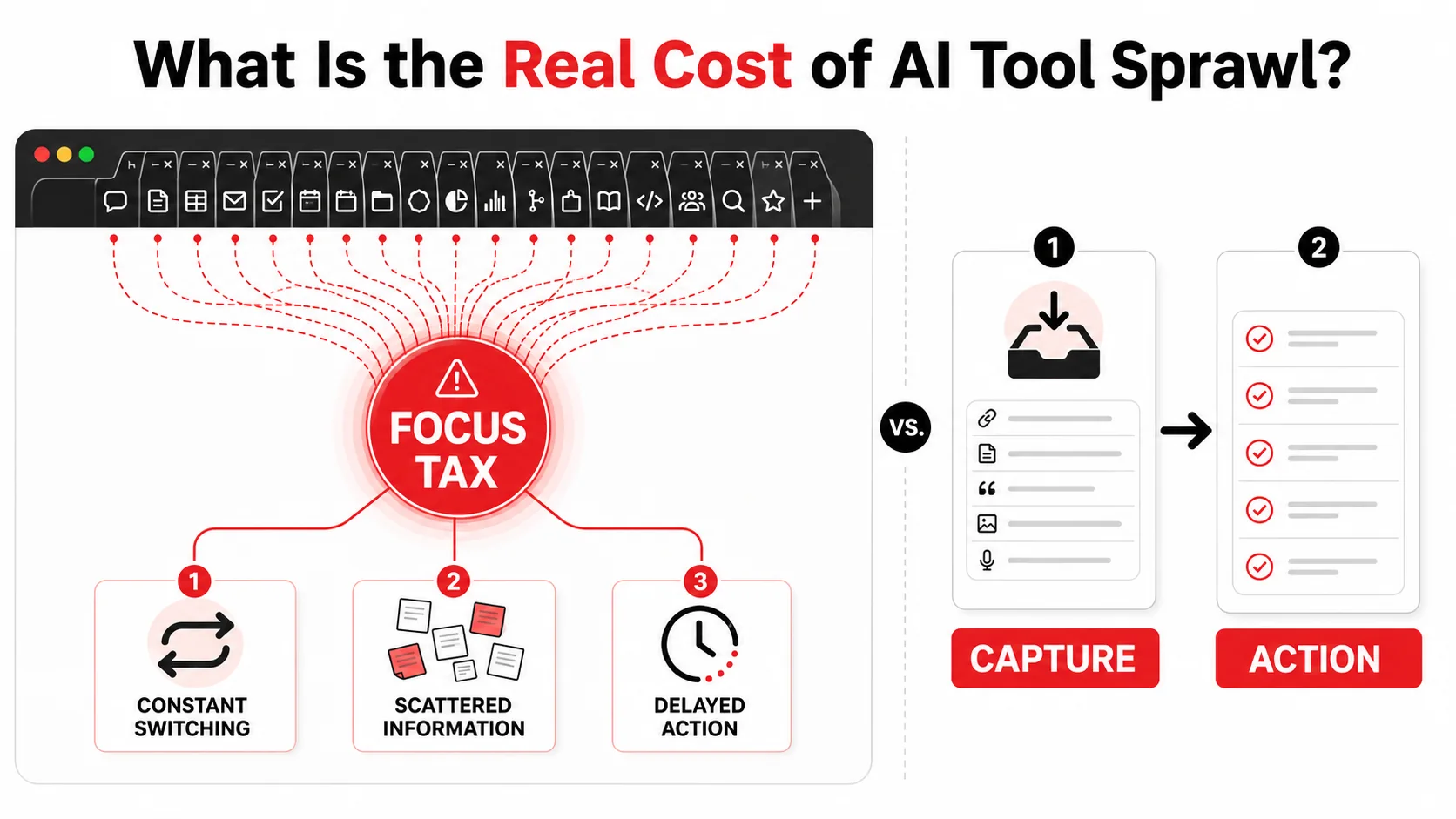
AI tool sprawl is the uncontrolled accumulation of single-purpose AI assistants that fragment your attention across multiple interfaces. It's the opposite of integrated workflow design. Count the AI tools you opened this week, then ask a harder question about each one: can it see what the others already did? If the answer is no across the board, you are not running a workflow. When each AI tool lives in its own silo, your brain becomes the integration layer, and that's expensive.
How many tools does the average developer use?
More than you would guess. In Stack Overflow's 2025 Developer Survey, 54% of developers say they need six or more tools to do their job. The problem isn't the number itself. It's the lack of connection. Switching from your IDE to a standalone AI coding assistant, then to a separate AI research tool, and finally to a project management app creates a disjointed workflow. Each switch requires you to reorient, recall context, and remember where you left off, which directly undermines AI assistant productivity.What's the difference between a tool and a workflow?
A tool is a single application that performs a specific function, like generating code or summarizing text. A workflow is the connected system of tools, habits, and processes that moves a task from start to finish. Relying on a collection of brilliant but disconnected AI tools is like having a factory where every machine is state-of-the-art, but the conveyor belts between them are missing. You end up manually carrying parts from station to station. True AI assistant productivity is achieved when the AI integrates seamlessly into your existing workflow, not when it demands a new tab, a new login, and a new context.Can more AI tools actually lower productivity?
Yes, absolutely. There's a law of diminishing returns with tool adoption. The cognitive load of managing, switching between, and remembering how to use multiple assistants can eclipse the time they save. Gloria Mark, Daniela Gudith and Ulrich Klocke put 48 people through interrupted and uninterrupted work for CHI 2008 and found something most tool pitches skip: the interrupted group finished faster, with no drop in quality, because they compensated by working harder, and they paid for it in "more stress, higher frustration, time pressure and effort." Your assistants don't bill you in minutes. They bill you in stress. If your "productivity" AI pings you with a notification or requires you to switch contexts to use it, it may be creating more interruptions than it resolves. The goal should be consolidation, not accumulation.| Metric | Fragmented AI Tools | Integrated AI Workflow |
|---|---|---|
| Windows/Tabs Open | 8-12+ | 2-4 |
| Context Switches per Hour | 10-15 (estimated) | 2-3 |
| Time to Complete a Multi-Step Task | Longer due to manual handoffs | Shorter due to automation |
| Mental Overhead | High (remembering where info lives) | Low (single source of truth) |
| Onboarding/Setup Time | High per tool | One-time setup |
Why Constant Switching Kills Deep Work
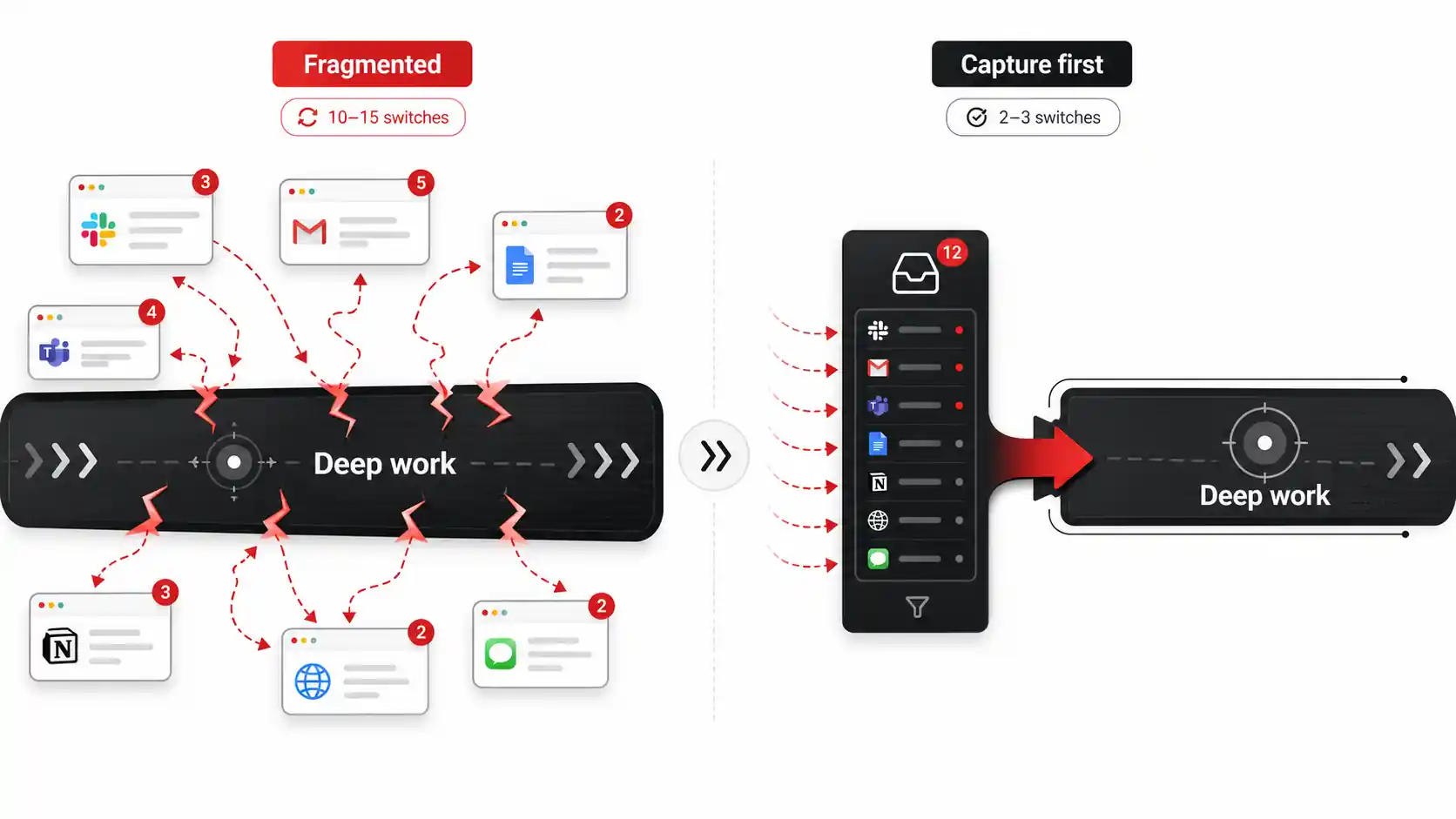
Context switching cost is the mental penalty paid when you shift your attention from one task to another. It's not just the seconds it takes to alt-tab; it's the minutes it takes for your brain to re-engage deeply with the original problem. This cost is the silent killer of meaningful output, and our current approach to AI tools multiplies it.
How does the brain handle context switching?
Your brain isn't a computer with instant task swapping. It requires a "loading" period. Research in cognitive psychology, like that cited in The Organized Mind by Daniel Levitin, shows that task-switching forces the brain to expend glucose and other metabolic resources. It also creates "attention residue," where thoughts of the previous task linger and pollute your focus on the new one. When you jump from debugging code to asking an AI a question in another window, you're not just asking the AI. You're asking your brain to perform an expensive unload/reload cycle. This directly contradicts the goal of AI assistant productivity.What is the actual time cost per switch?
Smaller than you think per switch, and worse than you think per day. Gloria Mark's team at UC Irvine has tracked how long people hold a single screen and watched the average fall to 47 seconds, down from two and a half minutes in 2004. At that rhythm you rarely reach the depth where hard problems crack open. Your AI assistant's "helpful" pop-up or its location in a separate app creates these micro-switches. Over a day, this fragments your time into useless slivers. You might feel busy, but you're not progressing on complex work.Are notifications the main problem?
Notifications are the symptom; the underlying disease is architectural. The main problem is that most AI assistants are built as destinations, not layers. They require you to go to them. Whether it's a browser tab, a separate desktop app, or a Slack channel, you must leave your primary work environment. This design guarantees a context switch. Each toggle, however brief, is a fracture in your concentration, and you make far more of them than you would ever estimate. For AI assistant productivity to be real, the AI must come to you, inside the app you're already using, without requiring a conscious decision to switch.What's the impact on code quality and creativity?
The impact is severe and measurable. Deep work, the state necessary for complex problem-solving and creative insight, requires uninterrupted blocks of time. A fragmented environment prevents entering this state. In my own experience building developer tools, I've seen bug rates spike on teams after introducing poorly integrated "productivity" software that increased interruptions. You can't architect a system or craft elegant code in 3-minute bursts. The context switching cost imposed by disparate tools doesn't just slow you down; it degrades the quality of your output. True productivity is about better outcomes, not more activity.How to Build a Capture-First, Action-Oriented Workflow
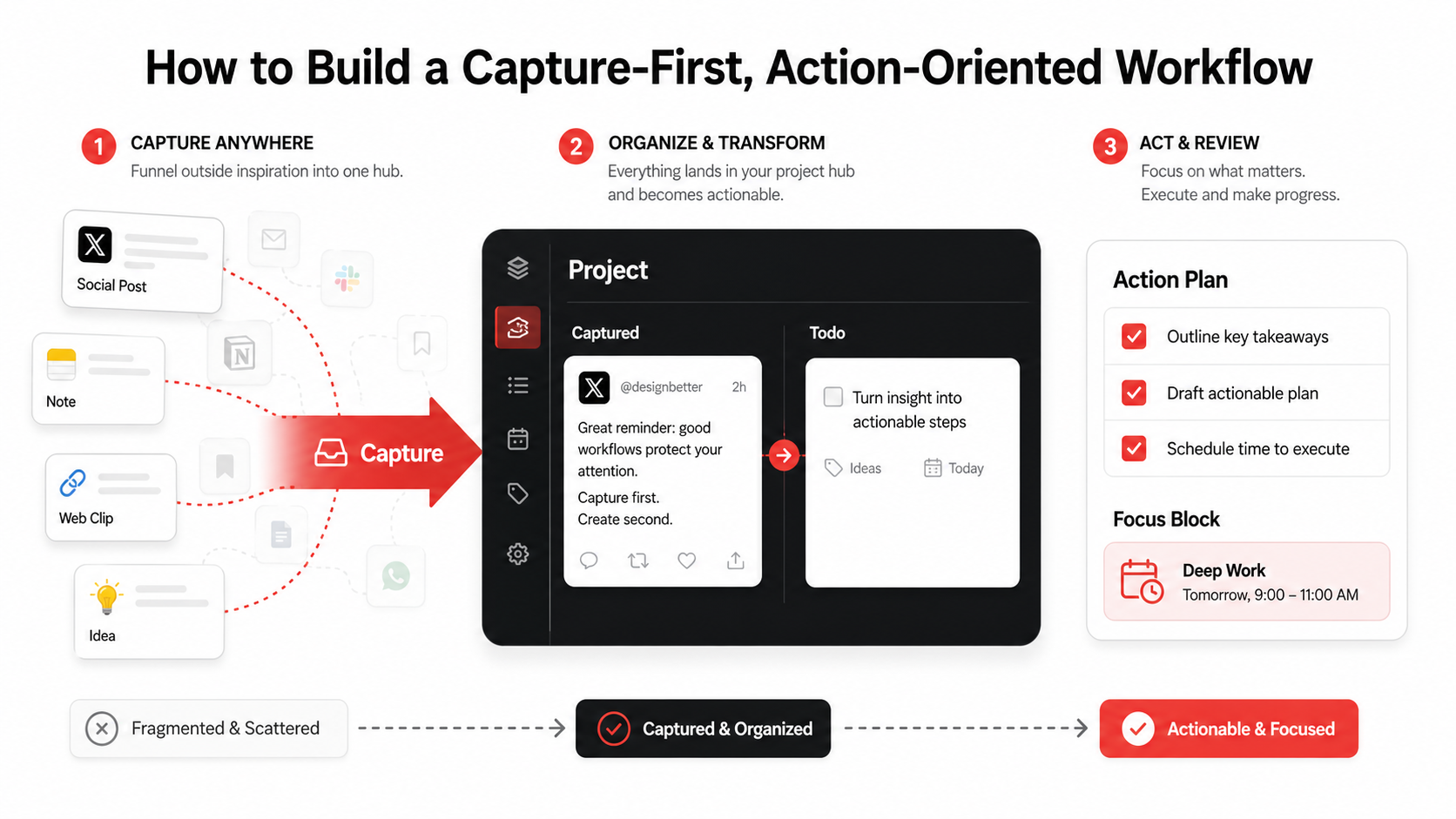
A capture-first workflow is a system designed to collect information and inspiration from any source with minimal friction, and then process it into actionable tasks within your core tools. It inverts the standard model: instead of scattering your attention across many "smart" apps, you funnel everything into one organized hub for later review. This method reduces immediate context switches by separating collection from action.
Step 1: Audit and ruthlessly consolidate your AI tools
Start by listing every AI tool you've used in the last month. Be brutal. For each one, ask: "Does this integrate directly into my core work environment (e.g., IDE, note-taking app), or is it a separate destination?" The goal is to cut your "destination AI" tools by at least 50%. The ones that survive that cut are almost always the embedded, job-specific ones rather than the general chatbot you keep in a lonely tab. Keep the ones that feel like a natural extension of your work (like an IDE copilot) and question the rest. This consolidation is the first step to reducing the context switching cost.Step 2: Design a single, frictionless capture point
Your capture point is the front door to your workflow. It must be faster than opening a new tab. This could be a global keyboard shortcut to a note app, a browser extension button, or a dedicated app like Glean. The key metric: capture should take less than 5 seconds. Whether it's a tweet, a YouTube tutorial timestamp, a code snippet, or an article, get it out of your browsing context and into your system immediately. I use a shortcut that saves the current webpage or selected text directly to my capture inbox without ever leaving the window I'm in. This habit alone can prevent dozens of "I'll come back to this later" tabs that breed anxiety.Step 3: Let AI process the capture, not you (right now)
This is where modern AI shines in a capture-first workflow. Instead of you manually summarizing or task-ifying content during capture, let the AI do it asynchronously. For example, when you save a 45-minute YouTube video, an AI can watch it and extract the three key actionable takeaways. When you clip a technical blog post, it can highlight the relevant code examples. Let the machine do the classifying and the routing, because that is the part you postpone and it is the part that is one of the highest-impact uses of technology. You capture in the moment; the AI organizes while you stay focused.Step 4: Schedule a daily "processing" session
Collection is pointless without review. Block 20-30 minutes at the same time each day (e.g., right after lunch) to process your capture inbox. This is when you review the AI-extracted todos, decide next actions, and move them to your project management tool (like Linear, Jira, or Todoist). By batching this administrative work, you contain the context switching cost to a defined period. You transform a scattered stream of potential interruptions into a structured list of clear next actions. This practice, often called "closing open loops," is central to stress-free productivity systems like GTD (Getting Things Done).Step 5: Integrate outputs into 2-3 core systems
Your processed actions should live in the minimal number of places where work actually gets done. For most developers and creators, this is: 1) Your project/task manager, 2) Your code repository/IDE, and 3) Your reference note-taking app (like Obsidian or Notion). The capture-first workflow succeeds by making these systems richer, not by creating a new one. An internal link to our guide on building a developer productivity workflow can help here. The AI's job is to format the captured insight correctly for the destination: turning a bug report from a tweet into a formatted GitHub issue, for instance.Step 6: Measure friction and iterate
After two weeks, assess the friction. Are you still opening random AI tool tabs out of habit? Is your capture process still over 5 seconds? Use simple metrics: count your daily app switches (RescueTime can do this) and track the time between capturing an idea and it becoming a task. The goal is to make the path from inspiration to action so smooth that you default to it. This systematic approach is what turns the vague promise of AI assistant productivity into a measurable reality.Step 7: Automate the most repetitive captures
Identify patterns in what you save. Is it always bug reports from Twitter? API documentation pages? Competitor feature announcements? Use tools like Glean, Zapier, or browser automation scripts to create rules. For example, "any tweet with #bugreport in my saved list gets auto-captured and formatted as a todo for the engineering backlog." Automation moves you from active capture to passive, intelligent collection, further reducing cognitive load. It makes your system proactive.Proven Strategies to Regain Control and Focus
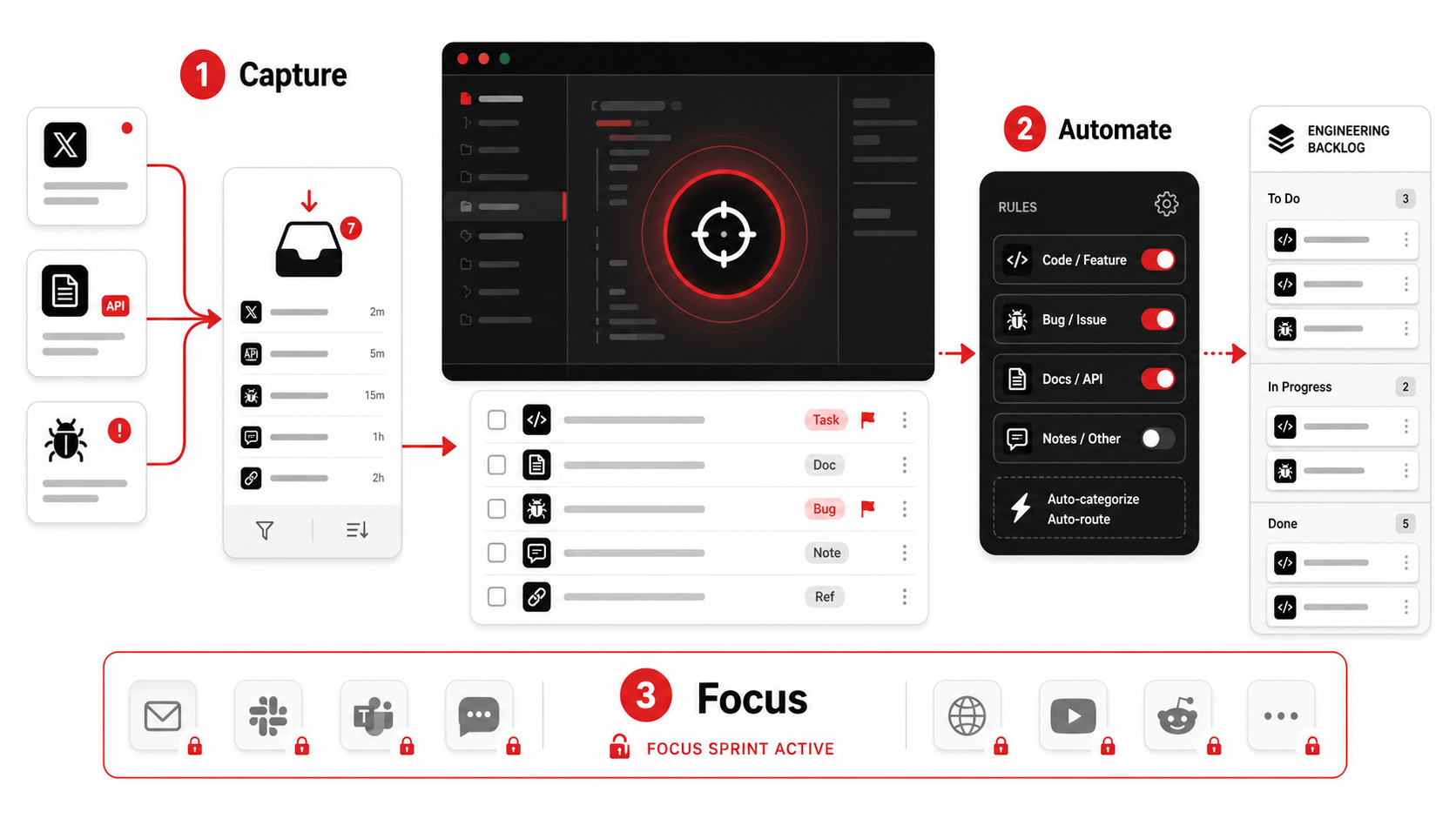
Regaining focus isn't about willpower; it's about designing an environment that makes focus the default. After building a capture-first workflow, these advanced strategies harden your system against the chaos of modern digital work.
Strategy 1: Implement "Focus Sprints" with tool lockdown
A focus sprint is a 60-90 minute block where you physically or digitally disable access to non-essential tools. Use app blockers (like Freedom or Cold Turkey) to block access to your email, social media, and (critically), any general-purpose AI chatbot tabs during this time. The only AI allowed is the one embedded in your primary work app (e.g., GitHub Copilot in your IDE). Block the tabs before you start, not when you catch yourself in them, because by then you have already paid the switch. This forces you to work with the tools you have, deepening your proficiency and reducing the itch to context-switch for a "better" answer elsewhere.Strategy 2: Create a "Toolchain Map" for your team
Individual workflow hygiene is good; team-wide alignment is a force multiplier. Document your team's official "toolchain map." This is a simple diagram showing the 3-4 approved core tools and how information should flow between them (e.g., "Customer feedback from Slack -> Captured in Glean -> Processed into Linear tickets"). Share this map and the rationale behind the chosen tools. This reduces the "which tool should I use for this?" ambiguity that wastes time and fragments knowledge. It turns personal AI assistant productivity into a team-wide standard, making collaboration smoother and reducing onboarding time for new members. For more on team-scale productivity, see our thoughts on building a hub for productivity.Strategy 3: Apply the "24-Hour Rule" for new AI tools
The hype cycle for new AI tools is relentless. Implement a personal rule: when you hear about a shiny new AI assistant, you must wait 24 hours before even visiting its website. In that time, ask: "What specific, painful problem does this solve that my current consolidated toolkit does not?" 80% of the time, the urge passes. This rule combats impulsive tool adoption, which is a major source of sprawl. It ensures every new addition is a deliberate, strategic choice that serves your workflow, not a distraction from it. This is a key discipline for sustainable AI assistant productivity.Strategy 4: Conduct a monthly "Workflow Autopsy"
At the end of each month, spend 30 minutes reviewing your completed work. Look for patterns of friction: Where did you get stuck? What task took surprisingly long? Often, the bottleneck is a manual handoff between tools that could be automated or a knowledge lookup that required 5 tab switches. Use this insight to tweak your capture-first workflow. Maybe you need a new capture rule or a better integration between two apps. This iterative, data-informed refinement is what separates a static setup from a living, adapting system that genuinely improves over time. For a deeper dive on evolving your system, check our comparison of AI capture vs. bookmarks.Got Questions About AI and Productivity? We've Got Answers
Do I need to quit using all my AI tools?
No. The goal isn't abstinence; it's intentional use. The question is whether the tool is integrated into your workflow or is a separate destination causing a context switch. AI embedded directly where you work (like code completion, grammar suggestions in your editor, or automated meeting notes in your calendar) is fantastic. It's the standalone "swiss army knife" chatbots that you constantly alt-tab to that become the problem. Keep the former, scrutinize the latter.Isn't a "capture-first" system just another thing to manage?
It can be, if it's overly complex. A good capture-first workflow should feel lighter than the chaos it replaces. The test is simple: does capturing an idea feel easier than leaving 50 tabs open? Does processing a daily inbox take less mental energy than constantly wondering what you're forgetting? A well-designed system externalizes mental clutter. It's not another thing to manage; it's the tool that manages everything else for you.How do I handle information that needs immediate action?
The capture-first model still works. If something is truly urgent and actionable right now (e.g., a production alert), you act on it immediately. That's not "capture," that's "doing." The system is for the 95% of inputs that are important but not urgent: ideas, references, bugs to fix later, articles to read. You capture them instantly to get them out of your head, then trust your scheduled processing time to prioritize them appropriately. This prevents the urgent from constantly hijacking the important.Can AI really understand my context well enough to create useful tasks?
Today's AI is surprisingly good at this for standard formats. It can reliably identify an action item in an email ("Please update the Q4 report"), extract a feature request from a tweet, or summarize key points from a video. For highly technical or niche contexts, you may need to train it with examples or use more specialized models. The key is to start with common cases and let the AI handle the 80% solution, which still saves you enormous time. You review and refine its output during your processing session.---
Your AI assistants should be silent partners in your workflow, not noisy neighbors demanding attention. The path to real AI assistant productivity isn't more alerts, more tabs, or more logins. It's a simpler, calmer system where AI works in the background of a capture-first workflow, turning the torrent of online information into a structured stream of action. Stop letting your tools switch your context. Start designing a workflow that protects it.
Ready to build a capture-first system that actually reduces friction? Start Glean Pro Trial, and turn your feed into your todo list in one tap.
Share what you read. Get your next step.
Every save you share comes back as one task for your project, with the reason it fits you.